web
You’re offline. This is a read only version of the page.
close
Skip to main content

Notifications

Announcements

No record found.

Community site session details

Community site session details

Session Id :
Finance | Project Operations, Human Resources, ...
Answered

RAF a production order gives LP error

(0) ShareShare
ReportReport
Posted on by 40

I have a production order that I get an error on.

We had a problem with it and I had to reset the status of the prod order from "Report as finished" to "Started". This allowed us to add lines to the picking list. When we completed the prod order we then posted the journals for "Picking List", "Route Card", and "Report as finished" from the View tab of the prod order. Then when going to the Production Order tab to perform the RAF I get an error:
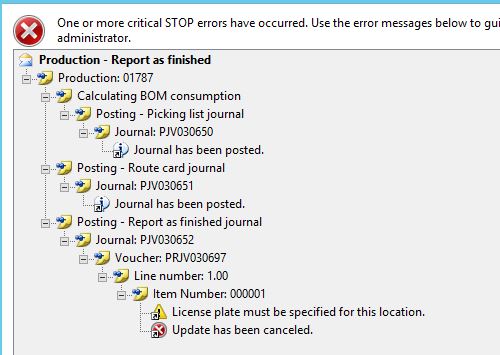
RAFError.JPG

I have checked all the lines in the journals that already posted, they all have the correct LPs. I don't see anywhere to look for the location that needs to have the LP added. I've not had success finding any information online about this error. I am not able to find that last journal entry either or the voucher, I don't know where to look other than the ProdJournalTable and they are not in there. I don't know where else to look.

I have created a job that allows me to update the ProdStatus on the ProdTable for this prod order (to Reported as finished), but then I still get the same error pictured above when trying to the RAF for the prod order. I ended up changing it back to "Started", using the job again so it would still be at the same status

I have the same question (0)
  • Suggested answer
    Ludwig Reinhard Profile Picture
    Microsoft Employee on at

    Hi,

    What do you see in the journal ending with the numbers 652?

    Can you share a screenprint?

    Many thanks,

    Ludwig

  • Verified answer
    Mike in IT Profile Picture
    40 on at

    Thank you for replying. I have finally found what the problem ended up being, but not how it happened. I was not able to find the journal ending in 652.

    The problem is that there was a -382000lbs of goob material that was not posting. I had to remove that number and make it 0 then I was able to complete the RAF for that production order. The amount that I had to remove was on the PmfProdCoBy table in the RemainCoByPhysical field.

Under review

Thank you for your reply! To ensure a great experience for everyone, your content is awaiting approval by our Community Managers. Please check back later.

Helpful resources

Quick Links

Responsible AI policies

As AI tools become more common, we’re introducing a Responsible AI Use…

Neeraj Kumar – Community Spotlight

We are honored to recognize Neeraj Kumar as our Community Spotlight honoree for…

Leaderboard > Finance | Project Operations, Human Resources, AX, GP, SL

#1
Martin Dráb Profile Picture

Martin Dráb 660 Most Valuable Professional

#2
André Arnaud de Calavon Profile Picture

André Arnaud de Cal... 549 Super User 2025 Season 2

#3
Sohaib Cheema Profile Picture

Sohaib Cheema 307 User Group Leader

Last 30 days Overall leaderboard

Product updates

Dynamics 365 release plans
