web
You’re offline. This is a read only version of the page.
close
Skip to main content

Notifications

Announcements

No record found.

Community site session details

Community site session details

Session Id :
Microsoft Dynamics AX (Archived)

Dimension Inventory status cannot be left blank if dimension Location is set. Update has been canceled

(1) ShareShare
ReportReport
Posted on by 147

Hi,

When receiving an item through Advanced Warehousing on mobile portal, I'm receiving this error. 

"Dimension Inventory status cannot be left blank if dimension Location is set. Update has been canceled. "

Anyone has any idea how to resolve it?
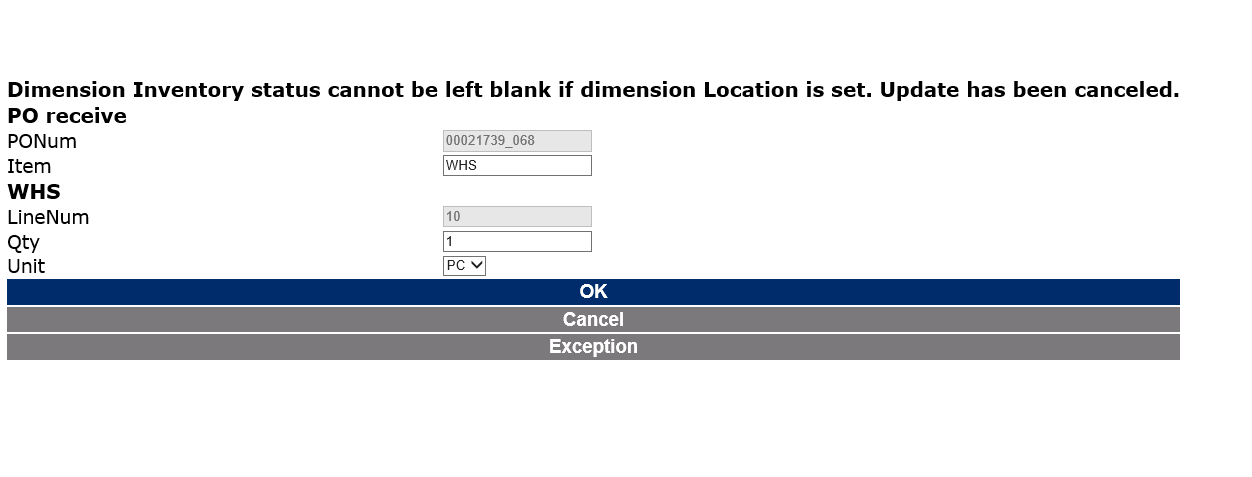
0830.Warehouse-receiving.PNG

Many thanks,

Ahmed. 

*This post is locked for comments

I have the same question (0)
  • Suggested answer
    fatihgork Profile Picture
    3,817 on at

    Hi Ahmed,

    Have you already specified inventory status in your Purchline and receiving this error?

    If not, it should be either specified in purchline or overwritten in mobile device.

    You can manually specify it on your purchline or set a default value on your warehouse, vendor etc.

    To be able specify it on mobile device, there is a parameter located at "Mobile device menuitems" form, it should be enabled.

  • Ahmed Siddiqui Profile Picture
    147 on at

    Hi Fatih,

    The inventory status doesnt get saved on the Purchline. As soon as we save/refresh the Purchase Order after entering the "inventory status", the inventory status disappears.

    How can have the option of entering "inventory status" in the mobile device menu item while receiving the PO?

    Thanks.

  • Verified answer
    Guy Terry Profile Picture
    28,924 Moderator on at

    Check in the Licence configuration in the Sys Admin module. Do you have 'Inventory Dimension Extensibility' enabled?

  • Ahmed Siddiqui Profile Picture
    147 on at

    Thanks Guy !!!

    You're a hero !

  • Cristina Martinez Profile Picture
    46 on at

    hello Guy. Where I find this setup?

  • Guy Terry Profile Picture
    28,924 Moderator on at

    In AX 2012 R3, it's Sys Admin -> Setup -> Licensing -> Licence configuration, and you'll find it under 'Trade'.

    I can't find it in D365; perhaps it became redundant.

  • Suggested answer
    Sagar Suman Profile Picture
    6,550 Super User 2025 Season 2 on at

    Hi,

    It happens as inventory status on purchase order line in blank.

    Inventory status on purchase order line gets updated from site, warehouse, warehouse management parameter and supplier.

    If default inventory status is not setup on above all this error will come.

    Solution is to update the status manually on purchase order lines or update any of these 4 masters as per business need.

    pastedimage1590057044866v1.png

    pastedimage1590057413288v1.png

Under review

Thank you for your reply! To ensure a great experience for everyone, your content is awaiting approval by our Community Managers. Please check back later.

Helpful resources

Quick Links

Responsible AI policies

As AI tools become more common, we’re introducing a Responsible AI Use…

Neeraj Kumar – Community Spotlight

We are honored to recognize Neeraj Kumar as our Community Spotlight honoree for…

Leaderboard > 🔒一 Microsoft Dynamics AX (Archived)

#1
Martin Dráb Profile Picture

Martin Dráb 4 Most Valuable Professional

#1
Priya_K Profile Picture

Priya_K 4

#3
MyDynamicsNAV Profile Picture

MyDynamicsNAV 2

Last 30 days Overall leaderboard

Featured topics

Product updates

Dynamics 365 release plans
