web
You’re offline. This is a read only version of the page.
close
Skip to main content

Notifications

Announcements

No record found.

Community site session details

Community site session details

Session Id :
Customer experience | Sales, Customer Insights,...
Answered

unable to login to unified service desk

(0) ShareShare
ReportReport
Posted on by 15

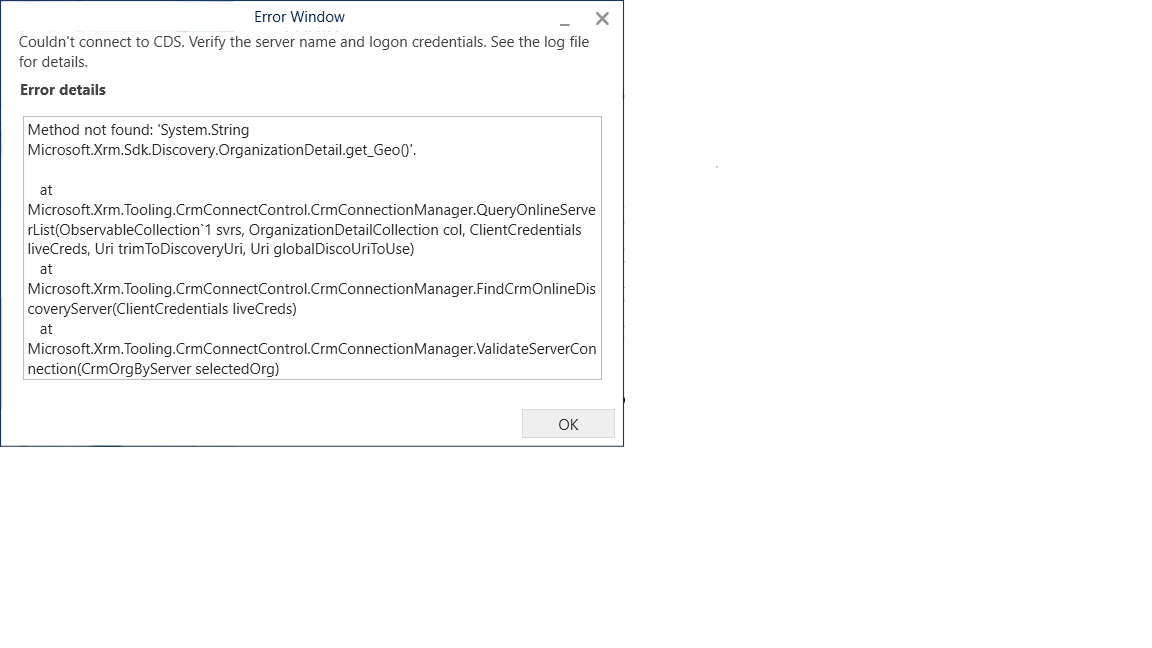
I am getting the following error using O365 credential to connect to CDS.  It works on another machine, but not on my local machine.  I do know that my credential is correct because I can login from another machine.

Couldn't connect to CDS. Verify the server name and logon credentials. See the log file for details.

Method not found: 'System.String Microsoft.Xrm.Sdk.Discovery.OrganizationDetail.get_Geo()'.

at Microsoft.Xrm.Tooling.CrmConnectControl.CrmConnectionManager.QueryOnlineServerList(ObservableCollection`1 svrs, OrganizationDetailCollection col, ClientCredentials liveCreds, Uri trimToDiscoveryUri, Uri globalDiscoUriToUse)
at Microsoft.Xrm.Tooling.CrmConnectControl.CrmConnectionManager.FindCrmOnlineDiscoveryServer(ClientCredentials liveCreds)
at Microsoft.Xrm.Tooling.CrmConnectControl.CrmConnectionManager.ValidateServerConnection(CrmOrgByServer selectedOrg)

Does anyone know what this error is and how can it be addressed?ConnectToCDS.png
I have the same question (0)
  • RaviKashyap Profile Picture
    55,410 Moderator on at

    Hi,

    Try to connect to other tools or may be web instance directly and see if it works. Most probably something is blocking.

  • PiggyVenus Profile Picture
    15 on at

    Thanks for your reply!  I am able to connect through MS Plugin Registration Tool.  I can also connect through web url on my local machine, but just not through USD on my local machine.  Since I use O365 credential and typed in the user name and password,  I just don't know what else could be missing.  It looks identical to the MS Plugin Registration Tool and yet it is not working in USD.

  • Mimi Yoshida Profile Picture
    on at

    Local machine logs may help this investigation as it looks like a connection issue. Check Fiddler and USD logs in your local machine.

    docs.microsoft.com/.../configure-client-diagnostic-logging-unified-service-desk

    I recommend you to create a support ticket for further investigation if the issue is not resolved.

  • Verified answer
    v-ancos Profile Picture
    on at

    Hello 

    I tried on my side and I could replicate the issue and fix it.

    https://www.microsoft.com/en-us/download/details.aspx?id=58204


    So, to install this version, the customer needs first to uninstall the previous 4.1 client version to take effect, otherwise just upgrade the version.

  • PiggyVenus Profile Picture
    15 on at

    @Ana Sofia Costa, thank you so much for the solution!  It worked.

Under review

Thank you for your reply! To ensure a great experience for everyone, your content is awaiting approval by our Community Managers. Please check back later.

Helpful resources

Quick Links

Responsible AI policies

As AI tools become more common, we’re introducing a Responsible AI Use…

Neeraj Kumar – Community Spotlight

We are honored to recognize Neeraj Kumar as our Community Spotlight honoree for…

Leaderboard > Customer experience | Sales, Customer Insights, CRM

#1
Tom_Gioielli Profile Picture

Tom_Gioielli 70 Super User 2025 Season 2

#2
Gerardo Rentería García Profile Picture

Gerardo Rentería Ga... 43 Most Valuable Professional

#3
Daniyal Khaleel Profile Picture

Daniyal Khaleel 32 Most Valuable Professional

Last 30 days Overall leaderboard

Product updates

Dynamics 365 release plans



