web
You’re offline. This is a read only version of the page.
close
Skip to main content

Notifications

Announcements

No record found.

Community site session details

Community site session details

Session Id :
Microsoft Dynamics AX (Archived)

How to change cost center on purchase order

(0) ShareShare
ReportReport
Posted on by

Hi All, 

Can you assist me on how to change the cost center on purchase order?

PO status: Open Order

Approval status: Confirmed
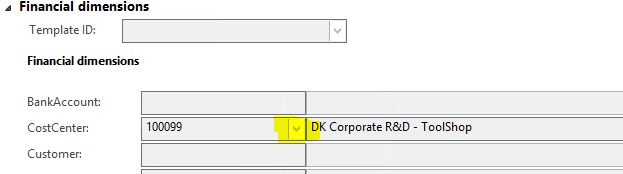
25276.Capture.JPG

Even if I click EDIT, the drop down list is disabled.

25276.Capture.JPG

Thank you in advance, 

Tata

*This post is locked for comments

I have the same question (0)
  • Suggested answer
    Ludwig Reinhard Profile Picture
    Microsoft Employee on at

    Hello Tata,

    Is it possible that you do not have sufficient user rights to make this change?

    Is a specific workflow running that prevents you from making this change?

    Where do you try to make the change exactly; in the PO form or in the PO invoice form?

    Best regards,

    Ludwig

  • Community Member Profile Picture
    on at

    Hello Ludwig,

    I have an Admin rights.

    Yes, there is a specific workflow running but I do not know where to start.

    I am trying to make the changes on the PO form.

  • Ludwig Reinhard Profile Picture
    Microsoft Employee on at

    Hello Tata,

    Can you see a yellow workflow bar in the PO form?

    If this is the case, can you check the workflow history of the workflow?

    Can you also check the procurement and sourcing parameters form and verify whether change management is activated or not?

    Is the PO that you see possibly an intercompany purchase order that has been created automatically?

    Best regards,

    Ludwig

  • Community Member Profile Picture
    on at

    Hello Ludwig,

    I cannot see the workflow history.

    The parameter on change management is currently deactivated.

    You are correct, this PO has been created automatically.

    Today, I just got a message from the user. She said that she deleted the link from the invoice to the PO. And now, she's asking me if it is possible to close the PO in the system and not to possibly use it anymore?

    Current status of PO is Open Order

    Document status is Invoice approval journal

    Approval status is Confirmed

    Thanks, Tata

  • Suggested answer
    Ludwig Reinhard Profile Picture
    Microsoft Employee on at

    Hello Tata,

    'Closing' the PO requires some additional information.

    As an example, do you know if the PO packing slip has already been posted.

    What kind of item, procurement categories or service items have been used in the PO?

    If no posting is created and if the PO is not related to an intercompany SO, can't you simply delete the PO? (Please test this first in a demo environment, not in your live system).

    Best regards,

    Ludwig

Under review

Thank you for your reply! To ensure a great experience for everyone, your content is awaiting approval by our Community Managers. Please check back later.

Helpful resources

Quick Links

Responsible AI policies

As AI tools become more common, we’re introducing a Responsible AI Use…

Neeraj Kumar – Community Spotlight

We are honored to recognize Neeraj Kumar as our Community Spotlight honoree for…

Leaderboard > 🔒一 Microsoft Dynamics AX (Archived)

#1
Martin Dráb Profile Picture

Martin Dráb 4 Most Valuable Professional

#1
Priya_K Profile Picture

Priya_K 4

#3
MyDynamicsNAV Profile Picture

MyDynamicsNAV 2

Last 30 days Overall leaderboard

Featured topics

Product updates

Dynamics 365 release plans
