web
You’re offline. This is a read only version of the page.
close
Skip to main content

Notifications

Announcements

No record found.

Community site session details

Community site session details

Session Id :
Microsoft Dynamics AX (Archived)

calling json service and de-serializing data

(0) ShareShare
ReportReport
Posted on by 3,006

Hi all,

I'm trying to call json service and update data in AX. I am trying couple of blogs.

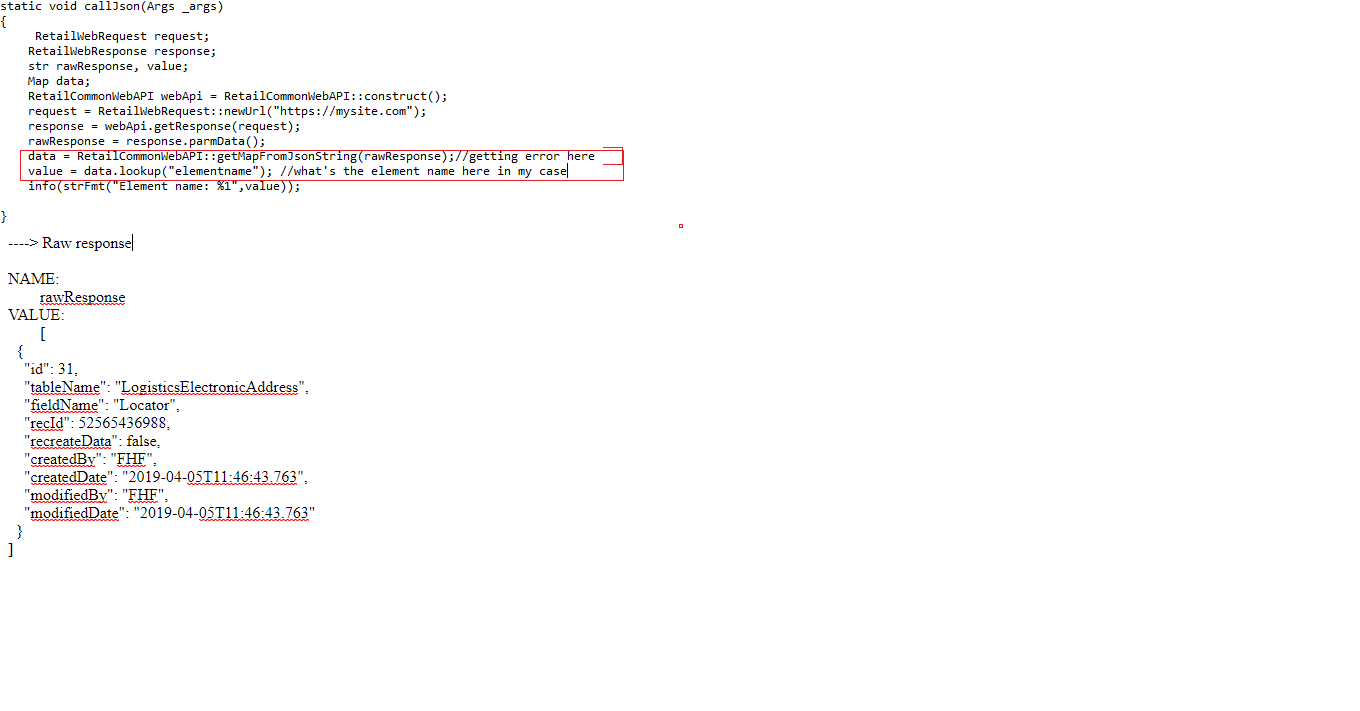
I see the data in rawresponse but getting error 'Object 'CLRObject' could not be created" in RetailCommonWebAPI::getMapFromJsonString(rawResponse);

Find the below image for detail.
Forum_5F00_JsonDeserializing.png

can someone help me here how we could fix this error and get the data in  appropriate format (might has to de-serializing) so we could insert in AX.

Appreciate your guidance

*This post is locked for comments

I have the same question (0)
  • Jie G Profile Picture
    on at

    Hello Krishna,

    Your code looks well. Object 'CLRObject' could not be created"  is a generic message, which means an exception was thrown when constructing a .NET object.  You should check the detailed exception message including inner exception.  BTW, if you have "Enable the hot-swapping of assemblies for each development session" enabled on the AX server configuration, please try to disable it.

  • krishna.rao@dax Profile Picture
    3,006 on at

    As per me, seems issue is in de-serializing, since we are assigning record have multiple values to 'map' object, as you see in main post.//hot swapping is  in off.

    //data = RetailCommonWebAPI::getMapFromJsonString(rawResponse);

    ----> Raw response

    NAME:

    rawResponse

    VALUE:

    [

     {"

       "id": 31,

       "tableName": "LogisticsElectronicAddress",

       ".............

       "modifiedDate": "2019-04-05T11:46:43.763"

     }

    ]

    would be great someone could help in de-serializing the json value  so we could get the records

  • Pradeep_Prakash Profile Picture
    717 on at

    Hi Krishna,

    You can try the below using a .net api.

    community.dynamics.com/.../296315

    Regards,

    Pradeep

  • Pradeep_Prakash Profile Picture
    717 on at

    using System;  

    using System.Collections.Generic;  

    using System.Linq;  

    using System.Text;  

    using System.IO;  

    using System.Runtime.Serialization.Json;  

    using System.Runtime.Serialization;  

    namespace Integration.JsonAdapter  

    {  

      public class Convert  

      {  

        // Deserialize a JSON stream to a User object.  

        public static Person ReadToObject(string json)  

        {  

          Person deserializedUser = new Person();  

          MemoryStream ms = new MemoryStream(Encoding.UTF8.GetBytes(json));  

          DataContractJsonSerializer ser = new DataContractJsonSerializer(deserializedUser.GetType());  

          deserializedUser = ser.ReadObject(ms) as Person;  

          ms.Close();  

          return deserializedUser;  

        }  

      }  

      [DataContract]  

      public class Person  

      {  

        [DataMember]  

        internal string name;  

        [DataMember]  

        internal int age;  

      }  

    }

  • Suggested answer
    Martin Dráb Profile Picture
    237,967 Most Valuable Professional on at

    Krishna, your input string is invalid. It's not valid JSON string at all, because the additional quotation marks between after {. Also, it's a JSON array, while the purpose of the method is deserializing a JSON object (not an array) to a map (mapping property names to their values).

    This would be a valid input:

    str rawResponse = @'{
        "id": 31,
        "tableName": "LogisticsElectronicAddress",
        "modifiedDate": "2019-04-05T11:46:43.763"
    }';

Under review

Thank you for your reply! To ensure a great experience for everyone, your content is awaiting approval by our Community Managers. Please check back later.

Helpful resources

Quick Links

Responsible AI policies

As AI tools become more common, we’re introducing a Responsible AI Use…

Neeraj Kumar – Community Spotlight

We are honored to recognize Neeraj Kumar as our Community Spotlight honoree for…

Leaderboard > 🔒一 Microsoft Dynamics AX (Archived)

#1
Martin Dráb Profile Picture

Martin Dráb 4 Most Valuable Professional

#1
Priya_K Profile Picture

Priya_K 4

#3
MyDynamicsNAV Profile Picture

MyDynamicsNAV 2

Last 30 days Overall leaderboard

Featured topics

Product updates

Dynamics 365 release plans



