web
You’re offline. This is a read only version of the page.
close
Skip to main content

Notifications

Announcements

No record found.

Community site session details

Community site session details

Session Id :
Finance | Project Operations, Human Resources, ...
Answered

Entity Publishing Error- new data contains rows without identity in excel addins D365 fO

(1) ShareShare
ReportReport
Posted on by

Hi All,

1. I'm working in Excel Addins which is developed with Data entity with 2 datasources.Yesterday, I have checked it it was working fine.

2. Now I have checked to publish my excel data then the below Identity error is coming as I have filled all the mandatory fields in the record still the error is coming.

3. The changes I have made today before checking it again is added a postLoad() and changes the allowedit and mandatory property of some  fields of Data enity, then build and sync my project.
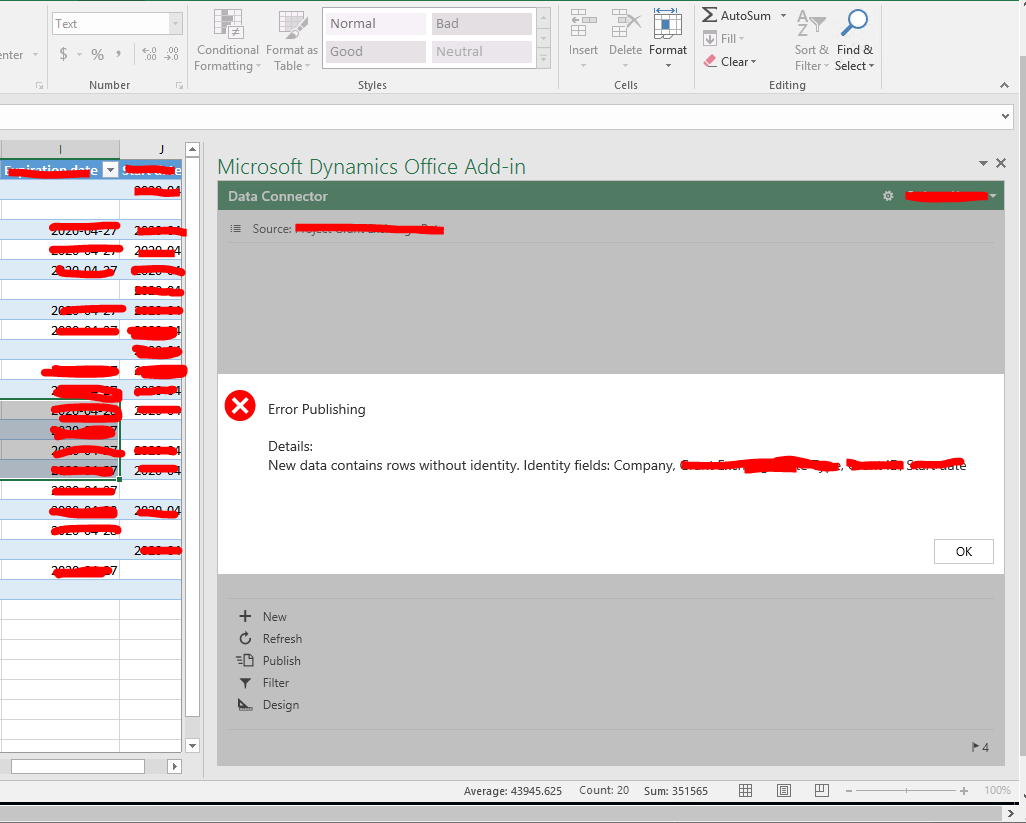
pastedimage1588142915917v3.png

Please suggest me the solution.

Thanks in advance.

Regards,

Aimon Fatima

I have the same question (0)
  • Verified answer
    nmaenpaa Profile Picture
    101,166 Moderator on at

    Perhaps you can share what changes you made?

    You can also try to undo your latest changes and see if it starts working again.

  • Community Member Profile Picture
    on at

    Yes. I have undo all the changes and full build my model.

    Problem resolved but it's weird that I have just changed the properties of Fields of Data entity and it started giving me error.

  • nmaenpaa Profile Picture
    101,166 Moderator on at

    Well, changing properties of data entity fields have quite a big impact on how the entity behaves.

    If you want help in figuring out the details, please share all details of your changes and perhaps some sample data. Thanks!

  • Suggested answer
    Rahul Mohta Profile Picture
    21,032 on at

    a good clean build is always needed for OData to work smoothly

  • Suggested answer
    Pete Alberts Profile Picture
    3,542 on at

    It is most probably DataAreaId. It does that sometimes. Not sure why.

    Add DataAreaId as a field (in the Excel designer). You can still leave it empty I think. Then it will stop complaining.

  • Pete Alberts Profile Picture
    3,542 on at

    It's not a development mistake. And also not an OData issue. It's an F&O Excel Add-in issue.

    You can post a record from postman without specifying DataAreaId, but in Excel with the same Data Entity it will sometimes give you that problem.

  • Esther Mulijono Profile Picture
    435 on at

    Hi all,

    Anyone have solution for this issue?

    We've filled in all the mandatory fields, but the error is still showing.

    Tried to add DataAreaId as a field in the Excel designer, but still not working.

    Thanks.

Under review

Thank you for your reply! To ensure a great experience for everyone, your content is awaiting approval by our Community Managers. Please check back later.

Helpful resources

Quick Links

Responsible AI policies

As AI tools become more common, we’re introducing a Responsible AI Use…

Neeraj Kumar – Community Spotlight

We are honored to recognize Neeraj Kumar as our Community Spotlight honoree for…

Leaderboard > Finance | Project Operations, Human Resources, AX, GP, SL

#1
Abhilash Warrier Profile Picture

Abhilash Warrier 677 Super User 2025 Season 2

#2
André Arnaud de Calavon Profile Picture

André Arnaud de Cal... 421 Super User 2025 Season 2

#3
Martin Dráb Profile Picture

Martin Dráb 317 Most Valuable Professional

Last 30 days Overall leaderboard

Product updates

Dynamics 365 release plans



