web
You’re offline. This is a read only version of the page.
close
Skip to main content

Notifications

Announcements

No record found.

Community site session details

Community site session details

Session Id :
Microsoft Dynamics AX (Archived)
Answered

How to auto resize the dialog form?

(0) ShareShare
ReportReport
Posted on by 1,200

Hi,

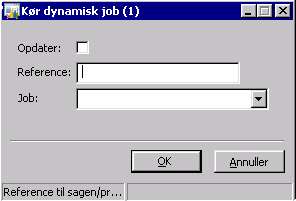
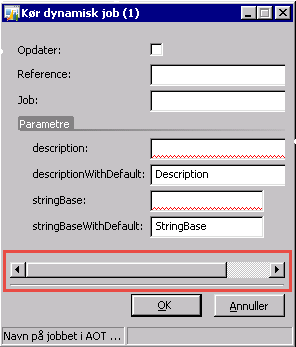
I have a created a class inherited from RunBaseBatch class with the dialog as displayed below. 

The dialog form displays a dynamic dialog Field based on the job selected but the form did not auto re-size to cover all fields. And instead display the horizontal bar. How do I get rid of this or how do I set the dialog form to automatically resize?
2015_2D00_05_2D00_15_5F00_19_2D00_26_2D00_25.png

2015_2D00_05_2D00_15_5F00_19_2D00_28_2D00_35.png

Thanks,

Paul

*This post is locked for comments

I have the same question (0)
  • Suggested answer
    Sohaib Cheema Profile Picture
    49,438 User Group Leader on at

    you can try two things

    for fields kindly try to set width

    DialogFieldName.widthMode(FormWidth::ColumnWidth);

    if issue is not resolved by above, use following line also

    dialog.form().design(1).width(

  • Community Member Profile Picture
    on at

    static server void Job2(Args _args)

    {

       Dialog  d = new Dialog();

       d.addField(extendedTypeStr(CustAccount));

       //d.formBuildDesign().heightMode(1);

       d.formBuildDesign().windowResize(true);

       d.run();

    }

  • Verified answer
    Martin Dráb Profile Picture
    237,980 Most Valuable Professional on at

    Try the following (not tested):

    1. Get the underlying FormRun (dialog.formRun()).
    2. Lock it (FormRun.lock())
    3. Add/show your dynamics controls
    4. Call FormRun.resetSize()
    5. Unlock the form (FormRun.unlock())
  • Paul1 Profile Picture
    1,200 on at

    Hi Sohaib,

    Using the widthMode did not work but setting the width explicitly do. But still not an auto resize. :)

    Thanks,

    Paul

  • Suggested answer
    Paul1 Profile Picture
    1,200 on at

    Thanks Martin. It did work!

Under review

Thank you for your reply! To ensure a great experience for everyone, your content is awaiting approval by our Community Managers. Please check back later.

Helpful resources

Quick Links

Responsible AI policies

As AI tools become more common, we’re introducing a Responsible AI Use…

Neeraj Kumar – Community Spotlight

We are honored to recognize Neeraj Kumar as our Community Spotlight honoree for…

Leaderboard > 🔒一 Microsoft Dynamics AX (Archived)

#1
Martin Dráb Profile Picture

Martin Dráb 4 Most Valuable Professional

#1
Priya_K Profile Picture

Priya_K 4

#3
MyDynamicsNAV Profile Picture

MyDynamicsNAV 2

Last 30 days Overall leaderboard

Featured topics

Product updates

Dynamics 365 release plans



