web
You’re offline. This is a read only version of the page.
close
Skip to main content

Announcements

News and Announcements icon
Community site session details

Community site session details

Session Id :
Microsoft Dynamics GP (Archived)

Vendor Look up under Void Payable Transactions

(0) ShareShare
ReportReport
Posted on by

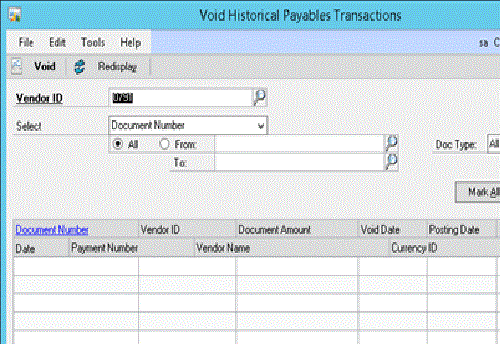
We recently upgraded our GP to 2013 and in Void Historical Transactions window if I type 2 letters and click on the glass it says Vendor ID does not exists but if I click on the glass without any letters then it will open up the vendors look-up window. I checked the Modified form and this form is not modified.  Any input will be appreciated.
*This post is locked for comments

I have the same question (0)
  • Suggested answer
    soma Profile Picture
    24,410 on at

    Open Customization Status(Tools-->Customize-->Customization Status) window to disable if any 3rd party customization installed.

    Hope this helps!!!

  • Suggested answer
    Mahmoud Saadi Profile Picture
    32,738 on at

    Here's the result on my test machine in which I tried to type the initial characters of a certain vendor id (ADV) and clicked on the glass first then lookup shortcut CTRL+L

    The following screen shot shows that typing the initial letters of the vendor and then clicking on the glass will retrieve an error (spcecifically as you mentioned);

    4454.11.jpg

    When i typed the initial characters of the vendor and then clicked (lookup shortcut, crt+l) results were retrieved for the first vendor with those characters.

    My understanding was complete when I went for the SQL profiler to check the underlying code of the window, it simply shows that the glass will consider the initial characters as the vendor id and therefore, retrieves (zero) records, hence, an error message pops up stating that there are no vendor at all. Otherwise, clicking the lookup shortcut gets the data where the vendor id likes (ADV), retrieving results successfully. See below;

    1- Glass Icon;

    SELECT  COUNT(VENDORID)
    FROM    TWO.dbo.PM30200
    WHERE   VENDORID = 'ADV'

    2- Lookup short cut (CTRL+L);

    SELECT TOP 25 *
    FROM    TWO.dbo.PM00200 WITH ( NOLOCK )
    WHERE   ( VENDORID > 'ADV' )
    ORDER BY VENDORID ASC

    Therefore, please try to type the initial characters and then click (CTRL+L), to retrieve the expected results. One thing to consider, this is not the same as in Vendor card window.

    Hope this helps,

  • L Vail Profile Picture
    65,271 on at

    Great job Mahmoud!

    The difference between this and other windows is that the other windows will allow you to 'add a vendor on the fly' whereas the Void window does not include that code.  The code to add a vendor is not part of the inquiry windows either. I think you'll find the option to add the vendor on the fly only exists on the card and transaction windows.

    You already know all of that, but others may not.

    Kind regards,

    Leslie

  • Suggested answer
    soma Profile Picture
    24,410 on at

    I am also tried. Based on my dexterity coding analysis, when you click the glass button, first the vendor ID change script will run and check whether the value entered in that field is correct or not. If not, it will through the error.

    When you click lookup button or Ctr+L key, the change script for Vendor ID field will not run. Because they have set the properties(TabStop =true) for the field lookup button prevent the change script in dexterity.

    Note: For some other windows in GP, the Vendor ID change script provide the option for "add vendor on fly". For this window, it doesn't provide that option. This the logic. Because, if we "add vendor on fly", definitely there is no transactions available for the vendor. Without transaction, we don't need this "add vendor on fly" option.

    Hope this helps!!!

  • L Vail Profile Picture
    65,271 on at

    No Worries Soma,

    I didn't mean to imply that this was in any way new information for you, I just didn't want the user to think this was some kind of a 'bug' or error on the GP side.  As you know, some of these windows were never meant to allow the 'on the fly' addition of records. I believe all of the inquiry windows work this way.

    Also, some of the lazier third-party ISVs don't go to the trouble to add this code. IMHO, the GP standard should be followed. I also notice the startling lack of record notes in ISV products.

    Oops, didn't mean to start on a rant :)

    Kind regards,

    Leslie

  • soma Profile Picture
    24,410 on at

    Your are correct Leslie. Thanks for the update.

  • Verified answer
    Community Member Profile Picture
    on at

    Thank you very much for the detailed analysis!

Under review

Thank you for your reply! To ensure a great experience for everyone, your content is awaiting approval by our Community Managers. Please check back later.

Helpful resources

Quick Links

Season of Sharing Community Challenge Launch!

Jump in, show your community spirit, and win prizes!

Women in Power Builds Momentum

Expanding mentorship, skilling, and AI innovation

Congratulations to the May Top 10 Community Leaders

These are the community rock stars!

Leaderboard > 🔒一 Microsoft Dynamics GP (Archived)

#1
Dan Liebl Profile Picture

Dan Liebl 2

#2
Shravan Attelli Profile Picture

Shravan Attelli 1

Last 30 days Overall leaderboard

Featured topics

Product updates

Dynamics 365 release plans



