web
You’re offline. This is a read only version of the page.
close
Skip to main content

Announcements

News and Announcements icon
Community site session details

Community site session details

Session Id :
Small and medium business | Business Central, N...
Answered

Customer Templates is missing the General FastTab

(0) ShareShare
ReportReport
Posted on by 285

Dears,

I noticed an important area in the Customer, Vendor & Items templates are missing

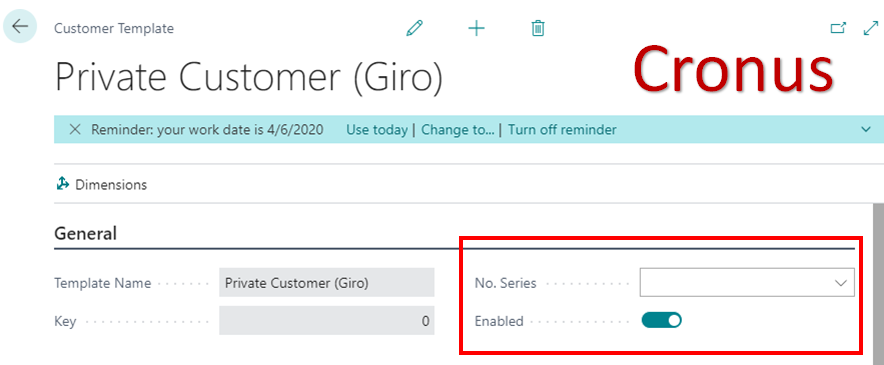
This screenshot from Cronus: No. Series & Enabled 
pastedimage1611036654760v1.png

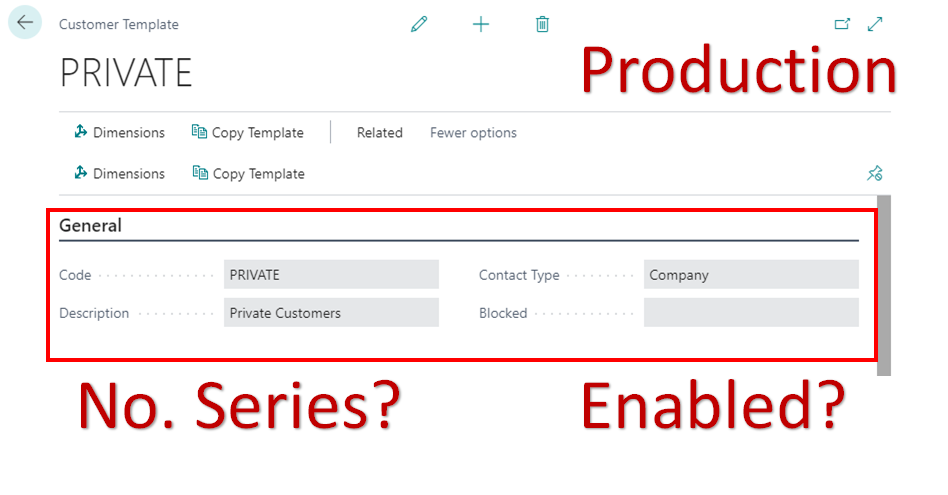
This screenshot from a production environment, missing No. Series & Enabled 
pastedimage1611036808966v2.png

I tried to personalize, did not work,

and reviewed any external extensions installed, and there is nothing only published by Microsoft.

Please let me know if someone gets the same issue and how to solve it?

I

I have the same question (0)
  • Suggested answer
    Dirk Profile Picture
    Microsoft Employee on at

    Hi Mahmoud,

    This is BC17, right?
    Are you aware about the new "Feature Management"?

    It is still possible to use the old template functionality (Configuration Templates).
    But with BC17 it is also possible to switch to the new template feature (be aware that you cannot swithc back to the old template functionality)

    To me it seems that in Production (second screenshot) you use the "new templates" which would mean that the new template feature has been enabled in the Feature Management.
    In the first screenshot it seems we look at the "old Configuration Template", which is the customer template before the new feature is enabled. 

    Here you can read more about the Feature Management:
    Enabling upcoming features ahead of time - Business Central | Microsoft Docs

    And here you find some more information about upcoming or already available features which require to be switched on explicitly:
    New and planned features for Dynamics 365 Business Central, 2020 release wave 2 - Dynamics 365 Release Plan | Microsoft Docs
     
    And from there you can access a short article explicitly about the new conversion templates:
    Use conversion templates to convert contacts to vendors and employees - Dynamics 365 Release Plan | Microsoft Docs

    Hope this helps
      Dirk

  • mahmoud_algindy Profile Picture
    285 on at

    Thanks, Drik,

    Unfortunately, I enabled the preview features, and this issue exactly happened after that.

    Please let me know if I can go back to the same old method which is easier for the end-users to just create the new customers by just selecting the template and the system will take care of the No. Series & Posting groups?

    Regards

  • Verified answer
    Dirk Profile Picture
    Microsoft Employee on at

    Hi Mahmoud,

    I think you can't easily move back ... at least not with just some clicks.

    Action item have been changed ... new pages are called, new functions are triggered, etc.

    (for example if you are on a customer card page and want to save settings as template).

    I think you would need to compare the code before and after you enabled the new feature and then create a custom extension with the old code.

    As written on docs:

    <<<

    Some features or feature improvements may permanently affect the state and capabilities of Business Central and can't be safely reverted. These irreversible features can't be turned off again after they've been enabled. Before you enable an irreversible feature on a production environment, we recommend that you first enable and evaluate it on a sandbox environment that has a copy of production data.

    When you choose to enable an irreversible feature, a warning dialog that describes the consequences is displayed. Choose Yes to proceed with permanently enabling the feature on that environment.

    >>>

    Regards

  • mahmoud_algindy Profile Picture
    285 on at

    Thanks, Drik,

    It was a mistake to enable the preview features, and I am encouraging all colleagues to not enable that in the production.

    I will just wait for some time as I think this could be described as a system bug and maybe with the new major release it will be corrected.

    Thanks

Under review

Thank you for your reply! To ensure a great experience for everyone, your content is awaiting approval by our Community Managers. Please check back later.

Helpful resources

Quick Links

Season of Sharing Community Challenge Launch!

Jump in, show your community spirit, and win prizes!

Women in Power Builds Momentum

Expanding mentorship, skilling, and AI innovation

Congratulations to the May Top 10 Community Leaders

These are the community rock stars!

Leaderboard > Small and medium business | Business Central, NAV, RMS

#1
OussamaSabbouh Profile Picture

OussamaSabbouh 1,690 Super User 2026 Season 1

#2
Grigorios Mavrogeorgis Profile Picture

Grigorios Mavrogeorgis 1,091 Super User 2026 Season 1

#3
YUN ZHU Profile Picture

YUN ZHU 1,047 Super User 2026 Season 1

Last 30 days Overall leaderboard

Featured topics

Microsoft Training Manuals

Product updates

Dynamics 365 release plans



