web
You’re offline. This is a read only version of the page.
close
Skip to main content

Notifications

Announcements

No record found.

Community site session details

Community site session details

Session Id :
Finance | Project Operations, Human Resources, ...
Suggested Answer

Error when importing General journal through Data management

(0) ShareShare
ReportReport
Posted on by 25

Hi,

I am trying to import General journals through Data management but I keep receiving the same error: "Cannot create a record in Ledger journal table (LedgerJournalTable). The record already exists.". However, I have searched for the Journal batch number in the Table Browser Caller to see if there was any record with the same code but there wasn't.

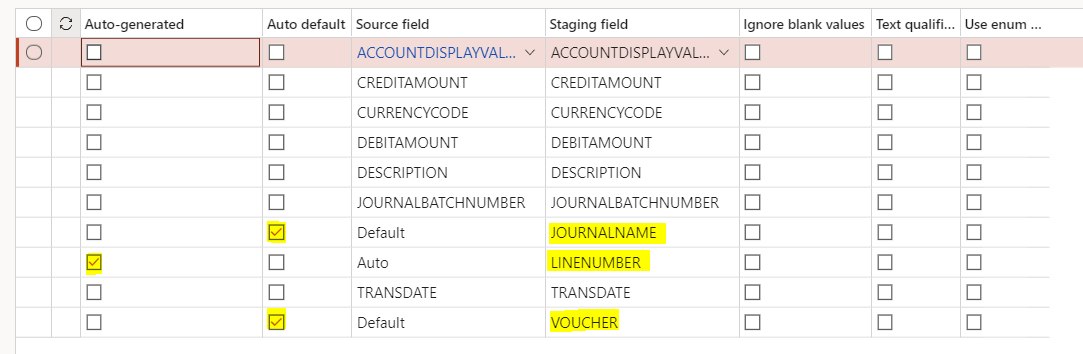
For the General journal entity, I have enabled the Set-based processing option and you can find below the setup for the mappings in the file I am trying to import:
pastedimage1631015697391v1.png

I believe the file contains all the required fields but you can confirm it:

pastedimage1631015809611v2.png

Does anyone know what could be missing?

Thank you

I have the same question (0)
  • Suggested answer
    Frank Hamelly | MVP, MCP, CSA Profile Picture
    46,625 Super User 2025 Season 2 on at

    I think your auto-default & auto-generate flags are causing you issues, because you're supplying these values in your source file.  Try unchecking those flags and see if that eliminates your errors.

  • Mafalda Braga Profile Picture
    25 on at

    I have tried unchecking the flags and the error persists.

    Do you have any other suggestion?

  • Suggested answer
    Ludwig Reinhard Profile Picture
    Microsoft Employee on at

    Hi Mafalda,

    Have you tried exporting a GL journal that was already created/posted via data management?

    If not then try to export one, modify the data and try to import the modified data into a new journal to ensure that the general export/import works.

    Best regards,

    Ludwig

  • Mafalda Braga Profile Picture
    25 on at

    Hi Ludwig,

    Yes I have and it worked. Then I used the template to try to import a new journal and that is when it failed.

    Thanks.

  • Frank Hamelly | MVP, MCP, CSA Profile Picture
    46,625 Super User 2025 Season 2 on at

    Also check whether the journal name specifies voucher allocation during posting.  Supplying the voucher number could be the issue also as well as if the supplied voucher number doesn't comply with the voucher number sequence format and configuration.

    pastedimage1631025703660v1.png

  • Mafalda Braga Profile Picture
    25 on at

    Hi Frank,

    The Number allocation at posting is selected as Yes. Should I change to No?

    Thanks

  • Frank Hamelly | MVP, MCP, CSA Profile Picture
    46,625 Super User 2025 Season 2 on at

    You should insert '1' in your voucher number column for all lines in your source file.  This tells the data project that you want to allow the system to auto-generate the voucher number at time of journal posting.

  • Mafalda Braga Profile Picture
    25 on at

    I am still getting the same error when the voucher number is '1' for all lines. Does that work for you?

  • Frank Hamelly | MVP, MCP, CSA Profile Picture
    46,625 Super User 2025 Season 2 on at

    The only thing I see that might be causing an issue is the date format.  Try manually entering the date on the lines.  The time component is not necessary.  And just to be sure, your account string matches the Financial dimensions for integrating applications setup?

  • Suggested answer
    Sheela Ningappa Profile Picture
    on at

    Hi,

    I guess the error is caused by number sequence. Please refer the below link which might help:

    dynamicsmanuals.com/.../

    Thanks,

    Sheela

Under review

Thank you for your reply! To ensure a great experience for everyone, your content is awaiting approval by our Community Managers. Please check back later.

Helpful resources

Quick Links

Responsible AI policies

As AI tools become more common, we’re introducing a Responsible AI Use…

Neeraj Kumar – Community Spotlight

We are honored to recognize Neeraj Kumar as our Community Spotlight honoree for…

Leaderboard > Finance | Project Operations, Human Resources, AX, GP, SL

#1
André Arnaud de Calavon Profile Picture

André Arnaud de Cal... 449 Super User 2025 Season 2

#2
Martin Dráb Profile Picture

Martin Dráb 422 Most Valuable Professional

#3
BillurSamdancioglu Profile Picture

BillurSamdancioglu 239 Most Valuable Professional

Last 30 days Overall leaderboard

Product updates

Dynamics 365 release plans



