web
You’re offline. This is a read only version of the page.
close
Skip to main content

Announcements

News and Announcements icon
Community site session details

Community site session details

Session Id :
Customer experience | Sales, Customer Insights,...
Suggested Answer

Adding custom text on the submission success page

(0) ShareShare
ReportReport
Posted on by 10

Hello Team,

Is there a way we can update custom text on the form submission thank you page and further apply some styling or even add a image there.

Regards,

Harshad Chalke

I have the same question (0)
  • Suggested answer
    cloflyMao Profile Picture
    25,210 on at

    Hi Harshad,

    It is easy to customize form submission thank you page.  :)

    There are two scenarios:

    Scene 1: If marketing form is portal hosted, then we can add custom text and image by selecting whole form element and edit them in Properties section.
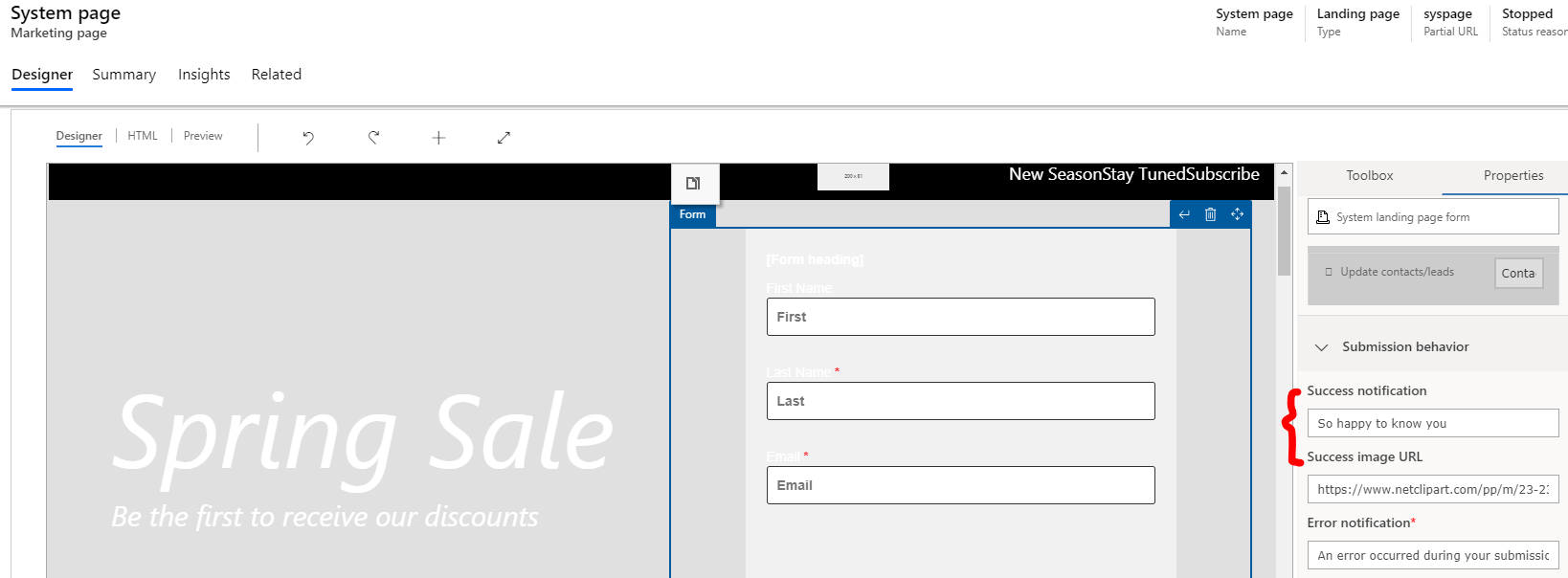
    8272.png

    result:

    pastedimage1587001823297v2.png

    Scene 2: If marketing form is self hosted on our own web server, then we can edit them in Marketing form > Form hosting > related marketing form pages:

    pastedimage1587002074405v4.png

    result 1:

    pastedimage1587002221458v7.png

    result 2, as you can see, we can also customize error message:

    pastedimage1587002255835v8.png

    Moreover, we can apply further styling to elements on page:

    e.g: Make a card to contain submission success text, image and button, increase default size of image, round the corner of reload button:

    pastedimage1587002996557v9.png

    Due to these elements have specific class name which are generated by form-loader script, so we can add custom css style rules to overwrite them.

    You can find name value of them via inspector with F12.

    pastedimage1587003203804v10.png

    My style rules:

    Add !important to overwrite default style.

    Regards,

    Clofly


  • cloflyMao Profile Picture
    25,210 on at

    Hi Harshad,

    Please let me know whether it could work for you.:)

    Thanks.

    Regards,  

    Clofly

  • Harshad2020 Profile Picture
    10 on at

    Hi Clofly,

    Sure, will update you and as of now we are working on applying your suggestion on the webform.

    Regards,

    Harshad

  • nickellis74 Profile Picture
    90 on at

    Hi @Clofly.

    We've followed these instructions and it's worked exactly as you describe, thanks!

    One question - any idea how we might change the text of the Reload button? My marketing manager wants it to say "Back" rather than "Reload".

    Thanks

    Nick

  • MattRitchie Profile Picture
    10 on at

    This is not working for me. I am hosting via iframe.

    when the form is submitted the page loads and none of the form css is loaded.

    where do we add this css? just to the main form?

  • Suggested answer
    MattRitchie Profile Picture
    10 on at

    I resolved this issue myself!

    I noticed the form div contents were being replaced. So i moved the <style> tag out of the <form> and put at line 1 in file.

    This resolved my issue. The css was getting blown away by the singlepageappness

Under review

Thank you for your reply! To ensure a great experience for everyone, your content is awaiting approval by our Community Managers. Please check back later.

Helpful resources

Quick Links

Season of Sharing Community Challenge Winners!

Congratulations to our community stars!

Women in Power Builds Momentum

Expanding mentorship, skilling, and AI innovation

Congratulations to the June Top 10 Community Leaders

These are the community rock stars!

Leaderboard > Customer experience | Sales, Customer Insights, CRM

#1
Manoj - ManoVerse Profile Picture

Manoj - ManoVerse 131 Super User 2026 Season 1

#2
11manish Profile Picture

11manish 95

#3
Chris1968 Profile Picture

Chris1968 20

Last 30 days Overall leaderboard

Product updates

Dynamics 365 release plans