web
You’re offline. This is a read only version of the page.
close
Skip to main content

Announcements

No record found.

News and Announcements icon
Community site session details

Community site session details

Session Id :
Microsoft Dynamics NAV (Archived)

Error when Posting Purchase Order

(0) ShareShare
ReportReport
Posted on by

Hi All,

Trying to post a purchase invoice in NAV 2013R2 and I get this error prompt.

Number of lines in this PO do not reach line no. 10015 so we find it baffling.

Would appreciate if anyone can give any idea on how to resolve this error.

Thank you and regards,

Sol R.
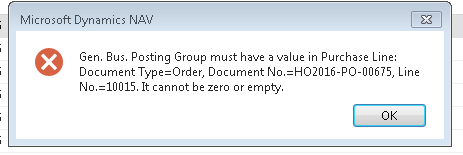
1184.Capture.PNG

*This post is locked for comments

I have the same question (0)
  • Suggested answer
    Marcellus Profile Picture
    2,735 on at

    Hi Sol R.,

    Line No.

    The Line No. field in the document is incremented by 10000. When you insert a line between two existing lines the application will create a line number according to the position. For example if you have line 10000 and 20000 and you insert a line between the two it will be line 15000.

    To find the line you can try to add the Line No. field to the purchase lines with the choose columns menu, if the field is not available there you can zoom in by highlighting a purchase line and use this key combination: Ctrl + Alt + F1.

    This will open a new window where you can open the Table Fields fast tab and find the Line No.

    Zoom.png

    You will also be able to see the General Business Posting Group in this window.

     If you are able to run the Purchase Line table (T39) from the development environment that would make it easier to find the line.

    Can you share the line once you found it?

    General Business Posting Group

    This field value is inherited from your Vendor so it would be best to check the Vendor Card/Invoicing Fast Tab to see if the field is populated. I think however that the application will not allow you to create a purchase document if you haven't entered the Gen. Bus. Posting Group on the selected Vendor.

    I tried out a few things to replicate your problem like entering Description lines without clearing the Type field, Charge Items and G/L Account lines where the G/L Account hasn't got a General Business Posting Group, but it all worked so I'm looking forward to hear from you.

  • Community Member Profile Picture
    on at

    Hi Marcell,

    Thank you for your feedback. I have tried to add column to show the line number but it is not available so I tried the CTRL+ALT+F1 instead and these are what I got:

    For the first line:

    gen-bus-posting-grendene.PNG

    For the last line:

    Line-no-15.PNG

    For this PO, it seems the increment per line is only 1. So I have lines 1 to 15. However, the prompt is that I don't have general business posting group in line 10015 so am wondering where to find this line, given that I only have lines 1 to 15.

    The purchase lines are populated with general bus. posting group too:

    gen-bus-posting.PNG

    The vendor's invoicing fast tab is shown below:

    gen-bus-posting-grendene.PNG

    I have 4 purchase orders which I cannot invoice/close due to the same error prompt. 

    Thank you very much for your assistance.

    Regards,

    Sol R.

  • Marcellus Profile Picture
    2,735 on at

    Hi Sol,

    Let's try to find those purchase lines. Can you open an item in Departments/Purchase/Planning/Items and drill down on the Qty. on Purchase Order value?

    PoLines.png

    This will open the Purchase Lines page. It will be filtered to the current item so you have to remove the filters first then you can filter to Document Type, Document No and Line No.

    PoLines.png

    Please post a screenshot of the lines. I hope this will bring us closer to the solution.

  • Community Member Profile Picture
    on at

    Hi Marcell,

    I tried doing that and this is the screenshot of what I got:

    Purchase-Lines.PNG

    I filtered to one of the Purchase Orders that are having issues. For this screen shot, I filtered to PO-2016-675. For this particular PO, the prompt error is that line no. 10015 does not have the gen. bus. posting group. However, as seen here, there is no purchase line bearing that number since line numbers for this PO are only within line nos. 1 to 15. Please note also that this PO has already been received, but not yet invoiced.

    Regards,

    Sol

  • Marcellus Profile Picture
    2,735 on at

    Could you please remove the Type = Item filter? To see if the line number comes up?

    If not, can you remove the Document No. filter as well and filter to

    Document Type= Order and Line No.=10015?

  • Community Member Profile Picture
    on at

    Hi Marcell,

    After filters were removed, I was able to find Line No. 10015 but they were related to other PO numbers:

    See screenshot below.

    Line-10015.PNG

    Regards,

    Sol

  • Marcellus Profile Picture
    2,735 on at

    Hi Sol,

    Looks like the only way to pinpoint the error is to debug your session and run the post action on the order.

    Are you able to do that?

    Do you have any customisations in your system? Is it possible that custom code creates a new line in your PO before you post? I think that would make sense because if an error occurs the changes will roll back so we wouldn't be able to find that line.

  • Community Member Profile Picture
    on at

    Hi Marcell,

    Unfortunately I do not have access to the development environment. I believe the debugger can only be activated from there? As I am only on the user side, perhaps I should contact the provider to assist on the matter?

    Thank you very much for your significant input and assistance, Marcell. Will update you on the progress of this issue.

    Regards,

    Sol

  • Marcellus Profile Picture
    2,735 on at

    Hi Sol,

    That is a good idea to contact the, It will be easier to fix the issue with access to your system.

    Good luck, I hope this will be fixed quickly.

  • Suggested answer
    Amol Salvi Profile Picture
    18,698 on at

    Check the field Gen.Bus Posting group for Line No 10015 of given Purchase order.

Under review

Thank you for your reply! To ensure a great experience for everyone, your content is awaiting approval by our Community Managers. Please check back later.

Helpful resources

Quick Links

Introducing the 2026 Season 1 community Super Users

Congratulations to our 2026 Super Stars!

Meet the Microsoft Dynamics 365 Contact Center Champions

We are thrilled to have these Champions in our Community!

Congratulations to the April Top 10 Community Leaders

These are the community rock stars!

Leaderboard > 🔒一 Microsoft Dynamics NAV (Archived)

Last 30 days Overall leaderboard

Featured topics

Product updates

Dynamics 365 release plans
