web
You’re offline. This is a read only version of the page.
close
Skip to main content

Notifications

Announcements

No record found.

Community site session details

Community site session details

Session Id :
Microsoft Dynamics AX (Archived)

Error when converting .xsd to .xml in visual studio

(0) ShareShare
ReportReport
Posted on by 1,875

Experts,

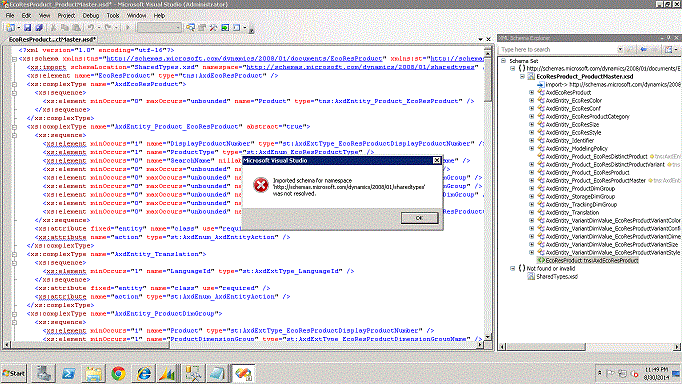
I get the following error when i try to convert .xsd to .xml. 

Error: Imported schema for namespace 'http://schemas.microsoft.com/dynamics/2008/01/sharedtypes' was not resolved.

How can i fix this error.
*This post is locked for comments

I have the same question (0)
  • Suggested answer
    Community Member Profile Picture
    on at

    You can retrieve XSDs for common schemas from the following directory where you installed Microsoft Dynamics AX:

    Program files\Microsoft Dynamics AX\60\Server\MicrosoftDynamicsAX\bin\Application\Share\Include

    Please refer following link for more details

    technet.microsoft.com/.../gg731873.aspx

  • Suggested answer
    Mohamed Asarafali Profile Picture
    445 on at

    I know its been a bit late.

    I just want to add more to nitesh answer.

    If you see that error. goto the inbound service and click data policies view schema. in bottom you see the view imported schema. it will open shared types. save that schema in this location (Program files\Microsoft Dynamics AX\60Server\MicrosoftDynamicsAX\bin\Application\Share\Include).

    Now validate the xsd, i hope it wont show the error again.

  • Community Member Profile Picture
    on at

    Hi Nitesh,

    Could you please help me out how to convert XSD to XML following to the above questions ?

  • Suggested answer
    Pravasti AK Profile Picture
    2,985 on at

    Hi Abdul,

    private void CreateXML(XmlNode xsdNode, XmlElement element, ref XmlDocument xml)
        {
            if (xsdNode.HasChildNodes)
            {
                var childs = xsdNode.ChildNodes;
                foreach (XmlNode node in childs)
                {
                    XmlElement newElement = null;
                    if (node.Name == "xs:element")
                    {
                        newElement = xml.CreateElement(node.Attributes["name"].Value);
                        CreateXML(node, newElement, ref xml);
                        if (element == null)
                            xml.AppendChild(newElement);
                        else
                            element.AppendChild(newElement);
                    }
                    if (node.Name == "xs:attribute")
                    {
                        element.SetAttribute(node.Attributes["name"].Value, "");
                    }
                    if ((node.Name == "xs:complexType") || (node.Name == "xs:sequence") || (node.Name == "xs:schema"))
                        CreateXML(node, element, ref xml);
                }
            }
        }How to use it.


    XmlDocument xsd = new XmlDocument();
    xsd.Load(xsdFileName);
    XmlNode xsdNode = xsd.DocumentElement;
    XmlElement element = null;
    XmlDocument xml = new XmlDocument();
    CreateXML(xsdNode, element, ref xml);
     
  • Community Member Profile Picture
    on at

    Hi Nitesh,

    Deactivate the port and get XSD schema and Shared type from the Service port (see the link to get the schema [View:https://technet.microsoft.com/en-us/library/bb496531.aspx:750:50])

    * Place both XSD and shared type in sames folder and open the XSD in Visual studio.

    * Go to View >> XML Schema Explorer

    * Expand XSD in XML Schema Explorer, at the end you will find the object starts with symbol "<>", right click on the tns object and click Generate sample XML.

  • Suggested answer
    Community Member Profile Picture
    on at

    Hi KarthiKeyanl,

    Thanks a lot. It is resolved.

Under review

Thank you for your reply! To ensure a great experience for everyone, your content is awaiting approval by our Community Managers. Please check back later.

Helpful resources

Quick Links

Responsible AI policies

As AI tools become more common, we’re introducing a Responsible AI Use…

Neeraj Kumar – Community Spotlight

We are honored to recognize Neeraj Kumar as our Community Spotlight honoree for…

Leaderboard > 🔒一 Microsoft Dynamics AX (Archived)

#1
Martin Dráb Profile Picture

Martin Dráb 4 Most Valuable Professional

#1
Priya_K Profile Picture

Priya_K 4

#3
MyDynamicsNAV Profile Picture

MyDynamicsNAV 2

Last 30 days Overall leaderboard

Featured topics

Product updates

Dynamics 365 release plans



