web
You’re offline. This is a read only version of the page.
close
Skip to main content

Notifications

Announcements

No record found.

Community site session details

Community site session details

Session Id :
Customer experience | Sales, Customer Insights,...
Answered

How do I select all contacts in the Advanced Find Results tab and not just the contacts displayed on the screen?

(0) ShareShare
ReportReport
Posted on by 15

Hi there, 

My advanced find results have 4,000 contacts and I would like to add all the contacts to a marketing list. However, when I click the box to select all the contacts, it only selects the contacts on the current screen. Is there a way around this? 

Thanks so much in advance!
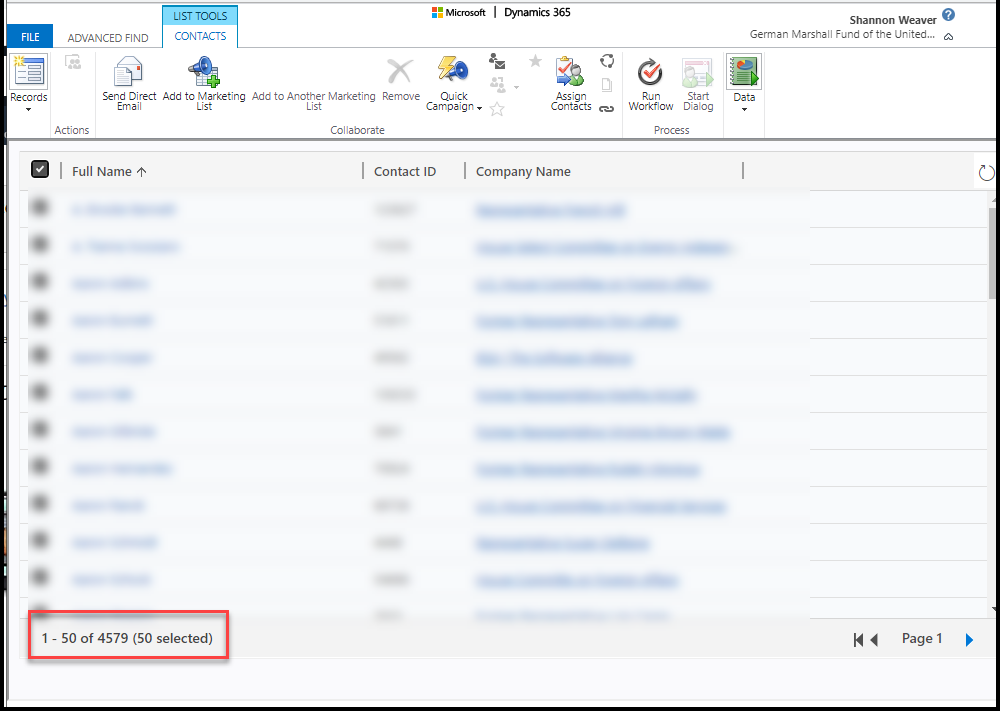
gmfus.png

I have the same question (0)
  • Verified answer
    Wahaj Rashid Profile Picture
    11,321 on at

    Hi,

    You can increase page limit to maximum of 250 records per page, which is inappropriate in your scenario.

    I would recommend following:

    • Create a Static Marketing List and add Members using Advance Find (use your filter criteria here). Here are the steps:
      • Go to Marketing -> Marketing Lists.
      • Create a Static Marketing Lists, select Contact as Target.
      • On the ribbon, click on dropdown button next to Manage Members and select Add using Advanced Find:

    pastedimage1598278795360v1.png 

    Define your criteria and finally click on Add all Members.

    pastedimage1598278928142v2.png

    • Second option is to use a Dynamic List, this way you can include all contacts as per criteria defined.

    Let me know, if you need further clarification.

    Best,

    Wahaj

    (if this answers your query, mark it as verified)

  • Verified answer
    Gus Gonzalez Profile Picture
    27,113 on at

    Hi Sweaver,

    You can always use the Outlook client to add them all at once...I wrote the steps on how to do this a few years ago: www.alithya.com/.../executing-workflows-for-more-than-250-records-in-microsoft-dynamics-crm-2011-updated

Under review

Thank you for your reply! To ensure a great experience for everyone, your content is awaiting approval by our Community Managers. Please check back later.

Helpful resources

Quick Links

Responsible AI policies

As AI tools become more common, we’re introducing a Responsible AI Use…

Neeraj Kumar – Community Spotlight

We are honored to recognize Neeraj Kumar as our Community Spotlight honoree for…

Leaderboard > Customer experience | Sales, Customer Insights, CRM

#1
Tom_Gioielli Profile Picture

Tom_Gioielli 70 Super User 2025 Season 2

#2
Gerardo Rentería García Profile Picture

Gerardo Rentería Ga... 43 Most Valuable Professional

#3
Daniyal Khaleel Profile Picture

Daniyal Khaleel 32 Most Valuable Professional

Last 30 days Overall leaderboard

Product updates

Dynamics 365 release plans



