web
You’re offline. This is a read only version of the page.
close
Skip to main content

Notifications

Announcements

No record found.

Community site session details

Community site session details

Session Id :
Finance | Project Operations, Human Resources, ...
Suggested Answer

Fixing a new fiscal calendar

(0) ShareShare
ReportReport
Posted on by 45

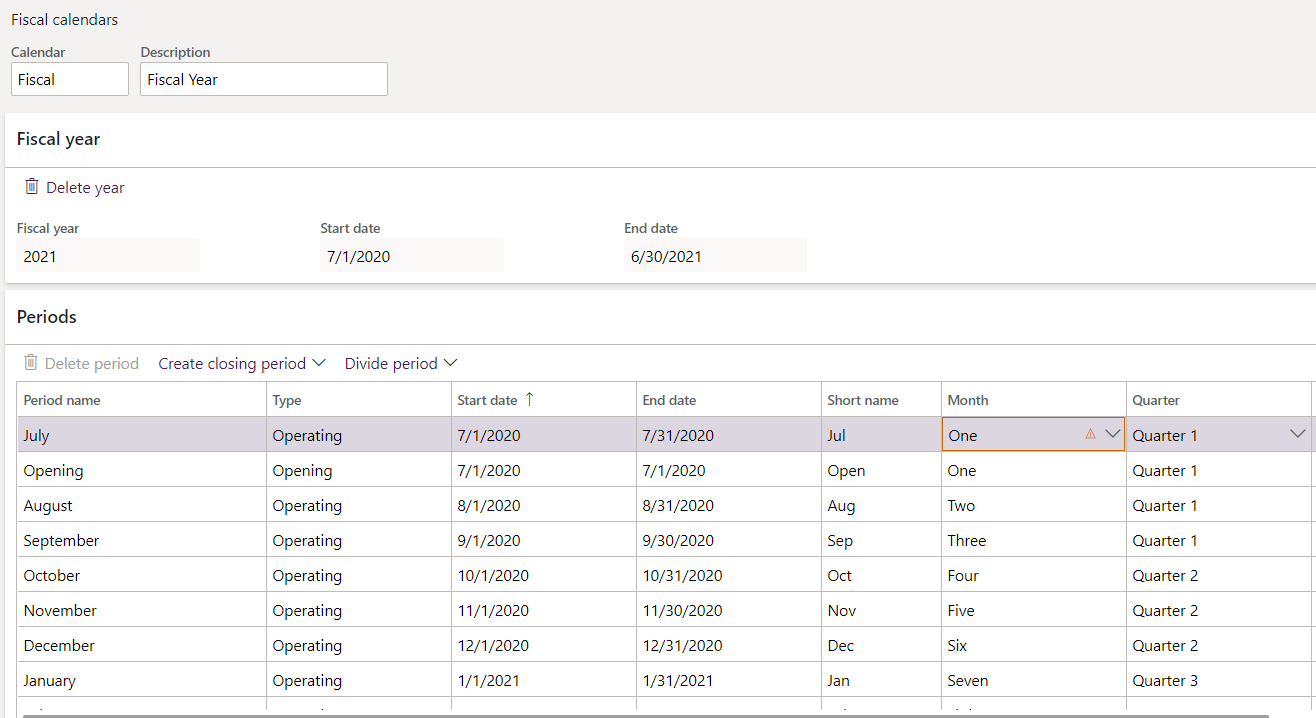
After our conversion to D365 our opening period was permanantly closed.  When we created our next fiscal year calendar (by using copy) the opening period started as permanently closed.

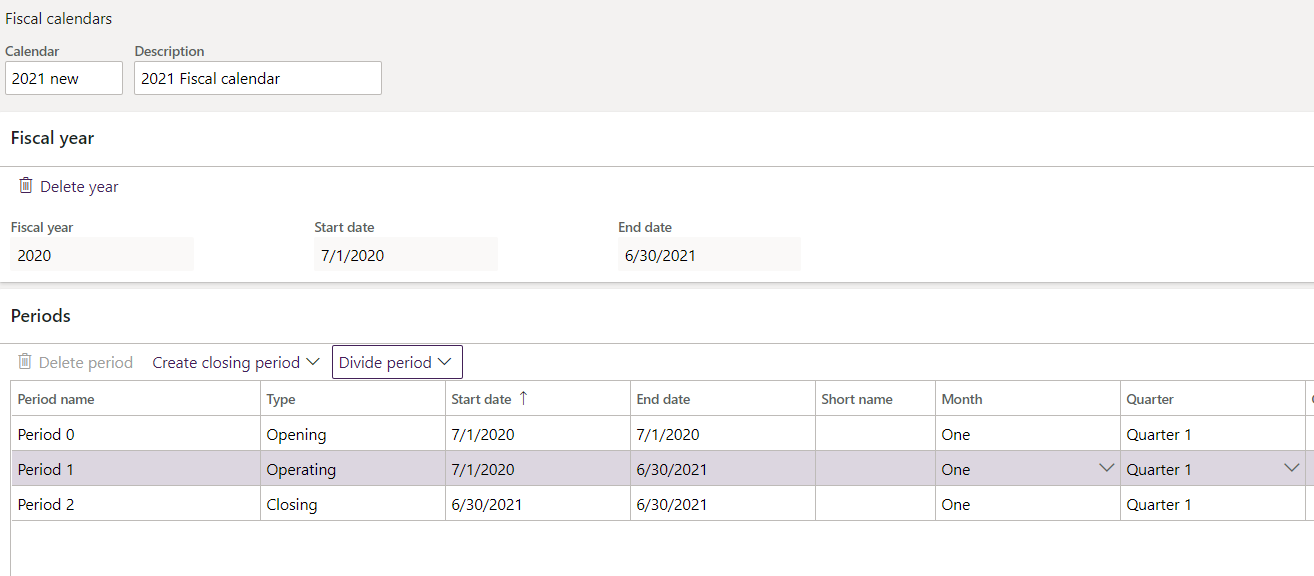
How do I make a new fiscal calendar, so that I have opening, 12 individual months, closing period.  When I attempted this, it did not result as I expected.
pastedimage1593631097423v1.png

I wanted to see this.

pastedimage1593631310414v2.png

Thank you for any help you can provide.

I have the same question (0)
  • CJ Abuya Profile Picture
    45 on at

    I figured out how to set up the months.  Now I can't get the quarters to work.  Why would it say "not in sequence" when I try to change month 4 to quarter 2?

    pastedimage1593632673138v2.png

  • CJ Abuya Profile Picture
    45 on at

    So this is how I fixed the problem.  In the line for Period 1 Operating, I chose divide period using the first day of the next month and naming accordingly.  When I got to the fourth month I had to change the Period 2 Closing line to Quarter 2 and then I could change my fourth month line to quarter 2.  I followed this protocol for the rest of the months/quarter setup.

  • Suggested answer
    zyir Profile Picture
    142 on at

    Hi Abuya,

    • Go to General ledger > Ledger setup > Fiscal calendars.
    • Select New calendar.
    • Enter the name of the calendar to be created in the Calendar field.
    • Enter a description of the fiscal calendar in the Description field. This description can be used on reports.
    • Enter the Start and End dates of the initial fiscal year in the appropriate fields.
    • Enter a Fiscal year name of the initial fiscal year to be associated with this fiscal calendar.
    • Enter the Length of the period and the Unit of the periods. These fields work together to determine how many periods will be created.
    • Select Create.

    You can try this out.

Under review

Thank you for your reply! To ensure a great experience for everyone, your content is awaiting approval by our Community Managers. Please check back later.

Helpful resources

Quick Links

Responsible AI policies

As AI tools become more common, we’re introducing a Responsible AI Use…

Neeraj Kumar – Community Spotlight

We are honored to recognize Neeraj Kumar as our Community Spotlight honoree for…

Leaderboard > Finance | Project Operations, Human Resources, AX, GP, SL

#1
Martin Dráb Profile Picture

Martin Dráb 660 Most Valuable Professional

#2
André Arnaud de Calavon Profile Picture

André Arnaud de Cal... 549 Super User 2025 Season 2

#3
Sohaib Cheema Profile Picture

Sohaib Cheema 307 User Group Leader

Last 30 days Overall leaderboard

Product updates

Dynamics 365 release plans