web
You’re offline. This is a read only version of the page.
close
Skip to main content

Notifications

Announcements

No record found.

Community site session details

Community site session details

Session Id :
Customer experience | Sales, Customer Insights,...
Answered

Show/Hide activity entity from activity menu

(0) ShareShare
ReportReport
Posted on by

#ONLINE CRM

Hi Community Member!
Need your support hope you will how i can hide activities

pastedimage1594632134470v1.png

Regards,
ZG

I have the same question (0)
  • Suggested answer
    LuHao Profile Picture
    40,892 on at

    Hi ZeeshanGhause,

    Go to Advanced Settings > Customizations > Customize the System.

    pastedimage1594634544888v1.png

    Expand Entities > the entity you want to modify(like Contact) > forms, edit the main form.

    pastedimage1594634629826v2.png

    Double click "Notes Properties".

    pastedimage1594634674576v3.png

    Under Activities tab, select "Show selected" and hold down the Ctrl key to select the type of activity to display.

    pastedimage1594634767053v4.png

    Save and publish.

  • ZeeshanGhause Profile Picture
    on at

    Thanks Lu Hao you always rocked

    one more thing after that i will mark verified obviously

    how i can get the description of each item of option set basically i want to send email to selected items in multi option set for that i have stored the email in each item description
    one.png

    two.png


    Regards,
    ZG

  • blackfincloud Profile Picture
    566 on at

    Hello - because you cannot use out-of-the box workflows to retrieve data from multi-select option sets, and because I believe it would be difficult to use Microsoft Flow to obtain the meta-data from those multi-select option sets (The Description field is a meta-data component), I believe you will need to solve this problem with a plugin. Here is an article that documents the attributes with some sample code, and here is an article that documents the meta-data of the multi-select option set (or picklist, as it is referred to.)

  • Verified answer
    LuHao Profile Picture
    40,892 on at

    Hi ZeeshanGhause,

    Agree with Owen.

    Since the email is stored in the description of multi option set field, I'm afraid you have to create a plugin to obtain it.


    If you would use no-code way, like workflow or power automate, we can only set the email in the steps, not store email in the field.

    Here is a demo. I take the contact entity as an example.

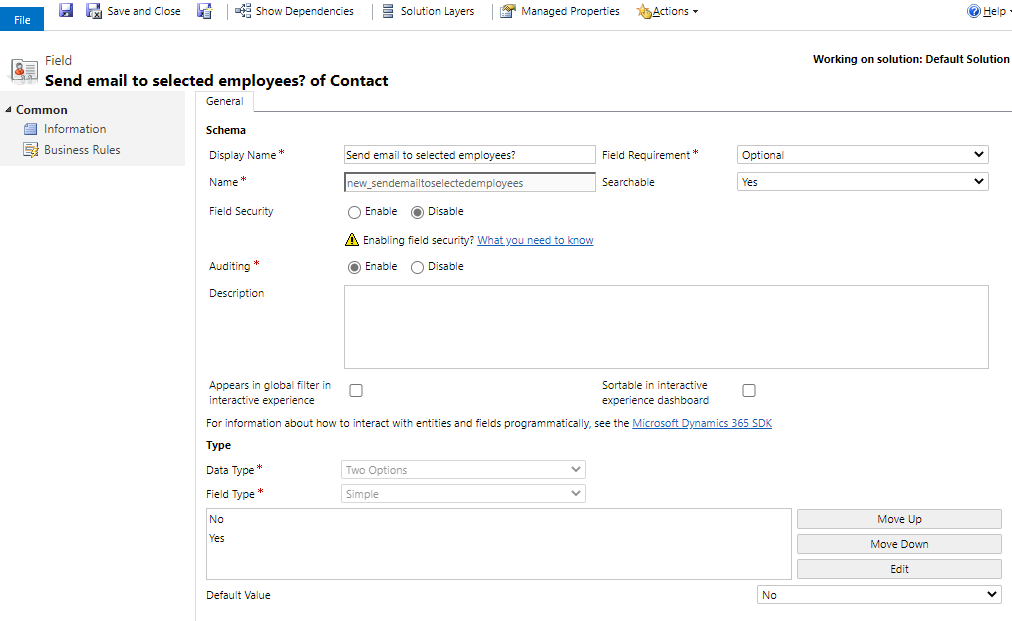
    I have a multi option set field which has 3 options and a two option field to indicate whether to send emails. 

    Whenever the user selects the options of the multi option set field and select two option field as Yes, D365 will automatically send an email to the selected employees, and set the two option field to No.

    pastedimage1594714865878v1.png        pastedimage1594714966959v2.png

    Go to https://us.flow.microsoft.com/, select the D365 environment.

    Create an automated flow, set it as follow.
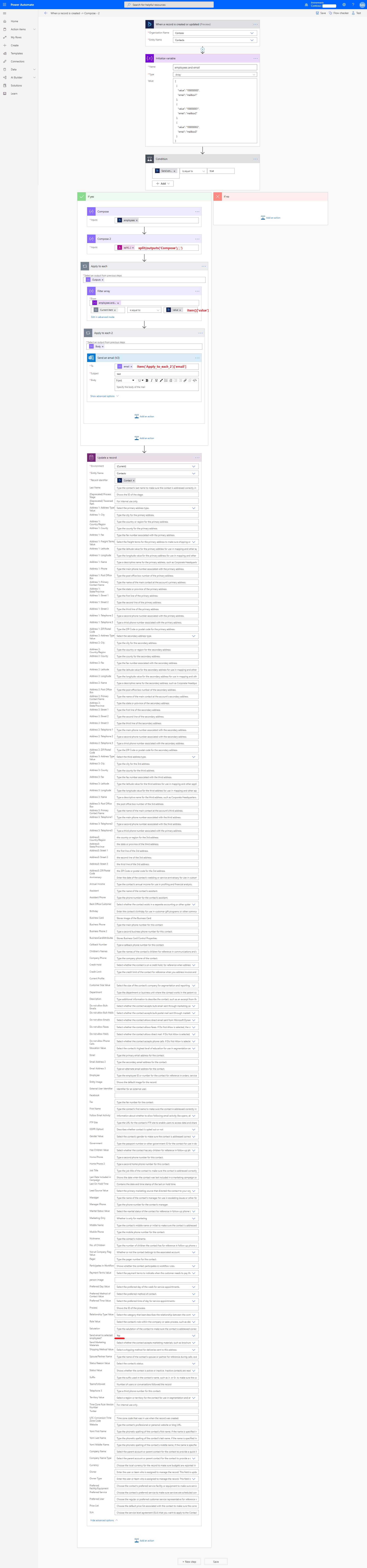
    pastedimage1594716156102v1.png

Under review

Thank you for your reply! To ensure a great experience for everyone, your content is awaiting approval by our Community Managers. Please check back later.

Helpful resources

Quick Links

Responsible AI policies

As AI tools become more common, we’re introducing a Responsible AI Use…

Neeraj Kumar – Community Spotlight

We are honored to recognize Neeraj Kumar as our Community Spotlight honoree for…

Leaderboard > Customer experience | Sales, Customer Insights, CRM

#1
Tom_Gioielli Profile Picture

Tom_Gioielli 73 Super User 2025 Season 2

#2
Gerardo Rentería García Profile Picture

Gerardo Rentería Ga... 43 Most Valuable Professional

#3
Daniyal Khaleel Profile Picture

Daniyal Khaleel 32 Most Valuable Professional

Last 30 days Overall leaderboard

Product updates

Dynamics 365 release plans