web
You’re offline. This is a read only version of the page.
close
Skip to main content

Announcements

No record found.

News and Announcements icon
Community site session details

Community site session details

Session Id :
Customer experience | Sales, Customer Insights,...
Suggested Answer

Workflow Activity (CodeActivity) plugin output parameter returning a null value

(0) ShareShare
ReportReport
Posted on by 12

Hi,

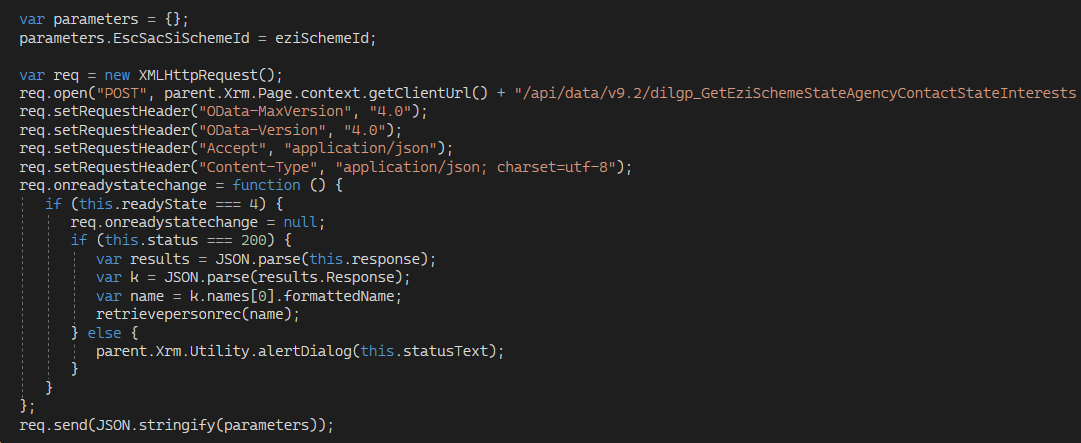
I am attempting to execute a Workflow Activity plugin using JS via a Process Action.

Here is the JS that calls the process Action:
pastedimage1660169907859v1.png

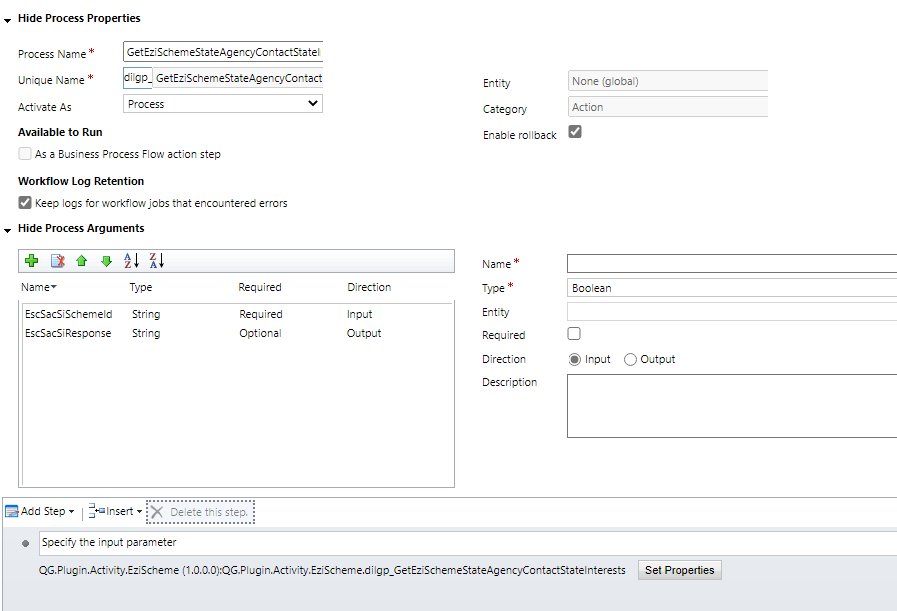
And this is the process Action.

pastedimage1660169997185v2.png

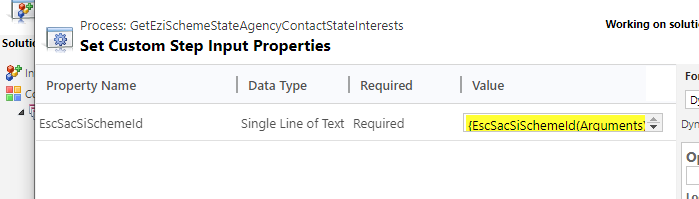
And this is the part where I set the input parameter to the Workflow activity plugin.
pastedimage1660170071058v3.png

So far so good.

My workflow activity plugin has one INPUT parameter and one OUTPUT parameter (as show in the image above).

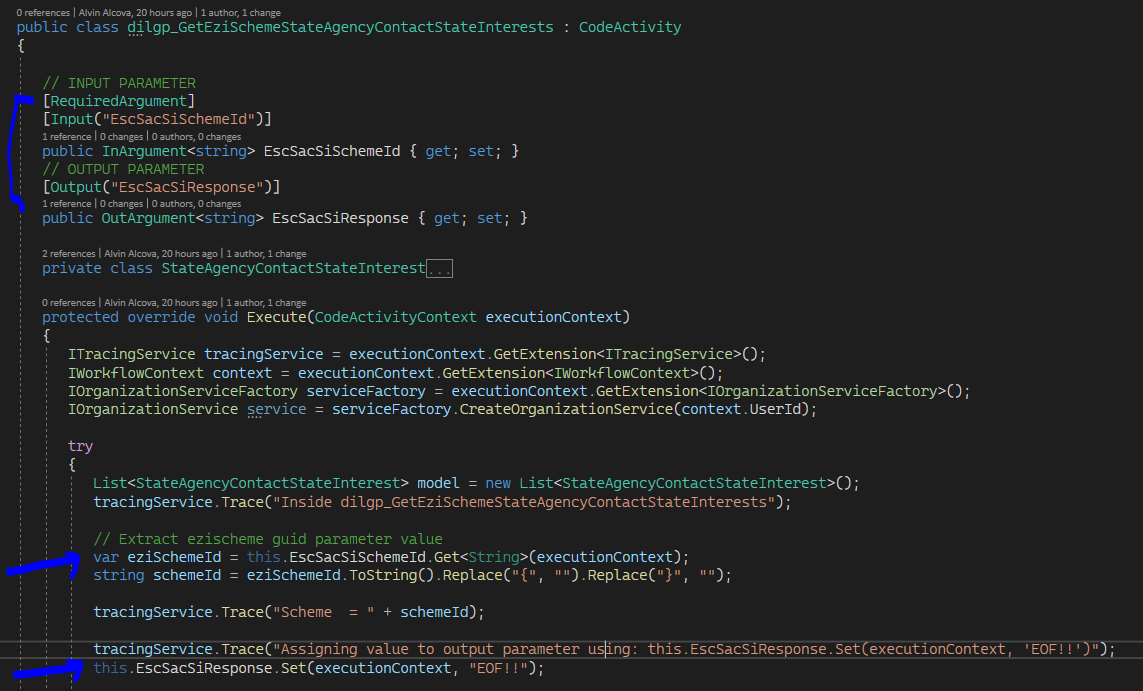
Here is the workflow activity plugin.
pastedimage1660170206380v4.png

As you can see, I have 2 parameters. I am just getting the input parameter and setting the value of the output parameter. Simple!

So when I call the action via JS, I was expecting the response to return "EscSacSiResponse: EOF!!! but I get instead a NULL value.

pastedimage1660170533467v5.png

As you can see above, the output parameter is null.

I know the Workflow activity plugin was called based on its trace log.
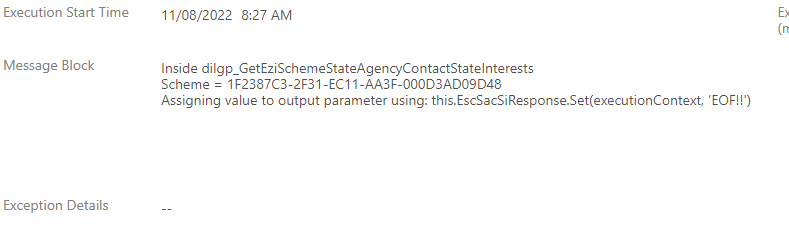
pastedimage1660170694580v6.png

The plugin code clearly shows I am setting the value of the OUTPUT parameter but it is giving me a null value.

Is there an extra step that I need to do, like assigning the value of the output parameter outside the plugin code?

Do I need to do an extra step in the configuration of the Process Action in order to return the value of the output parameter?

Anyone?

a2z 


I have the same question (1)
  • Ray Profile Picture
    1,537 on at

    Hi,

    I think you need add a step in your action, set the output from workflow activity to your action output variable.

  • Suggested answer
    Bipin D365 Profile Picture
    28,985 Moderator on at

    Hi,

    Yes, you need add another step Set variable to set the Action output variable with Workflow code activity output variable to see the result from js call.

  • cheezecake Profile Picture
    12 on at

    Yes, I did figure it out and got the result back. Just wish MS documented this more clearly and gave examples. Their documentation are all over the place and atrocious. 

    pastedimage1661896806278v1.png

    Thx

    a2z

  • Suggested answer
    Bipin D365 Profile Picture
    28,985 Moderator on at

    Please mark this thread completed by click on Yes under Did this answer your question.

  • CU29041406-0 Profile Picture
    3 on at
    I faced the same issue and this screenshot that assign the output variable helped all my lost time debugging with trace. Thank you for that @cheezecake!

Under review

Thank you for your reply! To ensure a great experience for everyone, your content is awaiting approval by our Community Managers. Please check back later.

Helpful resources

Quick Links

Introducing the 2026 Season 1 community Super Users

Congratulations to our 2026 Super Stars!

Meet the Microsoft Dynamics 365 Contact Center Champions

We are thrilled to have these Champions in our Community!

Congratulations to the March Top 10 Community Leaders

These are the community rock stars!

Leaderboard > Customer experience | Sales, Customer Insights, CRM

#1
11manish Profile Picture

11manish 156

#2
ManoVerse Profile Picture

ManoVerse 153 Super User 2026 Season 1

#3
Zhilan Profile Picture

Zhilan 49

Last 30 days Overall leaderboard

Product updates

Dynamics 365 release plans