web
You’re offline. This is a read only version of the page.
close
Skip to main content

Announcements

No record found.

News and Announcements icon
Community site session details

Community site session details

Session Id :
Finance | Project Operations, Human Resources, ...
Suggested Answer

Use PowerAutomate to send monthly emails with dates from sharepoint list

(0) ShareShare
ReportReport
Posted on by 10

Hi all!

I have made a sharepoint list with important dates for events coming up for the next 10+ years. I wish to generate a flow via PowerAutomate which can send me a monthly email which informs me the events coming up for the coming month (based on the dates in sharepoint list).

Can you help?

Thanks a lot!,

Magnus 

I have the same question (0)
  • Suggested answer
    Community Member Profile Picture
    on at

    Hi,

    You can refer to my flow:

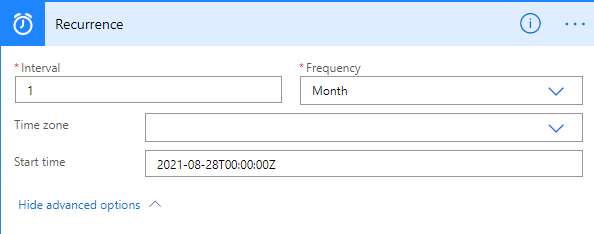
    1. You can first use the Recurrence trigger to trigger the flow in the last few days of each month:
    pastedimage1628217851551v5.png

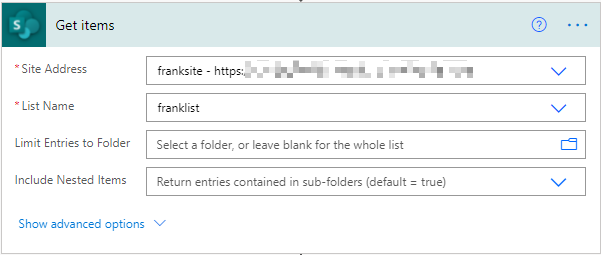
    2. Then use Get items to get the values in the list:
    pastedimage1628217665393v1.png

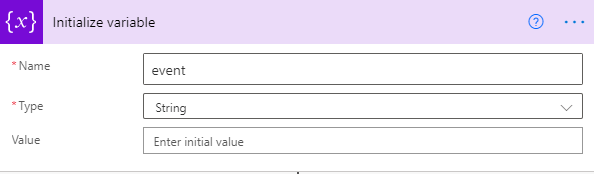
    3. Predefine a variable to receive events:
    pastedimage1628217677921v2.png

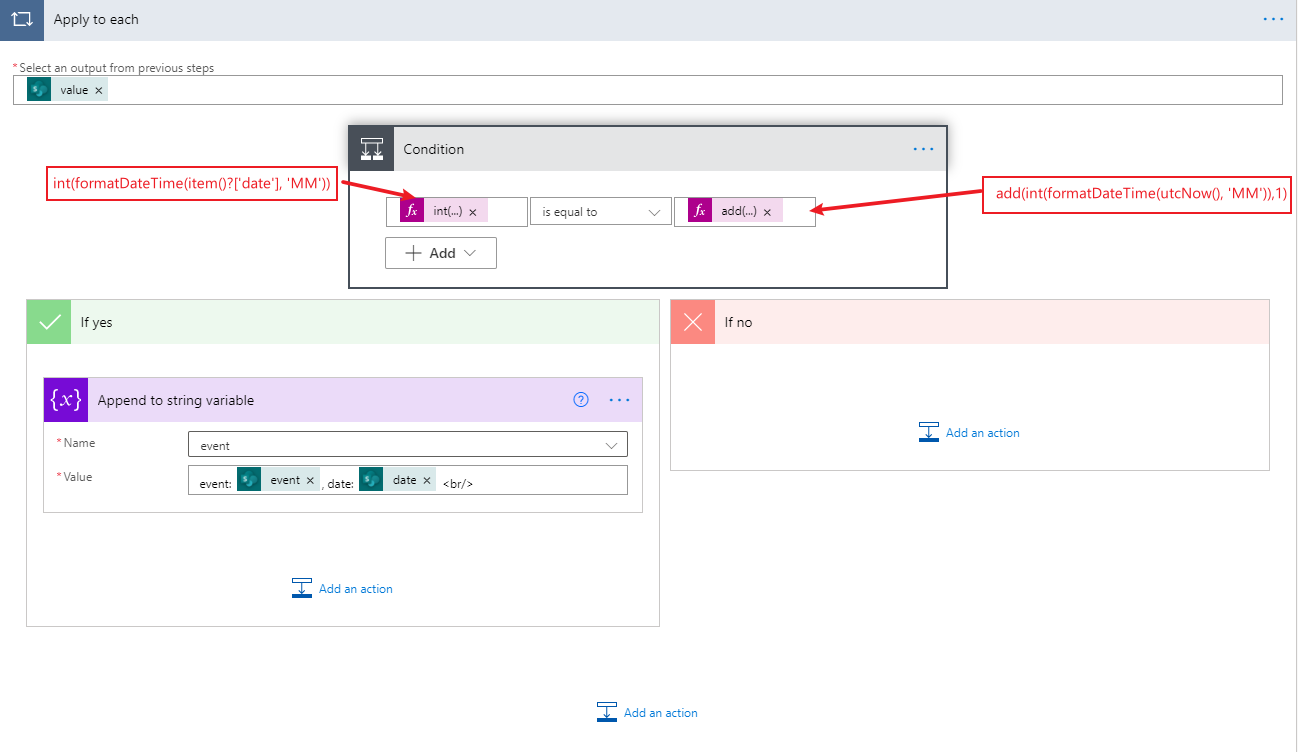
    4. Then determine whether it is an event that needs attention next month:
    pastedimage1628217768996v3.png

    Expression:

    int(formatDateTime(item()?['date'], 'MM'))


    add(int(formatDateTime(utcNow(), 'MM')),1)

    5. Finally, all events in the next month will be notified to users via email:
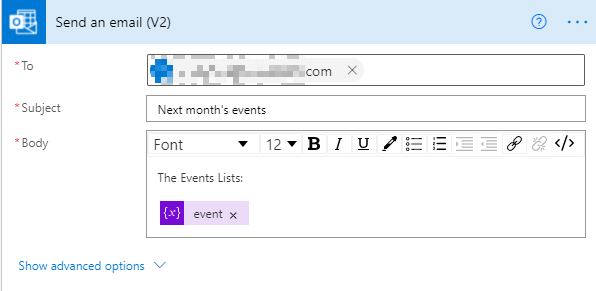
    pastedimage1628217792994v4.png

    Result:

    Only a small amount of test data was constructed, but the results are accurate:
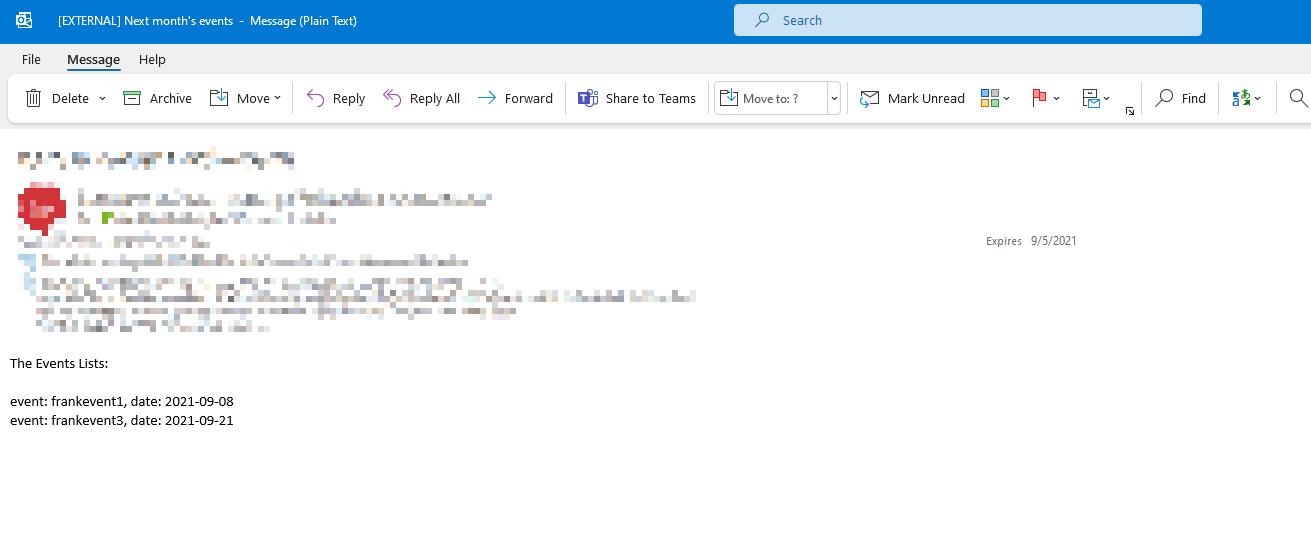
    pastedimage1628218222905v6.png

    If this helped you, I'd appreciate it if you'd mark this as a Verified Answer, which may in turn help others as well.

    Best Regards,

    Frank Gong

  • MagnusWM Profile Picture
    10 on at

    Dear Frank,

    Thanks a lot - you're the best!! The flow almost works. The only issue is that the Flow email correctly gives me the events for next month (September) but also include events from the other years (September events for 2021 as well as 2023).

    Are there a way to fix this? Also, it send multiple emails instead of sending one with all events in it.

    Thanks a lot!

    Magnus

  • Suggested answer
    Community Member Profile Picture
    on at

    Hi,

    You can click Add in the condition, and then add the comparison (year) as shown in the figure below:

    pastedimage1628580217113v1.png

    Sending mail is outside the loop:

    pastedimage1628580309981v2.png

    If this helped you, I'd appreciate it if you'd mark this as a Verified Answer, which may in turn help others as well.

    Best Regards,

    Frank Gong

  • MagnusWM Profile Picture
    10 on at

    Hi again Frank,

    Thanks, really appreciate it!! I've followed all your instructions, however since I have now placed the "Send Email" outside the "Apply to each", it doesn't not include any events. In the email the Event tap is empty. See below:

    Screenshot_5F00_1.JPG

    See my flow above. The empty email below.

    Screenshot_5F00_2.JPG

    Anyway to fix this? Thanks!

Under review

Thank you for your reply! To ensure a great experience for everyone, your content is awaiting approval by our Community Managers. Please check back later.

Helpful resources

Quick Links

Introducing the 2026 Season 1 community Super Users

Congratulations to our 2026 Super Stars!

Meet the Microsoft Dynamics 365 Contact Center Champions

We are thrilled to have these Champions in our Community!

Congratulations to the March Top 10 Community Leaders

These are the community rock stars!

Leaderboard > Finance | Project Operations, Human Resources, AX, GP, SL

#1
Giorgio Bonacorsi Profile Picture

Giorgio Bonacorsi 659

#2
André Arnaud de Calavon Profile Picture

André Arnaud de Cal... 465 Super User 2026 Season 1

#3
Syed Haris Shah Profile Picture

Syed Haris Shah 304 Super User 2026 Season 1

Last 30 days Overall leaderboard

Product updates

Dynamics 365 release plans
