web
You’re offline. This is a read only version of the page.
close
Skip to main content

Notifications

Announcements

No record found.

Community site session details

Community site session details

Session Id :
Finance | Project Operations, Human Resources, ...
Unanswered

add invent site name in standard form in d365fo

(0) ShareShare
ReportReport
Posted on by 45

Hi All,

I tried to add invent site name to two standard form, PurchReqCreatePurchListPage and InventOnhandItem.

and we retrieve two different error

PurchReqCreatePurchListPage , I added the InventSite datasource on PurchReqCreatePurch query and expose the field name in form. and all works fine until we try to filter it, then the error "Column is not filterable." appears
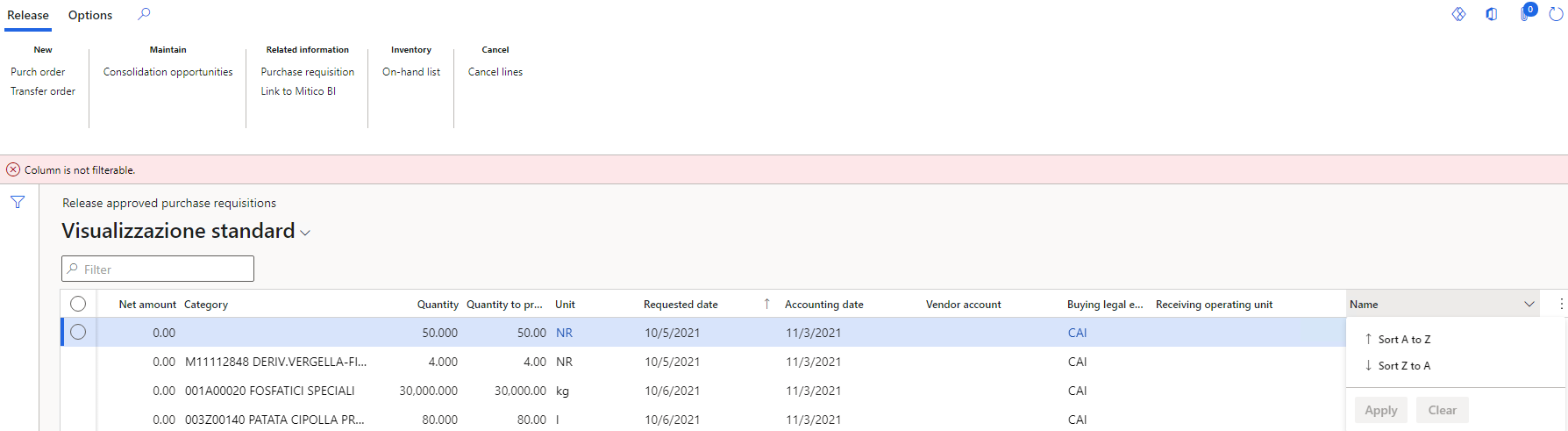
Image

InventOnhandItem , I added the inventSite datasource in join with inventDim and expose the field name in form. but the filed appears empty but filterable

Image

I can't figure out how to fix it, if it can be fixed =/

thanks to all

I have the same question (0)
  • Alex VN Profile Picture
    1,994 on at

    Hi,

    I think you can try to check for your setup on the Join for the extension for new datasource and debug to see which code is triggering the error. The first one seems to be a filter issue for related DS and the second one might be a wrong relation maybe.

  • Mattia.c Profile Picture
    45 on at

    Hi Alex,

    thanks for your reply.

    unfortunately I have already tried to change the join in the datasource added to the query (first case) and in the datasource added to the form (second case)

    but nothing has changed

  • Alex VN Profile Picture
    1,994 on at

    Hi,

    In that case I think you can:

    For the first case, try to debug and see the code where the errors are thrown.

    For the 2nd case, you can try to analyze the SQL query created and see which join is causing the missing data and from there check further.

    Hope you will find the solution. Sorry as without the dev env I can only recommend kind of general approach like this.

Under review

Thank you for your reply! To ensure a great experience for everyone, your content is awaiting approval by our Community Managers. Please check back later.

Helpful resources

Quick Links

Responsible AI policies

As AI tools become more common, we’re introducing a Responsible AI Use…

Neeraj Kumar – Community Spotlight

We are honored to recognize Neeraj Kumar as our Community Spotlight honoree for…

Leaderboard > Finance | Project Operations, Human Resources, AX, GP, SL

#1
André Arnaud de Calavon Profile Picture

André Arnaud de Cal... 449 Super User 2025 Season 2

#2
Martin Dráb Profile Picture

Martin Dráb 422 Most Valuable Professional

#3
BillurSamdancioglu Profile Picture

BillurSamdancioglu 239 Most Valuable Professional

Last 30 days Overall leaderboard

Product updates

Dynamics 365 release plans



