web
You’re offline. This is a read only version of the page.
close
Skip to main content

Notifications

Announcements

No record found.

Community site session details

Community site session details

Session Id :
Customer experience | Sales, Customer Insights,...
Suggested Answer

How to solve Mscrm enable rule false

(0) ShareShare
ReportReport
Posted on by 120

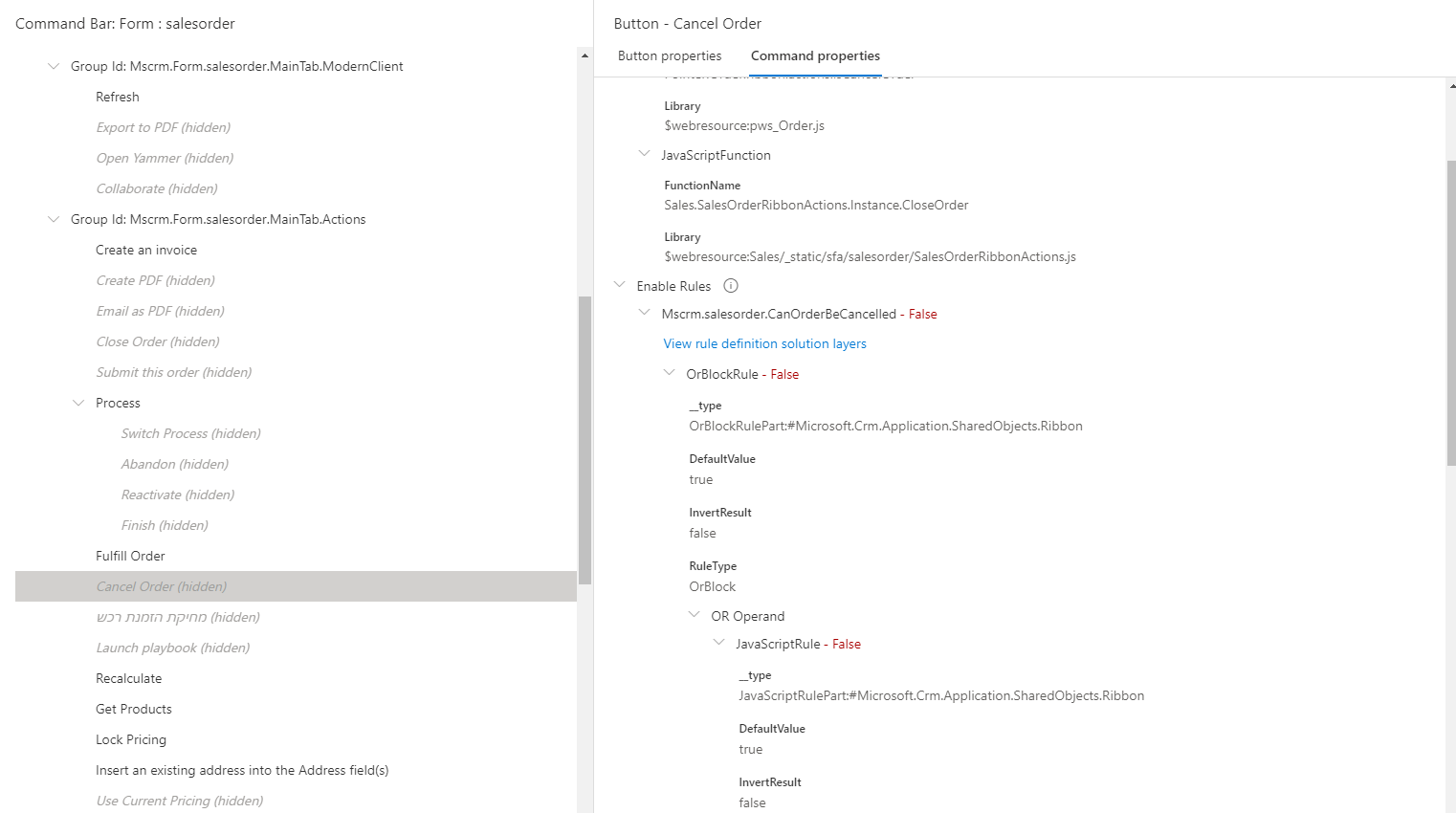
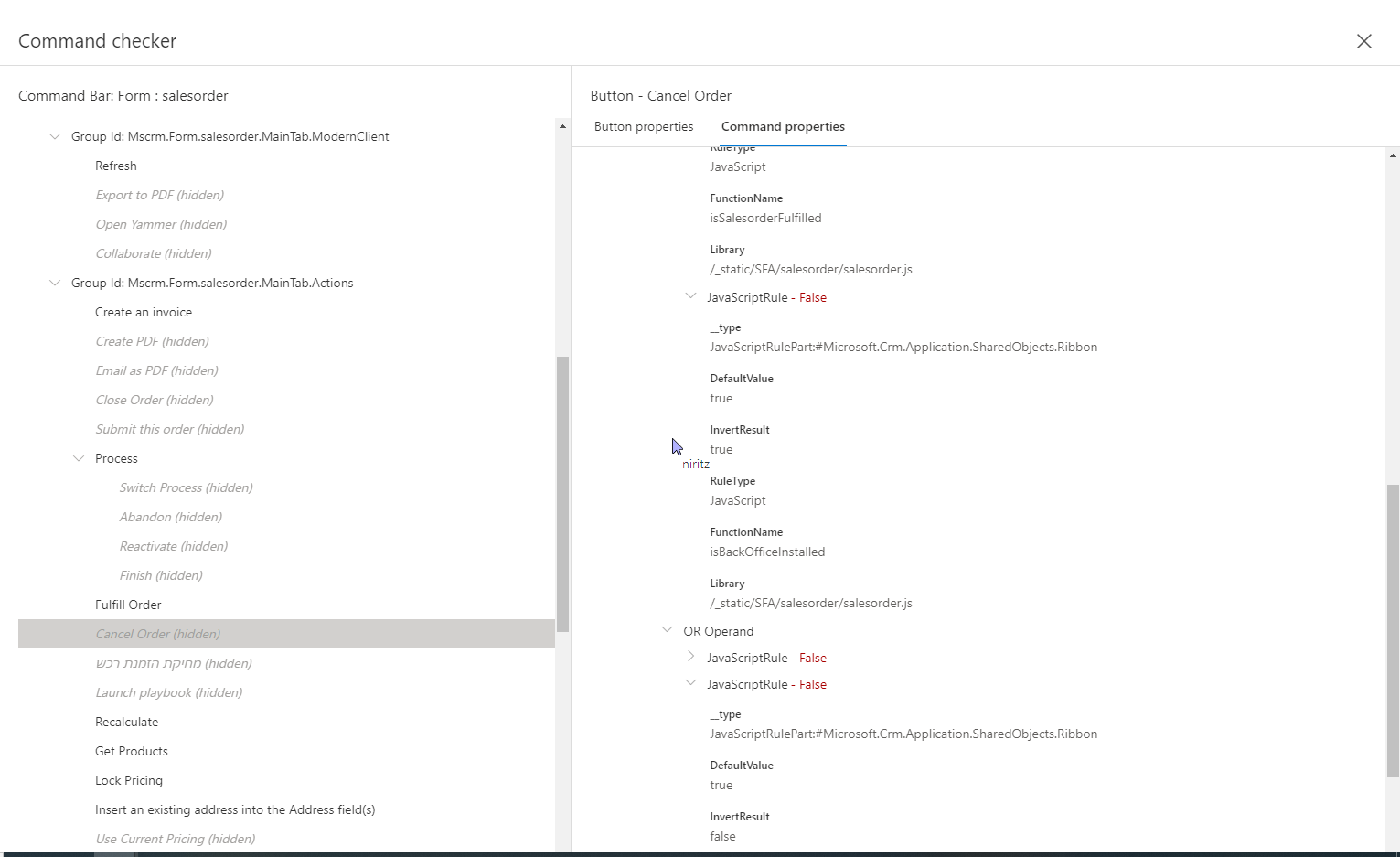
I upgraded from 2016 on-premise to 365 on-premise. On my cancel order button I have Mscrm enable rules that showed me my button with no problem(2016). but now (365) my button is hidden and I get False from mscrm Enable rule.(shown in the pictures add.)

1. how can I find out why I get the false from that rules

2 if I delete these enable rules will it harm the cancel funcionality ?

pastedimage1674033274948v1.png

2677.MicrosoftTeams_2D00_image-_2800_2_2900_.png

5381.MicrosoftTeams_2D00_image-_2800_3_2900_.png4743.MicrosoftTeams_2D00_image-_2800_4_2900_.png

I have the same question (0)
  • Suggested answer
    Naveen Ganeshe Profile Picture
    3,397 User Group Leader on at

    Hello Damka,

    Please check the form and fields that the rule is referencing If they have not been renamed/deleted.

    Also, I don't think deleting enable rules will not harm the cancel functionality. It is just that It affects the visibility of the button.

  • damka Profile Picture
    120 on at

    Thank you, How can I see the fields in the functions ? it's Mscrm enable rule How can I reach that code?

    About the harm issue I just want to make sure that Mscrm doesn't show me the button because that orders can not be deleted or there will be a logical problem...

  • Suggested answer
    Bipin D365 Profile Picture
    28,983 Moderator on at

    Hi,

    If you would like to see the Microsoft code then you can try below format

    Organization Uri/WebResources/javascript web resource name

    You need to use ribbon workbench tool to know the javascript library for Cancel Order button Enable rule

  • Suggested answer
    Naveen Ganeshe Profile Picture
    3,397 User Group Leader on at

    Hi Damka,

    You need to check salesorder.js and look for IsSalesorderactive function. You can check in the chrome dev tool If the function is getting called or not. Also, check If it is using any field that is not on the form or deleted.  
    pastedimage1674040988986v1.png

  • damka Profile Picture
    120 on at

    thanks is it optional to delete them?

  • Suggested answer
    Naveen Ganeshe Profile Picture
    3,397 User Group Leader on at

    Yes. they are optional to delete

Under review

Thank you for your reply! To ensure a great experience for everyone, your content is awaiting approval by our Community Managers. Please check back later.

Helpful resources

Quick Links

Responsible AI policies

As AI tools become more common, we’re introducing a Responsible AI Use…

Neeraj Kumar – Community Spotlight

We are honored to recognize Neeraj Kumar as our Community Spotlight honoree for…

Leaderboard > Customer experience | Sales, Customer Insights, CRM

#1
Tom_Gioielli Profile Picture

Tom_Gioielli 83 Super User 2025 Season 2

#2
Gerardo Rentería García Profile Picture

Gerardo Rentería Ga... 49 Most Valuable Professional

#3
#ManoVerse Profile Picture

#ManoVerse 40

Last 30 days Overall leaderboard

Product updates

Dynamics 365 release plans