Hi Leo,
Actually it is possible to custom filter lookup field in portal, but it needs some code work.
For example, I'm using "Mod Administrator" user login the portal with the same name, and I have a "filterAccount" lookup field on case create form in portal, and I want to only show the accounts whose owner is the current user "Mod Administrator".
Let's do this.
1.Go to Dynamics 365 portals, create a new Web Template and add custom fetchxml with liquid to get the userid of current user in D365.
As we know, if we login portal with D365 user by Azure AD, a new contact with the same name of user will be created in D365, and if we use {{user.id}} in portal to get the current userid, this id is only the contact id in D365, not real userid, so we need to create a fetchxml to get the real user id first and the condition is systemuser's fullname euqals contact's fullname.

{% fetchxml feed %}


{% endfetchxml %}{
  "results": [
    {% for item in feed.results.entities %}
      {
         "userid" : "{{ item.systemuserid }}"
      }{% unless forloop.last %},{% endunless %}
    {% endfor -%}
  ]
}
We want this fetchxml return us a json object, so remember to set the "MIME Type" to "application/json"!

2.Create a page Template and select the web template we created above.

Remember to Uncheck "Use Website Header and Footer".
3.Create a web page.


Now we will be able to get the retrieve result in Json format through this URL: https://portalname.powerappsportals.com/GetRealUserID_WebPage
4.Create another web template with custom fetchxml to retrieve the accounts whose owner is current user and create page template and web page at the same time as what we did above.

{% fetchxml feed %}


{% endfetchxml %}{
  "results": [
    {% for item in feed.results.entities %}
      {
         "id" : "{{ item.accountid }}",
          "name": "{{ item.name }}"
      }{% unless forloop.last %},{% endunless %}
    {% endfor -%}
  ]
}
5.Go to the entity form you want to archive this requirement in portal, and go to Entity Form Metadata tab, create a new record, choose the lookup field you want to filter.

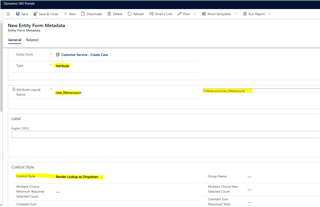
Select the control style to "Dropdown" will show the lookup records in dropdown style and could be more easier to custom with JS code.
6.Still in entity form and go to Additional Settings->Custom JavaScript.

Add the following function out of $(document).read().
function filterAccount(){
    var realUserID;
        $("#new_filteraccount").empty();
        //retrieve real userid
        $.getJSON( "/GetRealUserID_WebPage", function( data ) {
            if(data.results.length>0){
                data.results.forEach(element => {
                    realUserID=element.userid;
                });
            }
        }
        );
        //retrieve accounts
        $.getJSON( "/FilterCustomerInCaseCreating_Page?userid=" realUserID, function( data ) {
            if(data.results.length>0){
                //create option for each returned entity
                console.log(data.results);
                data.results.forEach(element => {
                    let option = document.createElement("option");
                    option.value = element.id;
                    option.innerText = element.name;

                    $("#new_filteraccount").append(option);
                    console.log(1);
                });
            }
        }
        );
    }
Here the "#new_filteraccount" is the lookup field on my portal form ,so you should replace the correct field name of yours.
And add this function in $(document).read() to trigger it when loading the form.
And here's the result.
My user owns 10 accounts in D365.

And I could also only see 10 accounts in portal.

You could also refer to the following links.
https://stoneridgesoftware.com/using-liquid-templates-and-fetchxml-to-retrieve-data-in-a-dynamics-365-online-portal/
http://dyn365apps.com/2017/09/14/dynamics-365-portals-liquid-templates-part-3-retrieve-data-using-fetchxml/
https://www.dancingwithcrm.com/custom-lookup-filtering-powerapps-portal/
Best Regards,
Leo







