Hi Ivan, here are a few observations / recommendations:
First, the setup you provided regarding how you are running the generate baseline forecast
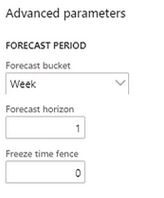
What this is doing is telling the engine to generate a future forecast that projects one week into the future from the date you specified as the start date in the section above this one on the system. You'll also readily note that the drop down in the forecast bucket field does not include anything similar to bi-weekly, so your either going to run as weekly or monthly buckets or customize the system.
Once you have the basics covered as far as time horizon settings used in generating your forecast, you then should be thinking about what is being done with this forecast (for instance, using as a source of planned demand in master planning). Once you have an adjusted forecast that is acceptable, your next step is to Authorize that forecast. Performing the authorize step pushes that forecast data into other parts of the system. For your particular needs, the place to go next would be the Demand Forecast Lines screen (Master Planning > Forecasting > Manual Forecast Entry > Demand Forecast Lines). Here you will be able to manipulate the original forecast you generate into the bi-weekly time buckets that you seek.
For instance, I had my system generate a forecast for an item for 20, 067 each for the month of March. Then using the Allocate Forecast process with these settings:
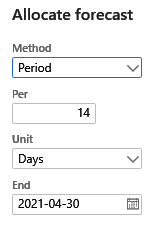
I had the system take that value and allocate it forward in 14 day buckets through the end of April, resulting in the allocated forecast lines shown below.
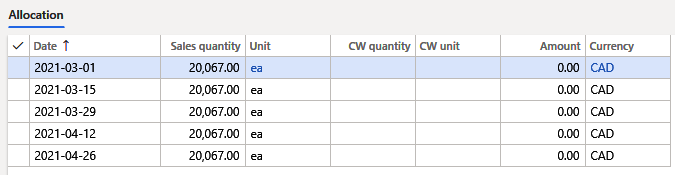
I then ran master planning for my forecast plan covering this item resulting in the planned production orders shown below - not a one-to-one match to the allocated forecast lines as there are other settings affecting the result from coverage settings and so forth, but you'll see the base relationship between the two.






