web
You’re offline. This is a read only version of the page.
close
Skip to main content

Notifications

Announcements

No record found.

Community site session details

Community site session details

Session Id :
Microsoft Dynamics AX (Archived)

Automatically print report

(0) ShareShare
ReportReport
Posted on by 260

Hey guys,

As part of a job, I have a requirement that I will need to print a SSRS report using X++. However, my code just opens the menu item and populate the parm field like the picture below. It doesn't automatically run the report.

The weird thing is that I'm using the same code for other reports and it works normal, it prints the report without showing the menu item.
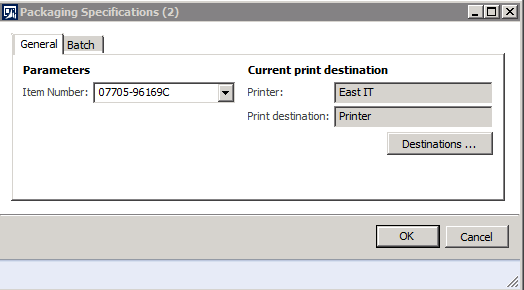
pastedimage1566330238124v1.png

controller.parmReportName("BibPacReport.Design");
controller.parmExecutionMode(SysOperationExecutionMode::Synchronous);
controller.parmShowDialog(false);

select ItemId from prodTable
     where prodTable.ProdId == prodId;

if (ProdTable)
{
     select ItemNumber from bibPac
           where bibPac.ItemNumber == prodTable.ItemId;

     if (bibPac)
     {
          args.record(bibPac);

          args.parmEnum(PrintCopyOriginal::Original);
          args.parmEnumType(enumNum(PrintCopyOriginal));
          controller.parmArgs(args);

          settings = controller.parmReportContract().parmPrintSettings();
          settings.printMediumType(SRSPrintMediumType::Printer);
          settings.printerName(printer);
          settings.numberOfCopies(1);

          controller.startOperation();
     }
}

Above is the code that I'm using.

Any ideas what am I missing?

Thanks.

*This post is locked for comments

I have the same question (0)
  • Suggested answer
    Khushhal Garg Profile Picture
    1,514 on at

    Code seems correct to me. Try clearing object cache.

  • bois0155 Profile Picture
    260 on at

    Thanks for the reply.

    I did it, it didn't work either.

  • Verified answer
    Khushhal Garg Profile Picture
    1,514 on at

    Can you move this code

    controller.parmShowDialog(false);

    just before controller.startOperation();

    like this

    controller.parmShowDialog(false);

    controller.startOperation();

  • bois0155 Profile Picture
    260 on at

    It really worked.

    Thanks Khushhal

Under review

Thank you for your reply! To ensure a great experience for everyone, your content is awaiting approval by our Community Managers. Please check back later.

Helpful resources

Quick Links

Responsible AI policies

As AI tools become more common, we’re introducing a Responsible AI Use…

Neeraj Kumar – Community Spotlight

We are honored to recognize Neeraj Kumar as our Community Spotlight honoree for…

Leaderboard > 🔒一 Microsoft Dynamics AX (Archived)

#1
Priya_K Profile Picture

Priya_K 4

#1
Martin Dráb Profile Picture

Martin Dráb 4 Most Valuable Professional

#3
Ali Zaidi Profile Picture

Ali Zaidi 2

Last 30 days Overall leaderboard

Featured topics

Product updates

Dynamics 365 release plans



