web
You’re offline. This is a read only version of the page.
close
Skip to main content

Notifications

Announcements

No record found.

Community site session details

Community site session details

Session Id :
Microsoft Dynamics AX (Archived)

DIXF Invalid file name error

(0) ShareShare
ReportReport
Posted on by

AX2012 CU13. 

I have a CSV file that I exported using DIXF to my computer's desktop. I then edited the file for different values to import. I clicked on the preview and the correct values from the file were displayed in the preview grid. Then I clicked the "Run" button and got the error "Invalid file name." and "File not found". I am puzzled how it can be valid for reading the preview but not for pulling into the staging table. Any thoughts?

Thanks,

Joel Harris
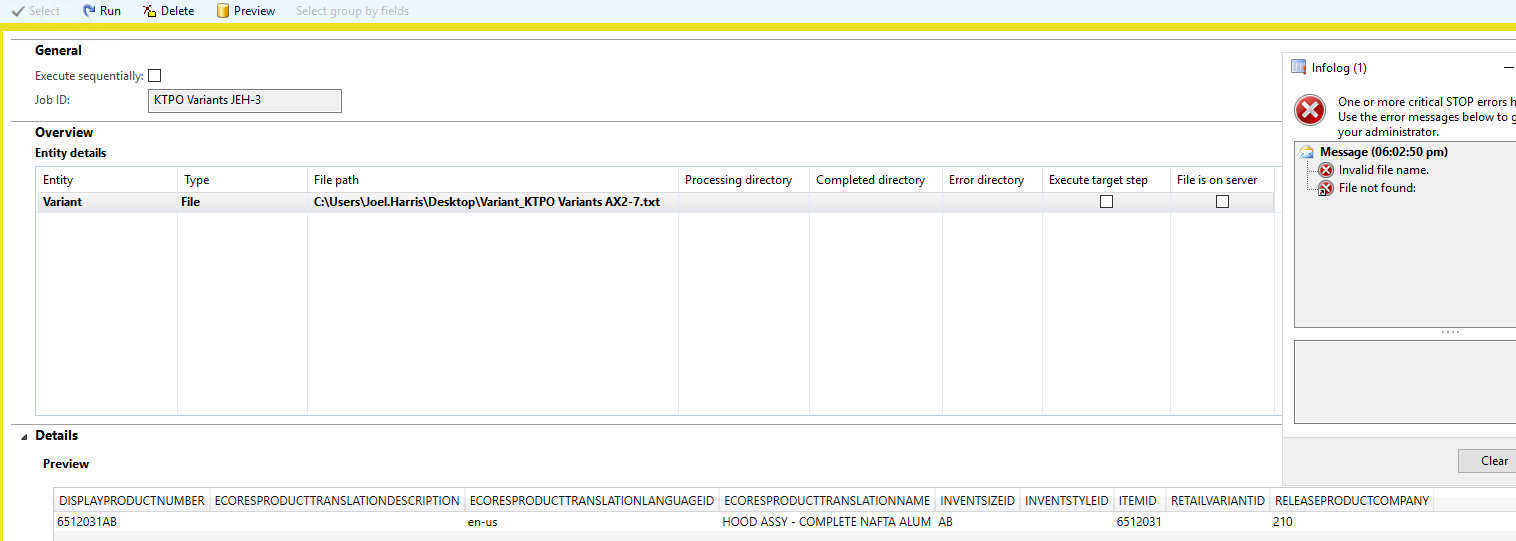
7752.DIXFError.png

*This post is locked for comments

I have the same question (0)
  • Albrecht Prieler Profile Picture
    857 on at

    Hi Joel,

    i can only guess, check the Name of the file are the spaces between? Your file is .txt Format, i am not sure if it works and last Thing i am not sure but maybe ax can not Access to the defined Folder.

    hope this helps

    best regards

    Albrecht

  • Community Member Profile Picture
    on at

    Albrecht and Crispin,

    Thanks for your responses. What I'm really working on is exporting and importing products and the variants. So my process group included both entities "Product" and "Variant". I believe there is an issue with the "Product" group, but that is a different discussion that we don't need to address here. So I exported both successfully (Products has 40 records and Variant has 10 records. I exported these to my client machine's desktop. I renamed them to make sure I had no spaces in the file and they had the csv extension. Then I ran a Get Staging Data on both files (without doing a preview). The Product entity added 0 records (that is the error with the Product entity that needs to be fixed). But the 10 variant records were loaded into the staging table. So far, so good (mostly).

    Then to show myself that I could run one without an error, I ran the Get Staging Data on the processing group, but I deleted the Product Entity so that I was only working with the Variant. And I got the "Invalid file name / File not found" error. Once again, this was pointed at the same file that worked for export, preview, and import when I included the other entity. Also...if I create a new processing group with only "Variant" in it and point to this file, it imports properly.

    SO, my issue is only when I have multiple entities in the processing group and I remove one of them. I guess I can work around that, but it seems very odd to me.

Under review

Thank you for your reply! To ensure a great experience for everyone, your content is awaiting approval by our Community Managers. Please check back later.

Helpful resources

Quick Links

Responsible AI policies

As AI tools become more common, we’re introducing a Responsible AI Use…

Neeraj Kumar – Community Spotlight

We are honored to recognize Neeraj Kumar as our Community Spotlight honoree for…

Leaderboard > 🔒一 Microsoft Dynamics AX (Archived)

#1
Martin Dráb Profile Picture

Martin Dráb 4 Most Valuable Professional

#1
Priya_K Profile Picture

Priya_K 4

#3
MyDynamicsNAV Profile Picture

MyDynamicsNAV 2

Last 30 days Overall leaderboard

Featured topics

Product updates

Dynamics 365 release plans



