web
You’re offline. This is a read only version of the page.
close
Skip to main content

Announcements

News and Announcements icon
Community site session details

Community site session details

Session Id :
Small and medium business | Business Central, N...
Suggested Answer

Bank Reconciliation Not showing Open Items Posted in Bank Account Subledger

(0) ShareShare
ReportReport
Posted on by 5

So far, I am not a fan of the bank reconciliation process in business central.  The program seems clunky and unreliable.

I have an entry included on my bank statement line which is not showing on the bank account ledger entries window to be matched even though the transaction was properly booked to the bank account subledger.

Here is the entry in the GL:

pastedimage1662647401472v1.png

Here is everything unmatched on the bank reconciliation:

pastedimage1662647483469v2.png

Can someone please help me identify what is going on here.  I have been dealing with application problems since our implementation at the beginning of the year.  The bank reconciliation report is also telling me that applied entries need to be zero and are giving me errors when I try to post.
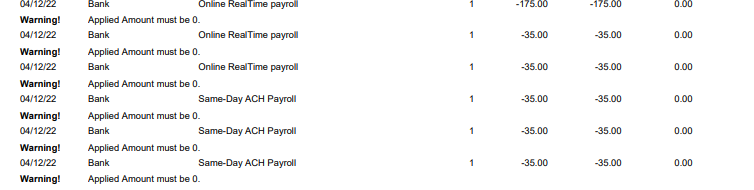
pastedimage1662647648365v3.png

Any help would be greatly appreciated.  Thanks. 

I have the same question (0)
  • Suggested answer
    Dallefeld Profile Picture
    235 User Group Leader on at

    1. the GL entry screenshot does no look like standard BC. What apps are you using?

    2. when you run auto match, what are you selecting for the matching fields?

    3. need more information to help with the applied error, Not seeing any document numbers.

  • Suggested answer
    Amit Baru Profile Picture
    3,043 on at

    Hi,

    Pls check G/L Entry again, If Bank Account no. is there, then entry is modify or delete in the Bank Account Ledger Entry.

    Otherwise, Entry was posted by taking direct Bank G/l from the COA.

    Regards

    Amit Sharma

    www.erpconsultors.com

  • DannyFarole Profile Picture
    5 on at

    Thanks for the reply.  As you can see.  This entry was posted to the bank subledger, not directly to the GL account. This bank reconciliation had to be reopened due to errors.  It seems like when the bank rec was reopened, it did not open back this transaction.  Is there a way to check?

    pastedimage1662662449019v1.png

  • DannyFarole Profile Picture
    5 on at

    Thanks for the reply Kim.

    1. I am using dynamics 365 business central.

    2. These are the matching fields I use:

    pastedimage1662662734061v2.png

    pastedimage1662663350200v3.png

    3. there are no documents on that report.  That is simply the bank account reconciliation test report.  

    pastedimage1662663547323v4.png

    These transactions are showing as being matched off on this report, but showing with no match from the bank reconciliation. 

    pastedimage1662663728944v5.png

    pastedimage1662663752500v6.png

    ^^ This is from matching>match details on those transactions.

    This bank account reconciliation had to be re-opened and i'm wondering if some transactions did not reopen as a result.  I have checked and made sure the bank subledger balance matches the GL account balance.  I just cant figure it out.

    Thanks

  • Suggested answer
    Dallefeld Profile Picture
    235 User Group Leader on at

    Did you execute the Suggest Lines to bring in the Bank Ledger Entries?

    pastedimage1662670975168v1.png

  • DannyFarole Profile Picture
    5 on at

    I did not at the start, however, I just tried it and nothing happened.

    Thanks

  • AD-22040756-1 Profile Picture
    668 on at

    based on your screenshot the bank account ledger entry is marked as reconciled. The open field does not have a check mark meaning the line is not open and it is reconciled. As its reconciled thats the reason its not appearing in your new bank reconciliation in the bank account ledger entries pane. Are you sure the bank rec. the line was reconciled on was reopened?

    There are three more fields you can look at in the bank ledger entries page to verify the line is reconciled or unreconciled (these fields are not visible on the page by default so you will have to open the page inspection pane to view them) - statement status, statement no., statement line no.

    pastedimage1662736073000v2.png

  • DannyFarole Profile Picture
    5 on at

    pastedimage1662822601582v1.png

    It is showing as closed.  Is there any way to reopen this transaction?  - I thought undoing the bank rec would reopen it. 

    I am positive this line was reconciled previously.  The bank rec was posted with no errors.  I have a copy of the bank rec when it was posted. 

    Here is the transaction posted and applied from the previous bank rec. 

    pastedimage1662822842103v2.png

Under review

Thank you for your reply! To ensure a great experience for everyone, your content is awaiting approval by our Community Managers. Please check back later.

Helpful resources

Quick Links

Season of Sharing Community Challenge Launch!

Jump in, show your community spirit, and win prizes!

Women in Power Builds Momentum

Expanding mentorship, skilling, and AI innovation

Congratulations to the April Top 10 Community Leaders

These are the community rock stars!

Leaderboard > Small and medium business | Business Central, NAV, RMS

#1
OussamaSabbouh Profile Picture

OussamaSabbouh 2,386 Super User 2026 Season 1

#2
YUN ZHU Profile Picture

YUN ZHU 1,774 Super User 2026 Season 1

#3
AndrewThomas81 Profile Picture

AndrewThomas81 1,515

Last 30 days Overall leaderboard

Featured topics

Microsoft Training Manuals

Product updates

Dynamics 365 release plans



