Hi everyone
I have the following issue. I’m modifying the Sales Detail form by adding two columns. The first column I’m adding adds the Customer description. The second column I am adding adds the Invoice number that appears on the invoice.
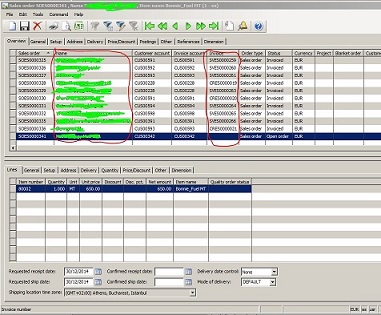
The first field comes from SalesTable.SalesName. This modification works fine. The second field I took from CustInvoiceJour.InvoiceId. In order to get this to work I defined a OuterJoin between the SalesTable and the CustInvoiceJour table. The result works fine in the form except for two things:
- The “Filter by Field” and “Filter by Selection” options are not available in the shortcut menu. I assume it has to do with the join, but I am not sure why this would be a problem.

- As I post the invoices, the invoice number does not appear in the form until I force a refresh (F5) or close and re-open the form.
- Which property controls the column names? I’d like to change “Invoice” to “Invoice Nr” but I can’t find the right property.
Of these two the first one is the most urgent one. I really would like to understand:
- Why the shortcut menu does not list the options
- How can I ensure the options become available?
- How can I ensure that the form auto refreshes after the sales order has been posted and the invoice number has been created?
Unfortunately, I am not yet very proficient in writing new classes or methods so I need some fairly detailed instructions if that is what is required to make this work. Thank you for your time and a Happy New Year!
Yours
Abaw
*This post is locked for comments
I have the same question (0)







