web
You’re offline. This is a read only version of the page.
close
Skip to main content

Notifications

Announcements

No record found.

Community site session details

Community site session details

Session Id :
Finance | Project Operations, Human Resources, ...
Suggested Answer

How to manage filter coonstraint in sysgen lookup form

(0) ShareShare
ReportReport
Posted on by 15

Hi all

My situation is as follows:

I have a form. In the form there is a grid In the grid there is a string field.

Addin a new line in the gid, I type in some letters and a lookup form pops up, showing possible entries. 

It filters on what I types in. Filter conditionion is "begins with"

A Sub-Form of this form has a grid, based on the same table, showing nearly the same behavior, but the lookup form has the condition "Exact match"

Additionally it seems to show a different behavior, opening it manually, or when it opens by itself because of typing letters.

So in our solution, we have many of this lookups and they don't show the same behavior, what is not OK.

So the question is: Where is the condition defined? Can we manipulate it?

followowing image shows, which condition I'm talking about.
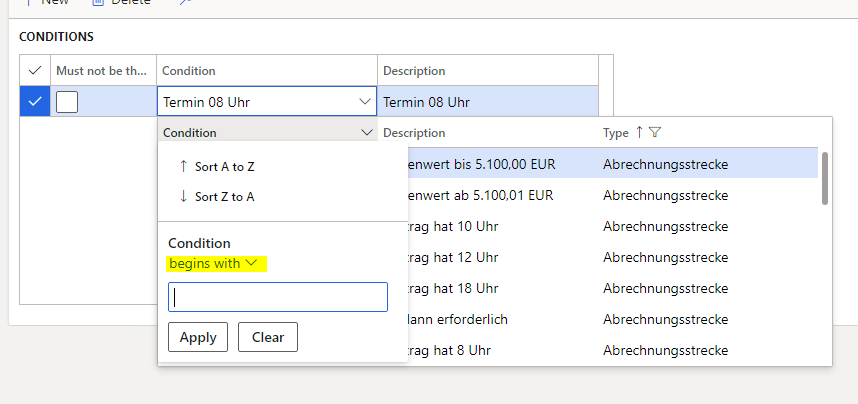
4010.pastedimage1611316291102v1.png

thanks You for any helping answer.

kind regards

Gerhard

I have the same question (0)
  • Suggested answer
    nmaenpaa Profile Picture
    101,160 Moderator on at

    I think it simply remembers your last selection on that specific field.

    So, if you change "begins with" to something else and filter with it, then next time the filtering of the lookup will remember your previous filtering type.

    You can reset usage data to get it back to it's original state.

  • GG-16051420-0 Profile Picture
    15 on at

    thanks for answering,

    but  no, it is not remembering it.

    In the case, where it shows "exat match", when I change to "begins with", select something and reopen it, it switched back to "exact match".

    And the original state ist "exact match", but I want it to be "begins with" as default behavior

  • nmaenpaa Profile Picture
    101,160 Moderator on at

    Could you share a screenshot of the "exact match" dialog? I don't have such option at all. I have "matches" and "is exactly".

    Also all other details regarding the differences of these two fields and their definitions are welcome.

  • GG-16051420-0 Profile Picture
    15 on at

    Sorry, it is named "is exactly"

    pastedimage1611319888347v1.png

    here is a screenshot of the same form, but it opened becaus I typed in "te".

  • nmaenpaa Profile Picture
    101,160 Moderator on at

    And are there any differences in how you set up the table fields, form data source fields, form controls?

    Did you try to clear usage data?

  • GG-16051420-0 Profile Picture
    15 on at

    It is the same tablefield. The difference is only, opening by clicking or getting it opened by typing in "te".

    No, I didn't try clearing usage data.

    I type in "te", the lookup opens, as shown in second screenshot.

    I delete the letters, using backspace and close the lookup.

    I click on the "down arrow" to reopen it, and it opens as shown in first screenshot.

    I type in "te" and it finds matching entries.

    I close and reopen it and it is back to second screenshot.

    Where Do I have to clear usage data?

    Will it help me in this situation?

  • Suggested answer
    nmaenpaa Profile Picture
    101,160 Moderator on at

    Could you please clarify if the two fields are working differently or the same way?

    You told that one of the fields works a bit differently, depending if the user inputs some text or not. But are the two fields working the same way or not?

    Clearing the usage data helps you to see how the system works, when there's guaranteed to not be any details "remembered" from last time the user used the form / lookup. Here's how to clear it: www.google.com/search

  • GG-16051420-0 Profile Picture
    15 on at

    In my last posting I'm talking about only one field.

    Somebody figured out, there are two comparable fields with different behavior.

    I figured out, I can get different behavior in one field, when opening it in different ways, as described above.

  • Suggested answer
    nmaenpaa Profile Picture
    101,160 Moderator on at

    Ok so now the question is:

    The filtering in the lookup works a bit differently if you had typed something in the field before opening the lookup, compared to opening the lookup without typing anything. And you want to know if you can control this?

    I think that this behavior is not something that we can control, it's managed by Microsoft.

    I assume you can see similar behavior across the entire system, not just in your form / field. Correct?

  • GG-16051420-0 Profile Picture
    15 on at

    I checked different string entry field, they all show a different behavior. The one from my last post changes its bahavior, the next one has always the filter option"contains" in both situations, with or without typed in something.

    Regarding to my first posting here:

    We have two similar grids, showing data from the same table, showing different behavior.

    So, if You say, it is managed  by microsoft, I'd like to know, which rules are behind it, so we can give a hint to our users, how to use the filtering function.

    Sorry for not stopping this questiuons, I'm frustrated about having no chance to get this run, as expected.

Under review

Thank you for your reply! To ensure a great experience for everyone, your content is awaiting approval by our Community Managers. Please check back later.

Helpful resources

Quick Links

Responsible AI policies

As AI tools become more common, we’re introducing a Responsible AI Use…

Neeraj Kumar – Community Spotlight

We are honored to recognize Neeraj Kumar as our Community Spotlight honoree for…

Leaderboard > Finance | Project Operations, Human Resources, AX, GP, SL

#1
Martin Dráb Profile Picture

Martin Dráb 544 Most Valuable Professional

#2
André Arnaud de Calavon Profile Picture

André Arnaud de Cal... 450 Super User 2025 Season 2

#3
Sohaib Cheema Profile Picture

Sohaib Cheema 250 User Group Leader

Last 30 days Overall leaderboard

Product updates

Dynamics 365 release plans
