Hi All,
On EP (ax 2012), I have a details page, and there are tree columns on it (AxGridView\Columns\AxBoundField). I’d like to align all captions (in columns’ header) and values in sells to the left.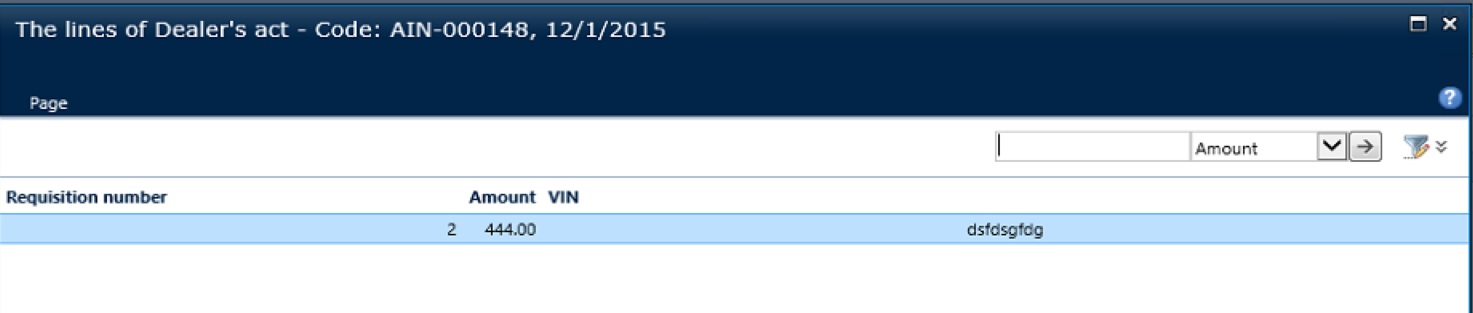
First column – display method
Second – money EDT
Third – str
There are plenty setting in Visual Studio for AxGridView and for AxBoundField but all combinations that I was trying did not work.
I was trying to setup:
-
For AxGridView:
-
AlternatingRowStyle-HorizontalAlign
-
EditRowStyle-HorizontalAlign
-
EmptyDataRowStyle-HorizontalAlign
-
FooterStyle-HorizontalAlign
-
HorizontalAlign
-
PagerStyle-HorizontalAlign
-
RowStyle-HorizontalAlign
-
SelectedRowStyle-HorizontalAlign
-
RowStyle-HorizontalAlign
-
HeaderStyle-HorizontalAlign
-
PagerStyle-HorizontalAlign
For AxBoundField – more or less the values in sells can be aligned (but not for all data types)
I would appreciate if somebody can advise how to:
-
Align the fields captions and sells’ values (to the left for instance)?
-
How to setup the column width?
*This post is locked for comments
I have the same question (0)


