web
You’re offline. This is a read only version of the page.
close
Skip to main content

Announcements

No record found.

News and Announcements icon
Community site session details

Community site session details

Session Id :
Microsoft Dynamics CRM (Archived)

Error While Saving the Record

(0) ShareShare
ReportReport
Posted on by

Hi Friends,

I am testing Security Roles. I am getting below Error while saving the new record. But I am not getting any error if I update already exsisting record. Any Suggestions please.
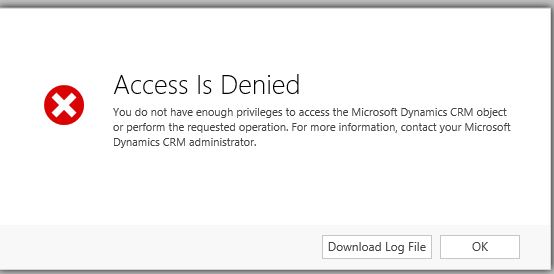
Security-role.JPG

Unhandled Exception: System.ServiceModel.FaultException`1[[Microsoft.Xrm.Sdk.OrganizationServiceFault, Microsoft.Xrm.Sdk, Version=6.0.0.0, Culture=neutral, PublicKeyToken=31bf3856ad364e35]]: SecLib::AccessCheckEx failed. Returned hr = -2147187962, ObjectID: 28151806-6d3c-e611-861f-12f8572613f5, OwnerId: a16e92cf-6011-e611-9e91-12f8572613f5,  OwnerIdType: 8 and CallingUser: 642a8e00-2c8c-e311-8495-02bfc0a8dc66. ObjectTypeCode: 10595, objectBusinessUnitId: a88160ef-9410-e611-8fa3-12f8572613f5, AccessRights: AppendToAccess Detail:
<OrganizationServiceFault xmlns:i="www.w3.org/.../XMLSchema-instance" xmlns="schemas.microsoft.com/.../Contracts">
  <ErrorCode>-2147187962</ErrorCode>
  <ErrorDetails xmlns:d2p1="schemas.datacontract.org/.../System.Collections.Generic" />
  <Message>SecLib::AccessCheckEx failed. Returned hr = -2147187962, ObjectID: 28151806-6d3c-e611-861f-12f8572613f5, OwnerId: a16e92cf-6011-e611-9e91-12f8572613f5,  OwnerIdType: 8 and CallingUser: 642a8e00-2c8c-e311-8495-02bfc0a8dc66. ObjectTypeCode: 10595, objectBusinessUnitId: a88160ef-9410-e611-8fa3-12f8572613f5, AccessRights: AppendToAccess </Message>
  <Timestamp>2016-06-29T14:25:26.2837583Z</Timestamp>
  <InnerFault i:nil="true" />
  <TraceText i:nil="true" />
</OrganizationServiceFault>

*This post is locked for comments

I have the same question (0)
  • Verified answer
    Aileen Gusni Profile Picture
    44,524 on at

    Hi Ayesha

    This is the clue

    <Message>SecLib::AccessCheckEx failed. Returned hr = -2147187962, ObjectID: 28151806-6d3c-e611-861f-12f8572613f5, OwnerId: a16e92cf-6011-e611-9e91-12f8572613f5,  OwnerIdType: 8 and CallingUser: 642a8e00-2c8c-e311-8495-02bfc0a8dc66. ObjectTypeCode: 10595, objectBusinessUnitId: a88160ef-9410-e611-8fa3-12f8572613f5, AccessRights: AppendToAccess </Message>

     <Timestamp>2016-06-

    Soyou find out the 10595 is which entity by querying (if using crm onpremise) in SQL

    Select name from entityview where objecttypecode = 10595

    Then you give the append to access permission to the user role.

    Or you can use xrm toolbox plugin so called access checker to check the missing role but you need to know the entity as well that is the

    10595

    Hope this helps.

    Thanks

    Hope this helps.

  • Community Member Profile Picture
    on at

    Thank you Aileen.

Under review

Thank you for your reply! To ensure a great experience for everyone, your content is awaiting approval by our Community Managers. Please check back later.

Helpful resources

Quick Links

Introducing the 2026 Season 1 community Super Users

Congratulations to our 2026 Super Stars!

Congratulations to our 2025 Community Spotlights

Thanks to all of our 2025 Community Spotlight stars!

Leaderboard > 🔒一 Microsoft Dynamics CRM (Archived)

#1
JS-09031509-0 Profile Picture

JS-09031509-0 3

#2
AS-17030037-0 Profile Picture

AS-17030037-0 2

#2
Mark Eckert Profile Picture

Mark Eckert 2

Last 30 days Overall leaderboard

Featured topics

Product updates

Dynamics 365 release plans



