Hello Johnabergercom.
On October 2019 there were significant changes on the Licensing Model: check the major changes on the October 2019 Licensing Guide.
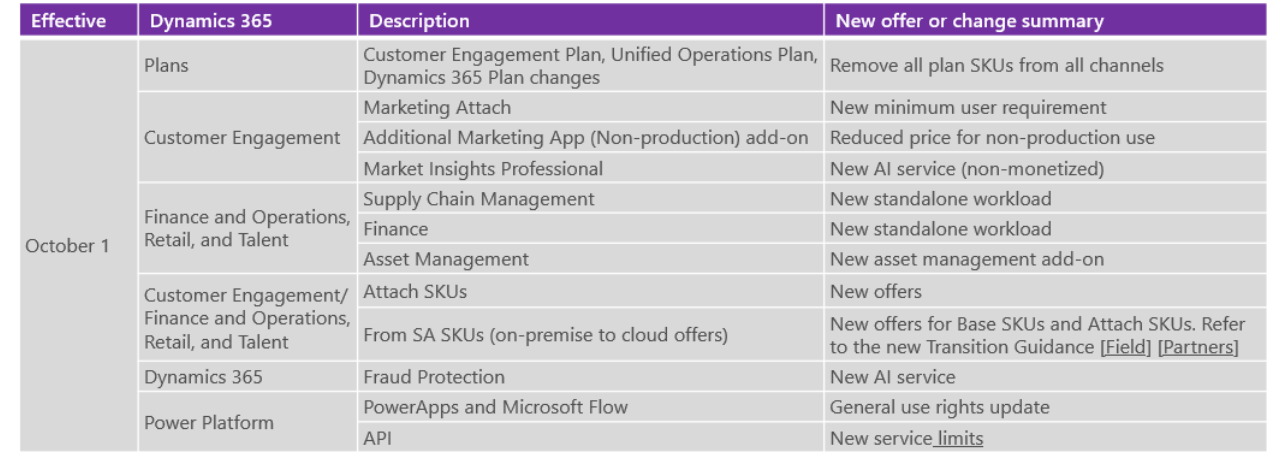
Nowadays you can find the most recent information about D365 Licensing on the Feb 2020 Licensing Guide at https://go.microsoft.com/fwlink/p/?LinkId=866544
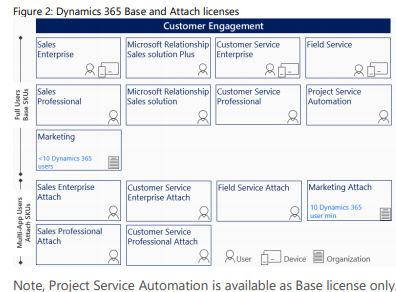
To license core Business Applications (Sales, Customer Service, Field Service, Project Service Automation, Finance, Supply Chain Management, Commerce, and Human Resources), customers may purchase as either a base or as an attach license(s).
When purchasing multiple core Business Applications, the first or Base license must be the highest priced license for the user.
Every full user must have a Base license.
Users requiring multiple core Business Applications may purchase as many Attach SKUs as needed at a reduced price.
Each Attach license can only be assigned to a user with a qualifying prerequisite Base license.
The admin will not be able to assign the Attach license to a user who doesn’t have the required Base license.
Customers trying to assign an Attach license to a user that does not have the prerequisite Base license, will get an error during assignment.
In EA if an Attach license is purchased when a Base license is required, customers may stepup the Attach license to the appropriate Base license. In CSP and MPSA, customers need to return the Attach license and purchase the appropriate Base license.
This sales motion is user license (USL) based.
Only the Business Applications that are USLs may be purchased as an Attach license.
1. Purchase the first or Base license at standard pricing
2. Purchase additional eligible Attach licenses at a reduced price
hope it helps
Teresa


