web
You’re offline. This is a read only version of the page.
close
Skip to main content

Notifications

Announcements

No record found.

Community site session details

Community site session details

Session Id :
Service | Customer Service, Contact Center, Fie...
Answered

Getting field value from a related child entity into parent entity

(0) ShareShare
ReportReport
Posted on by 15

I have created a new entity called Members. This has a lookup field relating to Contacts and links a membership to a Contact.

I would like to have in the Contacts entity a field that stores their Membership ID (members primary key) that is updated on an 'on save' event trigger of a Members form.

I already have a sub-grid table in the contacts showing this with other membership details but I am struggling to find a method to carry a value back to a field on the Parent entity from a Child entity. This is needed to run other business processes.

I have the same question (0)
  • Verified answer
    LeoAlt Profile Picture
    16,331 Moderator on at

    Hi partner,

    In D365, there is no OOB way to get child record data from parent entity. So I recommend you to use Power Automate(MS Flow) to do this.

    To make it more clearly to understand, I created an entity named Contact Members which has N:1 relationship with Contact.

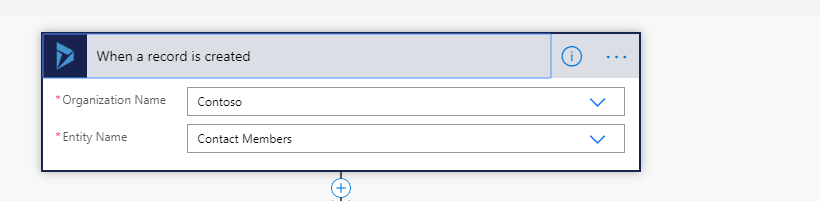
    1.Create a blank flow and set the trigger condition. Here we choose when creating members.
    pastedimage1588574278640v1.png

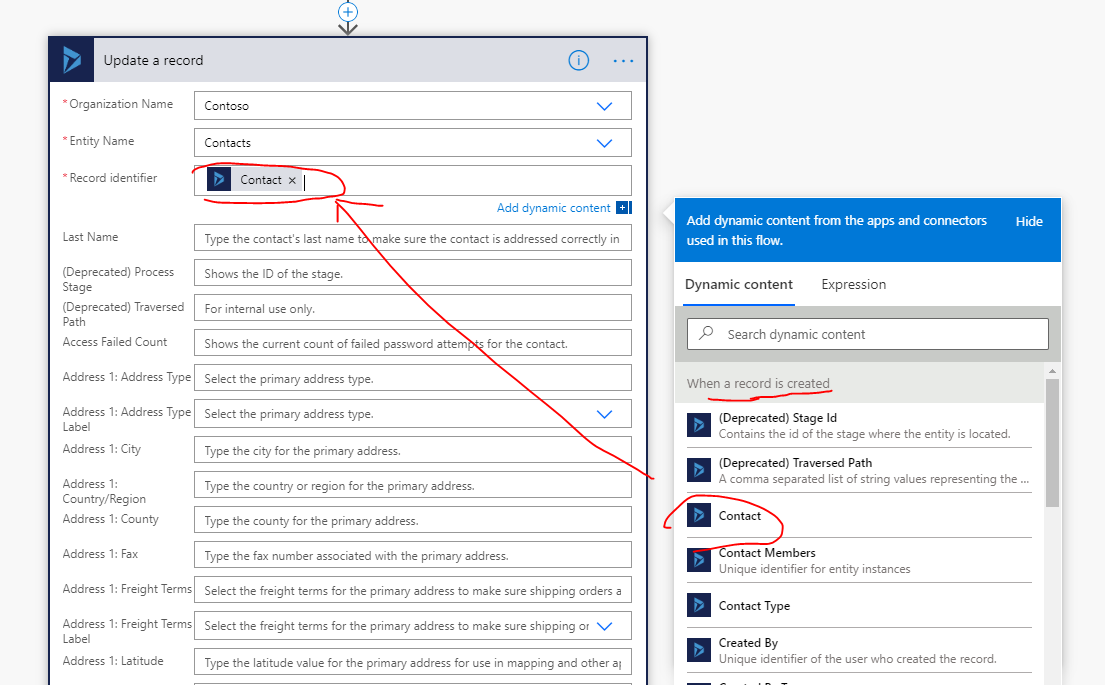
    2.Add a update action on Contact entity.
    pastedimage1588574323356v2.png

    Attention that in the "Record identifier", you should choose the "Contact" in list, this means we will get the contact which is related with the member we created before in trigger action.

    Set the value from member form to contact form. You could choose all the fields on member form and add them as new value to fields on contact form.

    BTW, in your case, one contact has multiple members with different member IDs, so how will you store these member IDS in only one field in contact form?

    Best Regards,

    Leo

  • P Dreyer Profile Picture
    15 on at

    Thank you Leo that works great.

    Yes, it is unfortunately possible that a contact could be assigned multiple memberships, but as it is a relatively small data set and only one person currently has create/update privileges the chances are low but I will be looking into a way to prevent this. There was not the option to create a 1:1 relationship. If you know of a way I could remedy this I would gratefully take your advice.

  • LeoAlt Profile Picture
    16,331 Moderator on at

    Hi partner,

    Thanks for your explanation.

    You are correct, we could use 1:N relationship  as 1:1 relationship since there is no OOB 1:1 relationship in D365.

    And this is also more conducive to the control of entity permissions.

    Best Regards,

    Leo

Under review

Thank you for your reply! To ensure a great experience for everyone, your content is awaiting approval by our Community Managers. Please check back later.

Helpful resources

Quick Links

Responsible AI policies

As AI tools become more common, we’re introducing a Responsible AI Use…

Neeraj Kumar – Community Spotlight

We are honored to recognize Neeraj Kumar as our Community Spotlight honoree for…

Leaderboard > Service | Customer Service, Contact Center, Field Service, Guides

#1
Tom_Gioielli Profile Picture

Tom_Gioielli 61 Super User 2025 Season 2

#2
Siv Sagar Profile Picture

Siv Sagar 52 Super User 2025 Season 2

#3
Daniyal Khaleel Profile Picture

Daniyal Khaleel 42 Most Valuable Professional

Last 30 days Overall leaderboard

Featured topics

Product updates

Dynamics 365 release plans
