web
You’re offline. This is a read only version of the page.
close
Skip to main content

Notifications

Announcements

No record found.

Community site session details

Community site session details

Session Id :
Microsoft Dynamics AX (Archived)

Changing funding source on an on-account transaction

(0) ShareShare
ReportReport
Posted on by

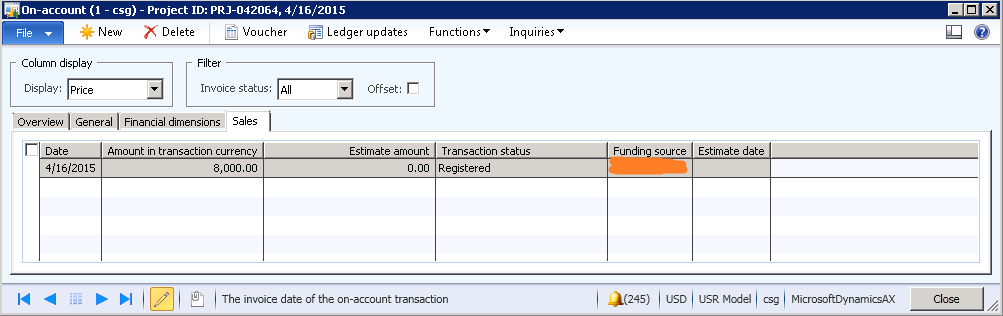
We're running into an issue on a project where we need to change the funding source. Attempting to delete the old funding source off the project contract and add the new funding source gives the error that the funding source has posted on-account transactions associated with it. However, the on-account transactions are technically not "posted"...just registered. Is there any way to change the funding source on a registered on-account transaction without deleting the transaction and re-adding it?

Even if you add the new funding source and change the allocation, it still wants to bill to the old funding source.
*This post is locked for comments

I have the same question (0)
  • austin91 Profile Picture
    135 on at

    We are actually experiencing the same issue. Does anyone know of a solution to this? We just need to be able to change the funding source of an on-account transaction. This is before we invoice the project, so I would think (or hope) there would be an easy solution!

    Thanks in advance.

  • Suggested answer
    André Arnaud de Calavon Profile Picture
    301,075 Super User 2025 Season 2 on at

    Hi,

    I just have encountered the same limitation on hour transactions. It would be my preference to have a correction function on the funding source like it is possible to correct prices, categories, tax information etc.

    I did resolve it by first creating a new funding source. Then I changed the funding source in the transactions to have the new funding source active on the transactions. I did this using the table browser in the AOT. After that I was able to delete the old funding source.

  • Suggested answer
    David Massey Profile Picture
    on at

    In the scenario of an On-account transaction which has not been invoiced or unposted transactions the safe way is to delete the transaction and recreate it after setting up the new funding source and allocation.

    One thing to keep in mind is that allocation do not need to be 100% to a single funding source or there may be funding limits which affect the transaction generation. This is particularly true for Public Sector customers which are funding projects through Grants.

    When funding limit are being used on the contract.  The amount allocated against each limit is update during transaction processing as either a committed or spent amount depending on the state of the transaction.  This tracking information affect which funding rule(s)/funding allocation is used.  A single transaction can use multiple funding rules to allocate the expected revenue to multiple funding sources.

  • Harold Boxtel Profile Picture
    75 on at

    Hi All,

    Changing the funding source with the transaction adjustment functionality would be a nice feature to be able to correct a possible incorrect funding source in the posted project transactions.

    However the possibility to change is manually would not be advisable, because this would give a user the possibility to override the project contract setup.

    I would prefer to have a boolean that would allow you to 'create' an adjusted transaction using the same function that is used when posting the transaction initialy to find the correct funding source. So change the funding rules and then adjust the transaction using the 'get default funding source' which will use the logic of ax to find the correct funding source.

    Regards,

    Harold.

  • Suggested answer
    David Massey Profile Picture
    on at

    Harold - Which version of AX are you using?  On AX 2012 R3 the adjustment form will use the current funding allocation rules during the adjustment process as noted in the text at the top of the adjustment form

  • Harold Boxtel Profile Picture
    75 on at

    Hi David,

    Unfortunately our customer is running AX2012R2 CU7.

    I will check the feature as you pointed out in a AX2012R3 database, I was not aware yet that this available in the next version. Sounds great!

    Thanks for the input!

    Kind regards,

    Harold.

  • Suggested answer
    Shawn B. Profile Picture
    5 on at

    Have you tried removing the on-account line in question and creating a new one after the new funding source and allocation has been selected? I was having a similar situation, and was able to resolve it via the below steps.

    1. Delete the existing on-account line.

    2. Add the new customer to the funding source to the list on the PCON.

    3. Go down to select your funding rule and click the “Allocation” button.

    4. Change the funding source to the newly added customer. The allocation percentage should be 100%. (Note: If you want to split the invoice between sources, you can add  the new funding source and split accordingly.)

    5. Create the on-account line and create your invoice proposal. The invoice should reflect the newly added funding source. If you want to retain that funding source as the main customer, you do not need to change anything. If you want to revert back to the original source, you will need to repeat steps 2 through 4 to select the original source prior to creating any new on-account lines.

Under review

Thank you for your reply! To ensure a great experience for everyone, your content is awaiting approval by our Community Managers. Please check back later.

Helpful resources

Quick Links

Responsible AI policies

As AI tools become more common, we’re introducing a Responsible AI Use…

Neeraj Kumar – Community Spotlight

We are honored to recognize Neeraj Kumar as our Community Spotlight honoree for…

Leaderboard > 🔒一 Microsoft Dynamics AX (Archived)

#1
Martin Dráb Profile Picture

Martin Dráb 4 Most Valuable Professional

#1
Priya_K Profile Picture

Priya_K 4

#3
MyDynamicsNAV Profile Picture

MyDynamicsNAV 2

Last 30 days Overall leaderboard

Featured topics

Product updates

Dynamics 365 release plans
