web
You’re offline. This is a read only version of the page.
close
Skip to main content

Notifications

Announcements

No record found.

Community site session details

Community site session details

Session Id :
Microsoft Dynamics 365 | Integration, Dataverse...
Suggested Answer

Workflow runs but no process session information recorded

(0) ShareShare
ReportReport
Posted on by 58

Hi everyone

I've taken over a Dynamics 365 environment from a previous dev and am struggling to work out what is happening with one of the workflows.  This workflow is setup to run when a field is updated on an Opportunity record and it creates a new contract record, which is related to the opportunity.  If I test this and update the field on the opportunity then a related contract is created successfully.  However, if I then go to the workflow and view process sessions nothing is displayed:
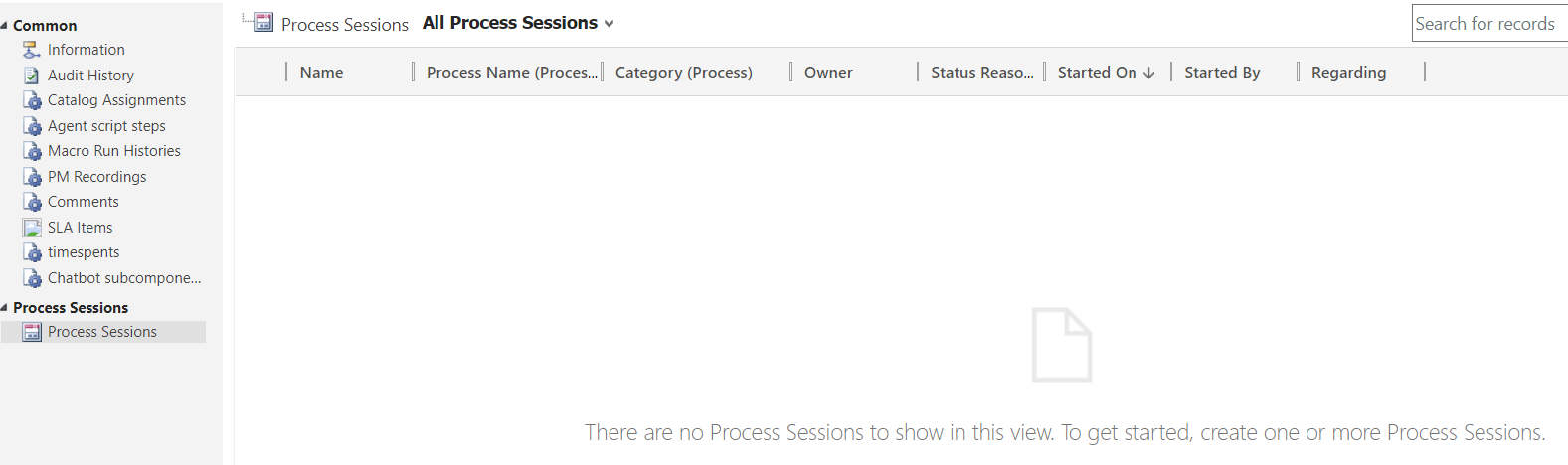
pastedimage1663927208898v1.png

Also, if I go to System Jobs in Settings this workflow doesn't show as having run at all (another flow that runs on the contract record after creation does show).

Does anyone know why this would be happening?  Is there a setting somewhere I need to enable to show the workflow runs in either of these views?  I haven't got much experience in Dynamics so struggling a bit to find out much information about this.

Thanks in advance.

I have the same question (0)
  • Community Member Profile Picture
    on at

    Hi,

    So you are experiencing a situation where the workflow is not running successfully and you can't find the run records?

    Could you provide screenshots about the workflow?

  • gjayn84 Profile Picture
    58 on at

    Hi Leah, no the workflow seems to be running successfully but no run records are created.

  • pratyush369 Profile Picture
    30 on at

    You must've selected option of deleting the successfully run system jobs in the workflow, disable the option and then you can see process sessions records for successfully run workflows.

  • Suggested answer
    Bipin D365 Profile Picture
    28,983 Moderator on at

    Hi,

    Please deactivate your workflow and uncheck setting which say Delete completed system jobs under Workflow job Retention

    Please click below link to see image.

    learn.microsoft.com/.../create-workflow-general-tab.png

Under review

Thank you for your reply! To ensure a great experience for everyone, your content is awaiting approval by our Community Managers. Please check back later.

Helpful resources

Quick Links

Responsible AI policies

As AI tools become more common, we’re introducing a Responsible AI Use…

Neeraj Kumar – Community Spotlight

We are honored to recognize Neeraj Kumar as our Community Spotlight honoree for…

Leaderboard > Microsoft Dynamics 365 | Integration, Dataverse, and general topics

#1
Martin Dráb Profile Picture

Martin Dráb 41 Most Valuable Professional

#2
iampranjal Profile Picture

iampranjal 39

#3
Satyam Prakash Profile Picture

Satyam Prakash 35

Last 30 days Overall leaderboard

Product updates

Dynamics 365 release plans



