web
You’re offline. This is a read only version of the page.
close
Skip to main content

Notifications

Announcements

No record found.

Community site session details

Community site session details

Session Id :
Microsoft Dynamics AX (Archived)

Enum Lookup Label & Remember Selection

(0) ShareShare
ReportReport
Posted on by 1,214

Hi. I'm working with an UIBuilder for a report.

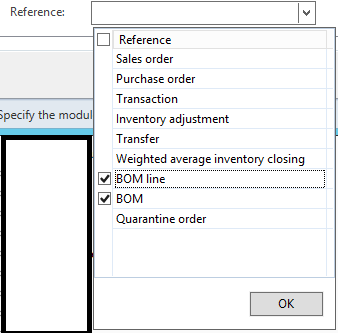
I'm getting InventTransType Enum lookup for one of the parameter.
8510.enum.png

When I select BOM & BOM line, the enum value will be displayed in the dialog field.

enumvalue.png

1. How  can I display the Enum label, in this case, BOM and BOM line?

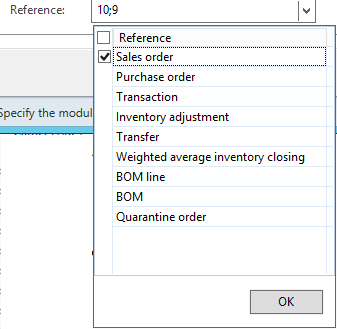
And when I re-click the lookup, it by default selects the first option.
enumagain.png

2. How can I remember my previous selection?

Here's my code::

Contract parmMethod();

[
    DataMemberAttribute('Reference'),
    AifCollectionTypeAttribute("referenceList", Types::String),
    SysOperationLabelAttribute(literalstr("Reference")),
    SysOperationHelpTextAttribute(literalstr("Reference")),
    SysOperationDisplayOrderAttribute('8')
]
public List parmReference(List _referenceList = referenceList)
{
    referenceList = _referenceList;
    return referenceList;
}

in Build method of UIBuilder:

DialogField dfReference ;
dfReference = this.addDialogField(methodStr(ProductionOutputDailyContract, parmReference),contract);

The lookup method in UIBuilder:

private void referenceLookup(FormStringControl _control)
{
SysLookupMultiSelectGrid msCtrlReference;
Query query; 
container conInventItem; 
query = new Query(queryStr(Reference)); 
msCtrlReference = SysLookupMultiSelectGrid::construct(_control, _control); 
msCtrlReference.parmQuery(query); 
msCtrlReference.run(); 
}


In UIBuilder postBuild() method:

dfReference = this.bindInfo().getDialogField(contract, methodStr(ProductionOutputDailyContract, parmReference));
    dfReference.registerOverrideMethod(methodStr(FormStringControl, lookup), methodStr(ProductionOutputDailyUIBuilder, referenceLookup), this);
    if (dfReference)
    {
        dfReference.lookupButton(2);
    }

Thank You.

*This post is locked for comments

I have the same question (0)
  • Suggested answer
    Rohin Profile Picture
    4,624 on at

    You can use enum2Str function to  get enum text.

  • HAIRUL HAZRI Profile Picture
    1,214 on at

    hi Visvash. Thank you. This is the method I'm looking for.

    But I'm confused on where exactly to use this method in my code since I can't figure out on which part of the  code does the enum value is being selected and displayed.

    Can you help me figure it out? Thanks a lot.

  • HAIRUL HAZRI Profile Picture
    1,214 on at

    Hi Sukrut,

    Sorry I didn't mention that I'm using SysLookupMultiSelectGrid class instead of SysLookupMultiSelectCtrl. But I believe the equivalent method should be SysLookupMultiSelectGrid .getSelected() method.

    Thanks for the link, but I'm getting confused since it's talking about lookup in normal form, not UIBuilder class.

    Regards.

  • HAIRUL HAZRI Profile Picture
    1,214 on at

    I see that doing this on form, we need to override the form init() method of the form and override() method of the field (as shown in the article).

    Since I'm doing this on UIBuilder class, I'm super confused on the fact that UIBuilder class doesn't have init() method.

    The lookup is populated on DialogField and DialogField doesn't have modified method either.

    Can you guide me deeper?

    I'm a newbie so from my perspective, these approaches on Form and UIBuilder are completely different.

    I have no idea where exactly to put the code. Where exactly do I need to use enum2str() function and where to use the SysLookupMultiSelectGrid .getSelected() function. And by where means on which method.

    Thank You So Much.

    Regards.

Under review

Thank you for your reply! To ensure a great experience for everyone, your content is awaiting approval by our Community Managers. Please check back later.

Helpful resources

Quick Links

Responsible AI policies

As AI tools become more common, we’re introducing a Responsible AI Use…

Neeraj Kumar – Community Spotlight

We are honored to recognize Neeraj Kumar as our Community Spotlight honoree for…

Leaderboard > 🔒一 Microsoft Dynamics AX (Archived)

#1
Priya_K Profile Picture

Priya_K 4

#1
Martin Dráb Profile Picture

Martin Dráb 4 Most Valuable Professional

#3
Ali Zaidi Profile Picture

Ali Zaidi 2

Last 30 days Overall leaderboard

Featured topics

Product updates

Dynamics 365 release plans



