web
You’re offline. This is a read only version of the page.
close
Skip to main content

Notifications

Announcements

No record found.

Community site session details

Community site session details

Session Id :
Microsoft Dynamics AX (Archived)

Cannot create a record in Ledger Journal table (The record already exists)

(0) ShareShare
ReportReport
Posted on by

Good Afternoon,
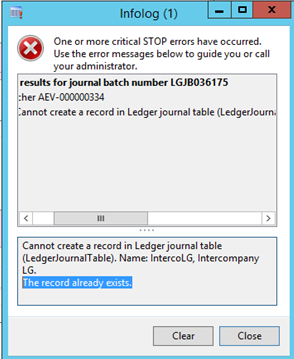
I am receiving the following error when trying to post a statement.
2335.error.PNG

After doing some reading on my own I found out that this might be caused to a Number Sequence limit. How can I proceed to increase this number? Would it be in the SQL table it's self or within AX? 

Thank you for any help provided! 

*This post is locked for comments

I have the same question (0)
  • Suggested answer
    Mahmoud Hakim Profile Picture
    17,887 on at

    this is a common issue, you can check this link

    stoneridgesoftware.com/microsoft-dynamics-ax-error-the-record-already-exists

  • oldman.logan Profile Picture
    565 on at

    Depending on if it is a journal entry in GL, AP or AR, the following are the locations for number sequences:

    GL -> Setup -> Parameters - Tab name: Number Sequences

    AP -> Setup -> Parameters - Tab name: Number Sequences

    AR -> Setup -> Parameters - Tab name: Number Sequences

  • Verified answer
    AXSHAH Profile Picture
    528 on at

    We had same issue, change the Number sequence for General ledger with max length including constants to 10 only.

    In your case: AEV-000000334 must be AEV-000334.

    Also if you have multiple legal entities then make sure each legal entity General ledger number sequence have unique format.

  • Suggested answer
    Community Member Profile Picture
    on at

    We were getting the same error while users were trying to Create and Post journal entries in AP, AR and GL modules. I was able to resolve this by Compiling and Synchronizing the following tables and form.

    Compiled and Synchronized the tables

    LedgerJournalTable
    LedgerJournalTrans

    Compiled the form
    Ledgerjournaltable

    Everyone was able to create and post journals after this. For one person I had to RESET the Usage Data and Clear CACHE by deleting the *.AUC files in \APPDATA folder.

Under review

Thank you for your reply! To ensure a great experience for everyone, your content is awaiting approval by our Community Managers. Please check back later.

Helpful resources

Quick Links

Responsible AI policies

As AI tools become more common, we’re introducing a Responsible AI Use…

Neeraj Kumar – Community Spotlight

We are honored to recognize Neeraj Kumar as our Community Spotlight honoree for…

Leaderboard > 🔒一 Microsoft Dynamics AX (Archived)

#1
Martin Dráb Profile Picture

Martin Dráb 4 Most Valuable Professional

#1
Priya_K Profile Picture

Priya_K 4

#3
MyDynamicsNAV Profile Picture

MyDynamicsNAV 2

Last 30 days Overall leaderboard

Featured topics

Product updates

Dynamics 365 release plans
