web
You’re offline. This is a read only version of the page.
close
Skip to main content

Notifications

Announcements

No record found.

Community site session details

Community site session details

Session Id :
Microsoft Dynamics NAV (Archived)

Displaying in the message box but not in report.

(0) ShareShare
ReportReport
Posted on by

Dear NAV Peers,

I'm developing a  production order report , In the report  i have used 1) Production order and 2) production order line table .I have a field as specification where i want to fetch the value through coding.

The below coding i have written in production order line -> OnAfterGet record ()

RecItem.RESET;
RecItem.SETRANGE(RecItem."No.","Prod. Order Line"."Item No.");
IF RecItem.FINDSET THEN BEGIN
RTestPlanSetup.RESET;
RTestPlanSetup.SETRANGE (RTestPlanSetup."Item No.",RItem."No.");
IF RTestPlanSetup. FINDSET THEN BEGIN
RTestPlan.RESET;
RTestPlan.SETRANGE(RTestPlan."No.",RTestPlanSetup."Test Plan No.");
IF RTestPlan.FINDSET THEN BEGIN
RTestPlanPropertySet.RESET;
RTestPlanPropertySet.SETRANGE(RTestPlanPropertySet."Test Plan No.",RTestPlan."No.");
RTestPlanPropertySet.SETRANGE(RTestPlanPropertySet.Version,RTestPlan.Version);
IF RTestPlanPropertySet.FINDSET THEN BEGIN
REPEAT // new
NewSpecification := RTestPlanPropertySet.Description;
MESSAGE('%1',NewSpecification);

UNTIL RTestPlanPropertySet.NEXT =0;
// MESSAGE('%1',NewSpecification);
END;
END;
END;
END;

in the test plan property we have 5 lines , in the message box all the five lines are displayed but in layout it display the last line only . Please help .
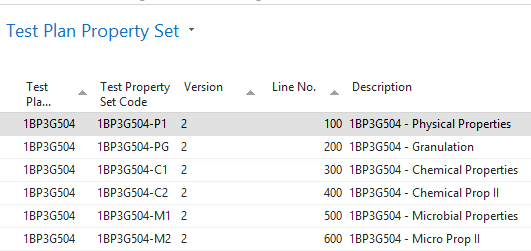
5-lines.PNG

the below image is the report  , only the last line is being displayed. 

last-line.PNG

Looking forward for the solution for the same . Thanks in advance.

*This post is locked for comments

I have the same question (0)
  • Verified answer
    Suresh Kulla Profile Picture
    50,245 Super User 2025 Season 2 on at

    Hello, Looks like you are storing the value in the NewSpecification Variable and using that to display in the report, but in your Repeat loop every time it will change the value of it and will store the last retrieved record value and that is the reason you are getting only last value, if you want to get all values you need to concatenate, change your code from 

    NewSpeciation := RTestPlanProeprtySet.Description to this

    NewSpecification += RTestPlanPropertySet.Description

    Make sure you set the NewSpecification variable length appropriately or just don't set the length at all 

  • Community Member Profile Picture
    on at

    thank you so much .. is it possible to get one specification per line. Now it displays as the below0245.report.png

  • Community Member Profile Picture
    on at

    Dear Suresh,

    Can you please help for the issue posted earlier. I would really appreciate you if you can help me to find a solution.

  • mmv Profile Picture
    11,471 on at

    Do you mean to display all the specification lines?

  • Community Member Profile Picture
    on at

    hi mahesh , if you look the image its displyed together as a paragraph. I want one in a line.

  • Suggested answer
    Suresh Kulla Profile Picture
    50,245 Super User 2025 Season 2 on at

    Please add the line break VBCRLF before adding each line in the code and that should give a line break.

    NewSpecification := RTestPlanPropertySet.Description + 'VBCRLF';

    Check if this does the trick

  • Community Member Profile Picture
    on at

    Dear Suresh,

      i tried the above step too, i get the  with vbcrlf in the report also and its not getting displayed as required . :( as  2 specification together as a paragraph.

  • Suggested answer
    Tina Menezes Profile Picture
    2,582 on at

    Hi Cindrella,

    You can check the below link to split a concatenated string on a new line.

    https://www.dynamics101.com/nav-2013-r2-report-trick-split-concatenated-string-on-new-line/

  • Community Member Profile Picture
    on at

    Dear tina, thanks for your reply , i just saw ur link of splitting in the lines, Actually in my report we can't define the fixed length of the description . It varies for each and test plan no . So friends plz help me how to proceed with this.

  • Suggested answer
    Tina Menezes Profile Picture
    2,582 on at

    Hi,

    Instead of giving BinCount<5 as mentioned in the link which i mentioned above, you will need to declare an integer variable say 'n' which will count the no of production order lines after getting the current record using setrange. You need to code for this.

    Now you need to change the code mentioned in the link to the below:

    If BinCount<n then begin

    //same as the link

    end;

Under review

Thank you for your reply! To ensure a great experience for everyone, your content is awaiting approval by our Community Managers. Please check back later.

Helpful resources

Quick Links

Responsible AI policies

As AI tools become more common, we’re introducing a Responsible AI Use…

Neeraj Kumar – Community Spotlight

We are honored to recognize Neeraj Kumar as our Community Spotlight honoree for…

Leaderboard > 🔒一 Microsoft Dynamics NAV (Archived)

#1
HoangNam Profile Picture

HoangNam 7

Last 30 days Overall leaderboard

Featured topics

Product updates

Dynamics 365 release plans
