web
You’re offline. This is a read only version of the page.
close
Skip to main content

Notifications

Announcements

No record found.

Community site session details

Community site session details

Session Id :
Microsoft Dynamics AX (Archived)

Automatic GL Allocations

(0) ShareShare
ReportReport
Posted on by 2

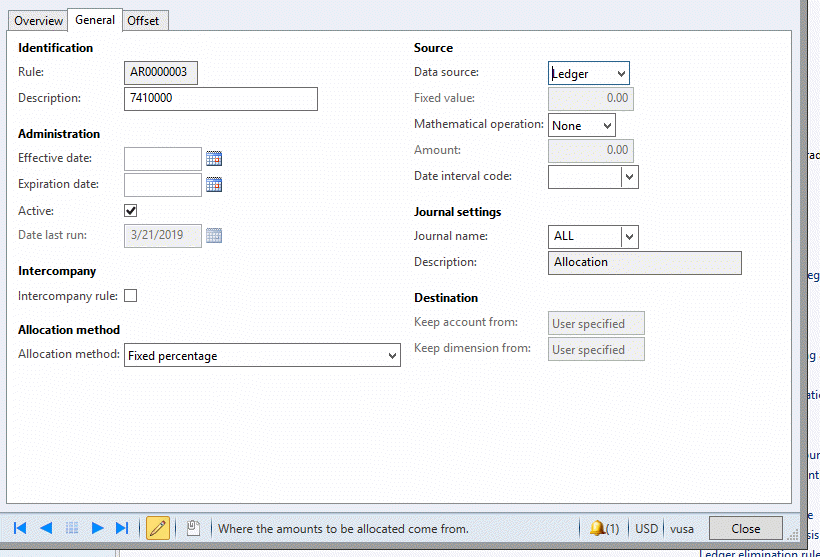
I have created the following allocation rule:


I have set up this as my source. I want to allocate any entry that hits this main account number with no machine type filled in.
 2019_2D00_03_2D00_26_5F00_5_2D00_34_2D00_07.gif

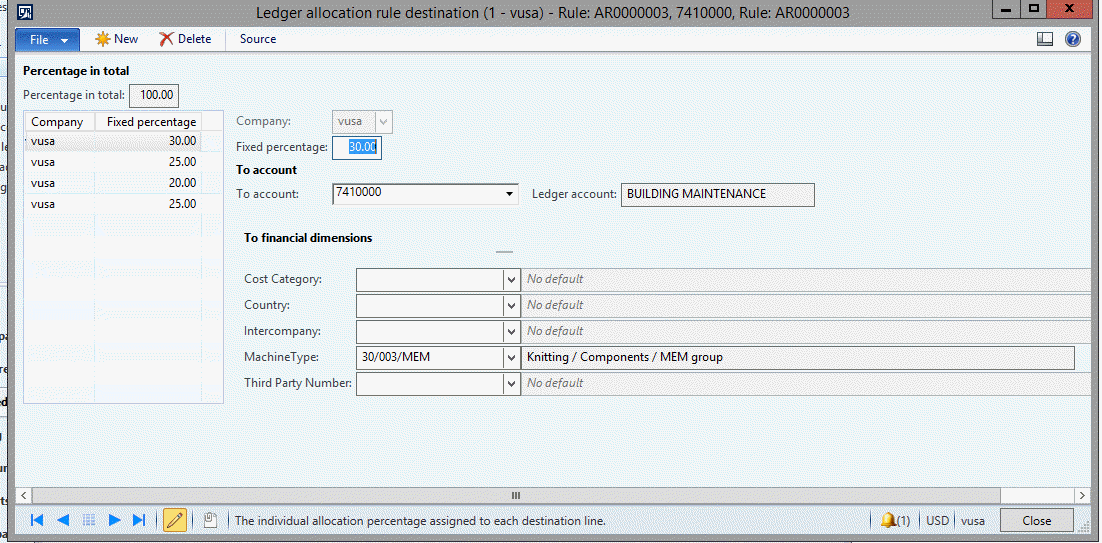
Destination- How I want this broken down
2019_2D00_03_2D00_26_5F00_5_2D00_38_2D00_53.gif


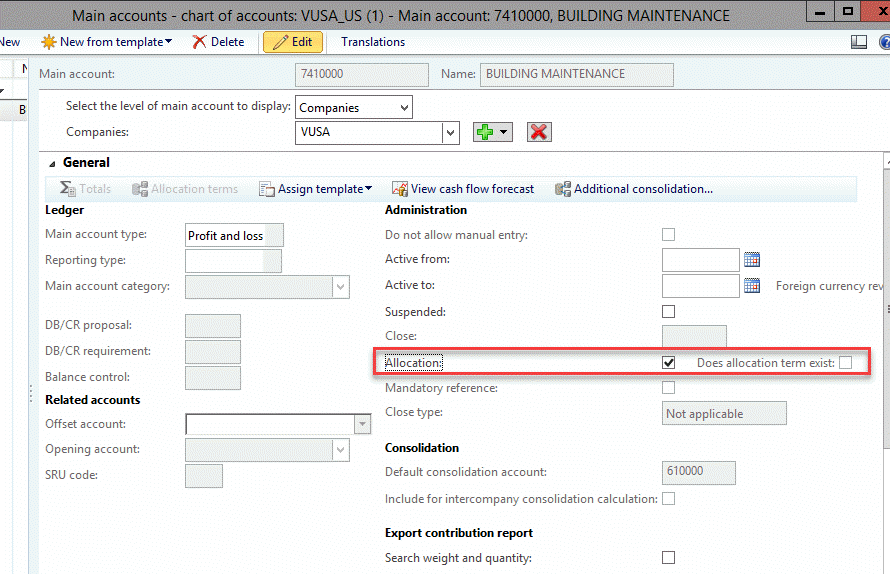
I have also configured the main account to allow allocations
2019_2D00_03_2D00_26_5F00_5_2D00_40_2D00_52.gif

I posted a GJE to this account in order to test the configurations. As far as I can tell the process did not work. When I look at the trial balance from Main Account-Machine Type. I am seeing the amount for the entry I made still in the 741000 account without being allocated.


Do I need to process the allocation? Wouldn’t this defeat the purpose of having it set up automatically? Am I missing a part of the set up?

*This post is locked for comments

I have the same question (0)
  • Verified answer
    Ludwig Reinhard Profile Picture
    Microsoft Employee on at

    Hello Mary,

    I think you mixed here something.

    The first two screenshots show the ledger allocation rules that are initiated by a periodic process. To get those allocations posted you have to start the process through the respective GL periodic function that creates an allocation journal for you.

    The last screenshot shows a configuration that can be made at the ledger account level and that does the allocation immediately if setup and configured correctly. This second setup is not linked to the first setup that you showed in screenshot 1 and 2.

    I would suggest that you try using the periodic allocation rule first and try to execute it. This should create an allocation journal that you can review and post.

    Additional information on this periodic journal functionality can be found on my blog. See e.g.

    dynamicsax-fico.com/.../allocations-cost-distributions-in-gl

    Best regards,

    Ludwig

  • Mary Myers Profile Picture
    2 on at

    Okay that makes more sense.  Where can I find more information on the automatic configuration, and not the periodic allocation?

  • Suggested answer
    Ludwig Reinhard Profile Picture
    Microsoft Employee on at

    Hello Mary,

    Unfortunately, I do not know a website/blog that has more information on the automatic configuration.

    Maybe have a look at the MS docs sites.

    The setup should, however, not be too difficult as it is a kind of similar to the periodic rules.

    Just give it a try and if things do not work, post some screenprints of your setup so that we can get it fixed together.

    Many thanks and best regards,

    Ludwig

  • Mary Myers Profile Picture
    2 on at

    I have figured it out.  When you select allocation on main account card you will get an option for allocation rules appear from there

  • Ludwig Reinhard Profile Picture
    Microsoft Employee on at

    Great!

    Anything else we can help you with?

  • Mary Myers Profile Picture
    2 on at

    That is all for now. Thank you!

Under review

Thank you for your reply! To ensure a great experience for everyone, your content is awaiting approval by our Community Managers. Please check back later.

Helpful resources

Quick Links

Responsible AI policies

As AI tools become more common, we’re introducing a Responsible AI Use…

Neeraj Kumar – Community Spotlight

We are honored to recognize Neeraj Kumar as our Community Spotlight honoree for…

Leaderboard > 🔒一 Microsoft Dynamics AX (Archived)

#1
Martin Dráb Profile Picture

Martin Dráb 4 Most Valuable Professional

#1
Priya_K Profile Picture

Priya_K 4

#3
MyDynamicsNAV Profile Picture

MyDynamicsNAV 2

Last 30 days Overall leaderboard

Featured topics

Product updates

Dynamics 365 release plans



