web
You’re offline. This is a read only version of the page.
close
Skip to main content

Notifications

Announcements

No record found.

Community site session details

Community site session details

Session Id :
Microsoft Dynamics AX (Archived)

Hide a field in Grid

(0) ShareShare
ReportReport
Posted on by

Dear All,

How to hide the field Amount from below grid. I have tried using below code but it didn't work for Amount field,

NoSalsPric = UserInfoHelp::userInUserGroup(curUserId(), "NoSalsPric");
if (NoSalsPric == true)
{
custConfirmTrans_ds.object(fieldNum(CustConfirmTrans, SalesPrice)).visible(false);
custConfirmTrans_ds.object(fieldNum(CustConfirmTrans, LineAmount)).visible(false);
}
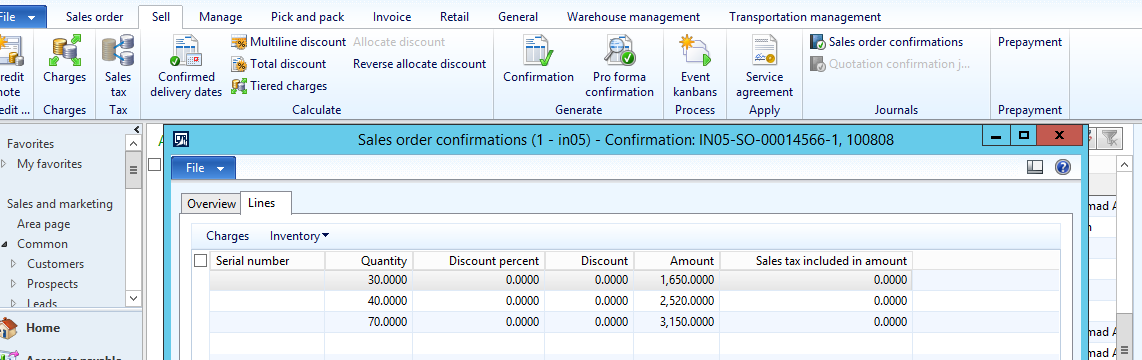
2625.1.png

Please help me.

Many Thanks,

Selva

*This post is locked for comments

I have the same question (0)
  • Suggested answer
    Mahmoud Hakim Profile Picture
    17,887 on at

    you need to write this code in init() method form and you must to set this object  auto declaration yes

    autodec.png

  • Suggested answer
    Chaitanya Golla Profile Picture
    17,225 on at

    Hi,

    I could see the field Amount on the form Sales order confirmation is driven by a data method lineAmountInclTax. So, we can set the property AutoDeclaration to yes for these both form controls and make them visible/invisible based on condition(as shown below).

    ConfirmVisible.jpg

    Implemented in the init method of the custConfirmTrans data source.
    Path: \Forms\CustConfirmJournal\Data Sources\CustConfirmTrans\Methods\init

    public void init()
    {
    boolean NoSalsPric;

    super();

    NoSalsPric = UserInfoHelp::userInUserGroup(curUserId(), "EDIGroup");

    if (NoSalsPric == false)
    {
    // custConfirmTrans_ds.object(fieldNum(CustConfirmTrans, SalesPrice)).visible(false);
    // custConfirmTrans_ds.object(fieldNum(CustConfirmTrans, LineAmount)).visible(false);
    CustConfirmTrans_SalesPrice.visible(false); // Use this code
    CustConfirmTrans_LineAmount.visible(false);
    }
    }

  • Rati Sharabidze Profile Picture
    612 on at

    Hello,

    Grid controls have property called "Visible", you can set it to "No" and therefore avoid coding for it.

    If you want it by coding, then please tell us what condition you are trying to achieve. The form init method is the perfect method to put the logic.

    Best regards

Under review

Thank you for your reply! To ensure a great experience for everyone, your content is awaiting approval by our Community Managers. Please check back later.

Helpful resources

Quick Links

Responsible AI policies

As AI tools become more common, we’re introducing a Responsible AI Use…

Neeraj Kumar – Community Spotlight

We are honored to recognize Neeraj Kumar as our Community Spotlight honoree for…

Leaderboard > 🔒一 Microsoft Dynamics AX (Archived)

#1
Martin Dráb Profile Picture

Martin Dráb 4 Most Valuable Professional

#1
Priya_K Profile Picture

Priya_K 4

#3
MyDynamicsNAV Profile Picture

MyDynamicsNAV 2

Last 30 days Overall leaderboard

Featured topics

Product updates

Dynamics 365 release plans



