web
You’re offline. This is a read only version of the page.
close
Skip to main content

Notifications

Announcements

No record found.

Community site session details

Community site session details

Session Id :
Customer experience | Sales, Customer Insights,...
Suggested Answer

How to configure DNS into CRM 2016 on-premise

(0) ShareShare
ReportReport
Posted on by

I have created a new dev environment from the production environment.

Now I can access the dev environment URL from other LAN computer. But I can not access the URL into server PC. 

It shows me an error.
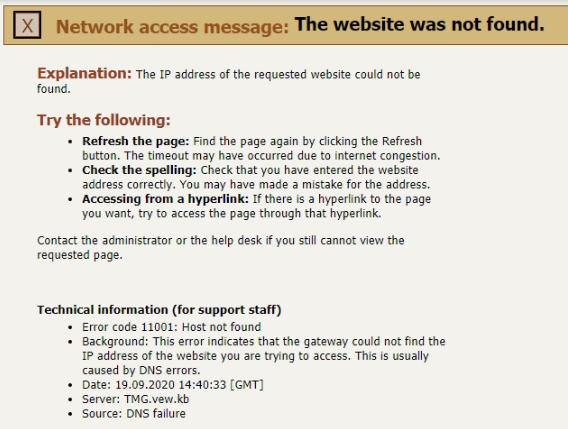
pastedimage1600526469358v1.png

Into server right now I can access with URL: http://localhost/crmdev

How I can access with computer name URL: http://computername/crmdev from server PC?

The error shows me DNS failure. How I can configure DNS for CRM?

Regards

Atiour

I have the same question (0)
  • Suggested answer
    saurabhtiwarii Profile Picture
    on at

    Hi Mohammed,

    Please run this cmdlets on the CRM server ::

    1. ipconfig

    This would give you the local IP address of the server.

    2. ping computername

    This should return an IP address of the local CRM server which should be the same as the above IP address returned for the CRM local server since CRM web service is hosted locally in here.

    If you get any other IP address returned or no IP address returned, please check your DNS server records and add an "A" DNS resource record type entry with a name computername which points to the CRM sever IP address.

    Please mark my comments as answered if this helps.

    Thanks,

    Saurabh

  • Community Member Profile Picture
    on at

    Hello Saurabh,

    Thanks for your answer. I follow your approach but I am getting same IP address.

    Regards

    Atiour

  • Suggested answer
    saurabhtiwarii Profile Picture
    on at

    Hi Mohammed,

    This is interesting.. Hmm.. How many front end servers do you have? I mean if you have more than one, you could be using a load balancer and it's IP address needs to be mapped to "computername".

    Do you use any other names to access CRM web app internally or externally? Do they work as expected?

    If they do, please compare the IP address returned for ping responses on those names and "computername".

    Paste screenshot of what the browser serves us when you browse "computername".

  • Community Member Profile Picture
    on at

    I resolve the issue to disable proxy.

    Regards

    Atiour

Under review

Thank you for your reply! To ensure a great experience for everyone, your content is awaiting approval by our Community Managers. Please check back later.

Helpful resources

Quick Links

Responsible AI policies

As AI tools become more common, we’re introducing a Responsible AI Use…

Neeraj Kumar – Community Spotlight

We are honored to recognize Neeraj Kumar as our Community Spotlight honoree for…

Leaderboard > Customer experience | Sales, Customer Insights, CRM

#1
Tom_Gioielli Profile Picture

Tom_Gioielli 108 Super User 2025 Season 2

#2
Jimmy Passeti Profile Picture

Jimmy Passeti 50 Most Valuable Professional

#3
Gerardo Rentería García Profile Picture

Gerardo Rentería Ga... 49 Most Valuable Professional

Last 30 days Overall leaderboard

Product updates

Dynamics 365 release plans



