web
You’re offline. This is a read only version of the page.
close
Skip to main content

Notifications

Announcements

No record found.

Community site session details

Community site session details

Session Id :
Finance | Project Operations, Human Resources, ...
Answered

Better understand this logic.

(0) ShareShare
ReportReport
Posted on by 535

So I am not fimilar to creating queries in D365. I am trying to add a field to the load lines form(WHLoadTable). When I add the purchline datasource with an inner join to the whsloadline it goes from the query:  Query  object 4daf4050: SELECT FIRSTFAST FORUPDATE * FROM WHSLoadTable(WHSLoadTable) USING INDEX LoadIdIdx WHERE (((((WHSLoadTable.LoadDirection == 2) && (WHSLoadTable.LoadStatus != 6)) || ((WHSLoadTable.LoadDirection == 1) && (WHSLoadTable.LoadStatus != 8)))))     to just a simple select * from WHSLoadTable.

All the logic is in the init, but how does it get the query?  And where does the whsLoadTable_q variable come from? I can't find that anywhere?  Is that just a reference to the actual table?

I have the same question (0)
  • André Arnaud de Calavon Profile Picture
    300,982 Super User 2025 Season 2 on at

    Hi Keith,

    The query is being built upon all data sources and their links on the form design and possible some overwrite of this using x++ coding.

    The WhsLoadTable_q is the query object for the WhsLoadTable data source. This is an automatic variable. There is also a WhsLoadTable_ds which is a reference to the data source.

  • GirishS Profile Picture
    27,827 Moderator on at

    Hi Keith,

    When you type in DataSourceName_ - This will show all the available member variables.

    As Andre mentioned DataSourceName_ds, DataSourceName_q,DataSourceName_qr - This are all member variables for the datasource.

    DataSourceName_q will return the query output for the DataSource and DataSourceName_qr will return the query run for the DataSource.

    Thanks,

    Girish S.

  • KeithM Profile Picture
    535 on at

    Thank you... I figured it had to be some type of system variable since I couldn't find the reference anywhere. Now how is it when I debug, the query is being build with a statement of ( SELECT * FROM WHSLoadTable(WHSLoadTable) USING INDEX LoadIdIdx WHERE (((((WHSLoadTable.LoadDirection == 2) && (WHSLoadTable.LoadStatus != 6)) || ((WHSLoadTable.LoadDirection == 1) && (WHSLoadTable.LoadStatus != 8))))) )? 

    I don't see this being built anywhere. I looked to see if there was a query which there was but it's blank.

  • GirishS Profile Picture
    27,827 Moderator on at

    Where did you get this query statement?

    Thanks,

    Girish S.

  • KeithM Profile Picture
    535 on at

    When I was debugging and understanding the code I put a break at this point(below). Rolled over the qdps(QueryBuilddatasource) and it gave me that select, which is the same select if you select the form information in D365. I'm just not sure where that is being built at.  The query for this is empty.

    qbds = whsLoadTable_q.dataSourceTable(tableNum(WHSLoadTable));

    pastedimage1686149563604v1.png

    Query:

  • KeithM Profile Picture
    535 on at

    So digging through D365 documentation it looks like I need to create an extension of the datasource from the Form.
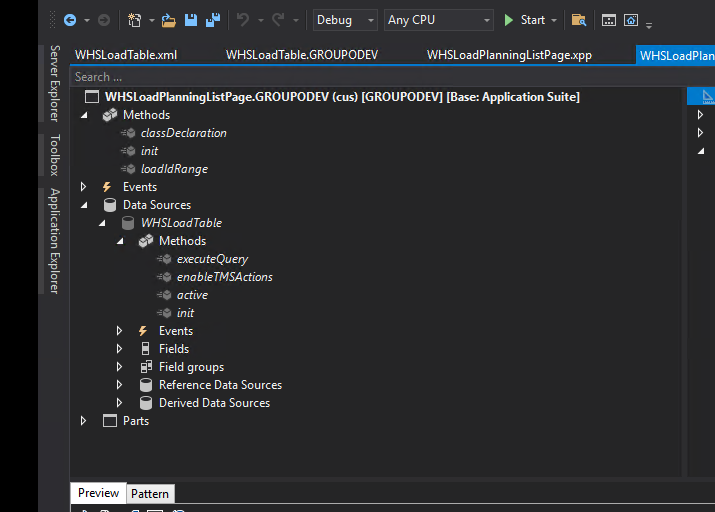
    So I have attempted to create that but get some errors that I am unsure of. I am trying to adjust the executequery method.

    [ExtensionOf(formDatasourcestr(WHSLoadPlanningListPage, WHSLoadTable))]
    final class WHSLoadTable_Extension
    {
        public void executeQuery()
        {
            if (!filteredByMenuItem)
            {
                qbrLoad = SysQuery::findOrCreateRange(WHSLoadTable_ds.queryBuildDataSource(), fieldNum(WHSLoadTable, LoadStatus));
                    
                if (showClosedLoads)
                {
                    qbrLoad.value('');
                }
                else
                {
                    str loadStatusFilterStr = strFmt('(((%1.%2 == %4) && (%1.%3 != %5)) || ((%1.%2 == %6) && (%1.%3 != %7)))',
                                                            formDataSourceStr(WHSLoadPlanningListPage, WHSLoadTable),   // 1
                    fieldStr(WHSLoadTable, LoadDirection),                      // 2
                    fieldStr(WHSLoadTable, LoadStatus),                         // 3
                    any2Int(WHSLoadDirection::Outbound),                        // 4
                    any2Int(WHSLoadStatus::Shipped),                            // 5
                    any2Int(WHSLoadDirection::Inbound),                         // 6
                    any2Int(WHSLoadStatus::Received));                          // 7
    
                    qbrLoad.value(loadStatusFilterStr);
                }
            }
    
            super();
        }
    }

  • André Arnaud de Calavon Profile Picture
    300,982 Super User 2025 Season 2 on at

    HI Keith,

    What errors do you get now?

  • GirishS Profile Picture
    27,827 Moderator on at

    Seems you have added COC for executeQuery method. In that case you need to write next statement. There wont be any super keyword in COC - You need to use next keyword like below.

    [ExtensionOf(formDatasourcestr(WHSLoadPlanningListPage, WHSLoadTable))]
    final class WHSLoadTable_Extension
    {
        public void executeQuery()
        {
            //add logic here.
            next executeQuery();
        }
    }

    Thanks,

    Girish S.

  • KeithM Profile Picture
    535 on at

    That helped. I also had the class name wrong and adjusted that. For some reason it can't find the reference for the _ds now. Do I need to declare that?  It wasn't declared in the original class anywhere, just assumed since it's a system variable.

  • GirishS Profile Picture
    27,827 Moderator on at

    Try prefixing element keyword. element.DataSourceName_ds.

    Thanks,

    Girish S.

Under review

Thank you for your reply! To ensure a great experience for everyone, your content is awaiting approval by our Community Managers. Please check back later.

Helpful resources

Quick Links

Responsible AI policies

As AI tools become more common, we’re introducing a Responsible AI Use…

Neeraj Kumar – Community Spotlight

We are honored to recognize Neeraj Kumar as our Community Spotlight honoree for…

Leaderboard > Finance | Project Operations, Human Resources, AX, GP, SL

#1
Martin Dráb Profile Picture

Martin Dráb 659 Most Valuable Professional

#2
André Arnaud de Calavon Profile Picture

André Arnaud de Cal... 533 Super User 2025 Season 2

#3
Sohaib Cheema Profile Picture

Sohaib Cheema 289 User Group Leader

Last 30 days Overall leaderboard

Product updates

Dynamics 365 release plans
