web
You’re offline. This is a read only version of the page.
close
Skip to main content

Notifications

Announcements

No record found.

Community site session details

Community site session details

Session Id :
Microsoft Dynamics AX (Archived)

Showing Description field from 'LogisticsAddress' tables (Street, City,ZIP Code, State/Province, Country, etc.) AX2012R3

(1) ShareShare
ReportReport
Posted on by 508

Hi DAXers.

Good Day,

After further investigation and attempts, I found that there is a way to show the description of addresses from the 'LogisticsAddress' tables that include (Street, City, ZIP Code, State / Province, Country, etc.). Having found a lot of inquiries here in the forum and in other forums, I wanted to share with you what I got, and what is the optimal solution away from playing in the codes. as follow:

Before starting, I would like to mention that the address format that applies on the Country/Region will affect all system addresses fields includes (Vendor, Customer, Delivery Addresses, etc.)

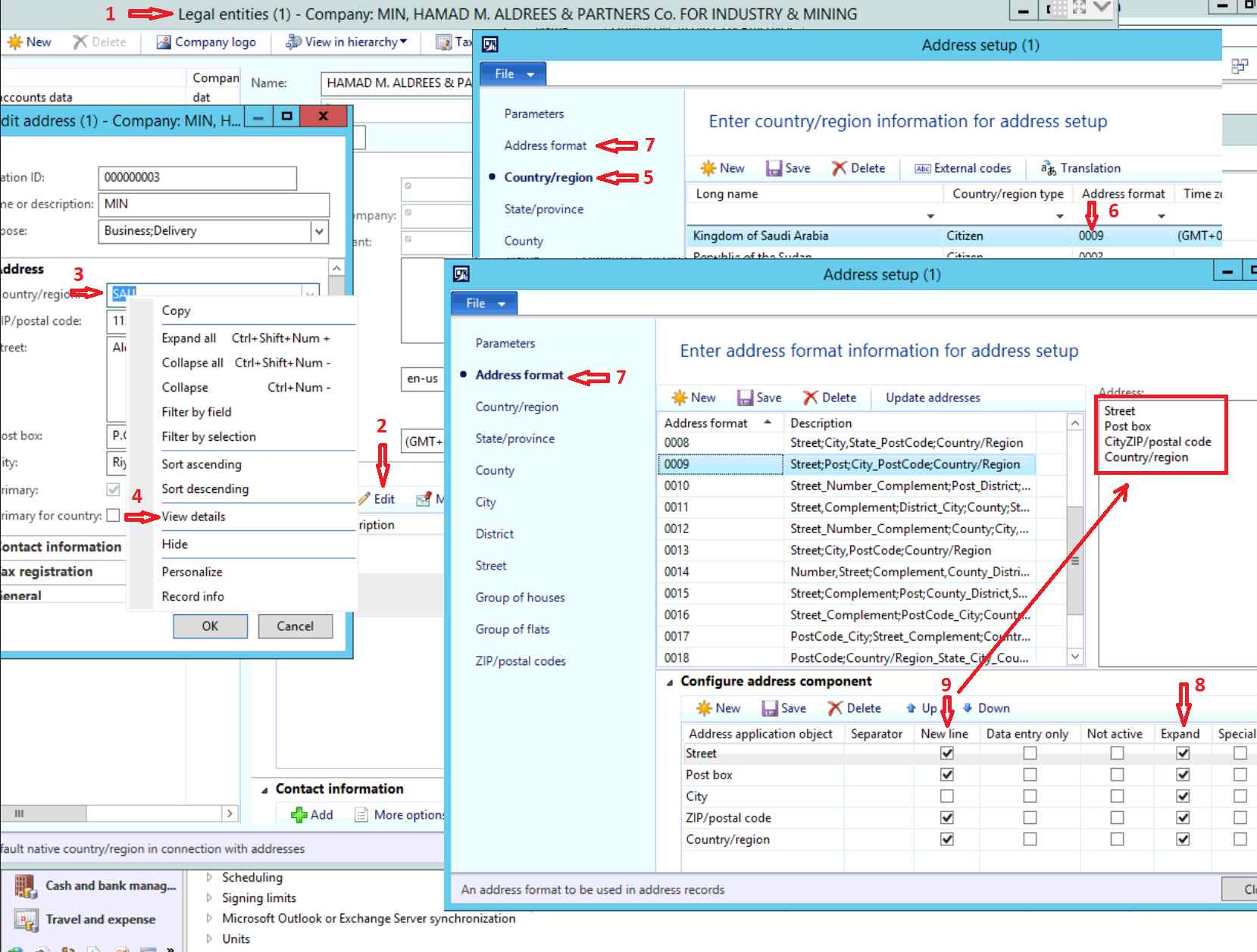
1- Go to Organization Administration > Setup > Organization > Legal entities.

2- Edit or Add the address.

3- Right click the Country/region field.

4- Press on View Details.

5- On the left pan, be sure that you are on the Country/Region tab.

6- On the right side, look for the country name that you want to change its address format and note the address format number.

7- From the same screen, on the upmost of the left pan, go to Address format tab.

8- On the right side, in the Configure address component tab, be sure that the Expand field for the records that have been added is ticked to show the description instead of the short name or code.

9- You can reconfigure the New line field on order to adjust the address lines as shown in the box in the upmost right side that shows the configuration result after refreshing the screen (either by pressing F5 or file\refresh).

See the illustration below:
Addresses-Description.png

here is an example of the result on PO report without customizing the address code that also applies on PurchTable form:

6505.Address-example.png 

I hope you have found it useful.

warm regards,

*This post is locked for comments

I have the same question (0)
  • André Arnaud de Calavon Profile Picture
    301,146 Super User 2025 Season 2 on at

    Hi Ahmed,

    If you aren't asking a question, it would be better to blog about your findings. You can request a blog space here: community.dynamics.com/.../136.request-a-new-blog-or-blog-to-syndicate

  • In AX2012 in the InventOnHandItemListPage I need to be able to f Profile Picture
    499 on at

    Hi Ahmed

    I am able to to get the address as required by me , but

    i am not able to get the expanded version of city in the address, state & country are getting expanded but only city is not getting expanded, i am not getting city's Description in my address could anybody can help me on this 

  • Verified answer
    Ahmed Siliem Profile Picture
    508 on at

    Hi Raghu G S,

    make sure that you have selected the correct targeted address format that your country uses.

    And make sure that there is a tick mark under expand on front of city as shown on the picture in the first post.

    Regards,

  • In AX2012 in the InventOnHandItemListPage I need to be able to f Profile Picture
    499 on at

    Hi Ahmed

    I am sure that my targeted address is correct as the changes i am making to country and state are getting reflected , but only city is not getting expanded

  • FatihKartal Profile Picture
    104 on at

    Thanks

Under review

Thank you for your reply! To ensure a great experience for everyone, your content is awaiting approval by our Community Managers. Please check back later.

Helpful resources

Quick Links

Responsible AI policies

As AI tools become more common, we’re introducing a Responsible AI Use…

Neeraj Kumar – Community Spotlight

We are honored to recognize Neeraj Kumar as our Community Spotlight honoree for…

Leaderboard > 🔒一 Microsoft Dynamics AX (Archived)

#1
Martin Dráb Profile Picture

Martin Dráb 4 Most Valuable Professional

#1
Priya_K Profile Picture

Priya_K 4

#3
MyDynamicsNAV Profile Picture

MyDynamicsNAV 2

Last 30 days Overall leaderboard

Featured topics

Product updates

Dynamics 365 release plans
