web
You’re offline. This is a read only version of the page.
close
Skip to main content

Notifications

Announcements

No record found.

Community site session details

Community site session details

Session Id :
Microsoft Dynamics AX (Archived)

Show attachment status: highlighted attachment not working on all menus

(0) ShareShare
ReportReport
Posted on by 1,261

Hi all,

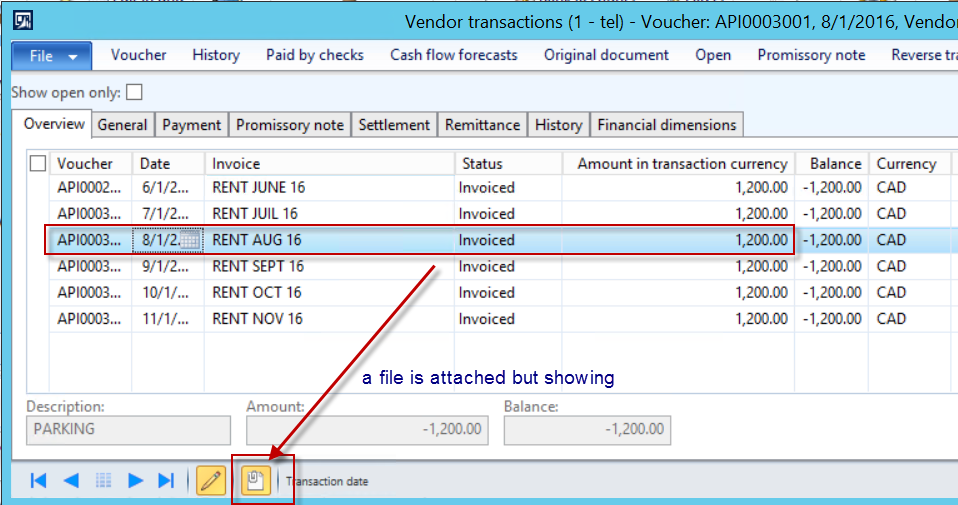
In user's personal options General - Miscellaneous - Show attachment status  - I have checked the check box which should indicate me when a document is attached on a transaction line by highliting the attachment button.

I noticed that, the highlight is not showing from all menus. By the way im on R3CU9

5226.a.png

7282.b.png

1016.c.png

5148.d.png

*This post is locked for comments

I have the same question (0)
  • André Arnaud de Calavon Profile Picture
    300,911 Super User 2025 Season 2 on at

    Hi Veronika,

    Are you sure that the Invoice journal record has an attachment? Note that the documents are related to a record. A Vendor transaction record is another record compared to the invoice journal. If you have attached the document on a vendor transaction, it is not visible on the invoice journal.

  • Veronika Filonenko Profile Picture
    1,261 on at

    Sorry here is the missing screen shot of the actual attached file.

    I have attached it on the Open Vendor invoice line and it is not yellow, when I'm on the line. It becomes highlighted only when open.

    6560.f.png

    6560.f.png

    I understand that if I attach it on the open invoice line, that it will not show on the vendor master. But the problem is that it does not show highlighted where i have attached it.

    And if iI add a document on the Settled transactions menu, which is a closed invoice, it will not show on the Invoice journal which also shows closed invoices. See my point? From a user perspective, it should flow thought both menus because he is looking at the same thing an old posted invoice.


    It looks like there is no connection between tables and the document. The same invoice can have an attachment, but depends from where you access it, you won't find it.

    You have to look throught various menus to find IF there is a document attached.

    And if a user attached a document, from 1 screen but 6 months later won't remember it, then he tries to find the attachment through a different menu and doesn't find it... It will be very hard to explain the logic to the customer, that there is no connection between various menus of the same record for document handling.

    Not the best.

  • Verified answer
    Veronika Filonenko Profile Picture
    1,261 on at

    I got it.

    It is really weird but i found the problem and how to correct it.

    The file was attached on my open vendor invoice, but it was not highlighted.

    When i clicked on the attachment from the status bar, it was empty!!!

    So there is 2 entry points for 1 record on 1 screen ?

    2275.y.png

    Bottom line, you must attach the documents from the status bar in order for the attachment function to be highlighted in Action pane.

    2275.y.png

  • Verified answer
    André Arnaud de Calavon Profile Picture
    300,911 Super User 2025 Season 2 on at

    Hi Veronika,

    I almost submitted the next text when I received a notification you also submitted a new reply. Anyway, the text should be of your interest.

    It seems like you don't understand the complete concept of Document management. Attachments are linked to a record in a table. Like said above the vendor transaction is another table thus it is not visible on the second screen which has other tables representing an invoice document. They look similar to new users but the function is completely different. The Vendor transactions are used to store information about credit and debit transactions. They could be related to invoices, payments or other transactions. The second screen contains information about the invoice document. But again other tables, so also other references for documents.

    About the latest screenshot where the big button for attachments is highlighted, this is not indicating there is an attachment, but that the Document handling button itself is active. At the bottom bar you can see the indication if there are attachments or not.

    I do agree that an end user would like to find the (scanned) invoice document from several views. But it is not like your expectations. In the past we had created several times a solution to store invoice documents in another new table with key fields like voucher, invoice and invoice date to be able to open the invoice from any form and thus any table. This is a customization.

  • Stefanrouwit Profile Picture
    12 on at

    Hi,

    I was wondering; where do I find the attachment after the vendor invoice is settled?

  • Suggested answer
    Majid Hafeez Profile Picture
    40 on at

    Follow this,

    www.theaxapta.com/.../how-to-attachments-button-on-new-form.html

  • Suggested answer
    Majid Hafeez Profile Picture
    40 on at

    Follow this,

    www.theaxapta.com/.../how-to-attachments-button-on-new-form.html

Under review

Thank you for your reply! To ensure a great experience for everyone, your content is awaiting approval by our Community Managers. Please check back later.

Helpful resources

Quick Links

Responsible AI policies

As AI tools become more common, we’re introducing a Responsible AI Use…

Neeraj Kumar – Community Spotlight

We are honored to recognize Neeraj Kumar as our Community Spotlight honoree for…

Leaderboard > 🔒一 Microsoft Dynamics AX (Archived)

#1
Martin Dráb Profile Picture

Martin Dráb 4 Most Valuable Professional

#1
Priya_K Profile Picture

Priya_K 4

#3
MyDynamicsNAV Profile Picture

MyDynamicsNAV 2

Last 30 days Overall leaderboard

Featured topics

Product updates

Dynamics 365 release plans