web
You’re offline. This is a read only version of the page.
close
Skip to main content

Notifications

Announcements

No record found.

Community site session details

Community site session details

Session Id :
Microsoft Dynamics NAV (Archived)

How to: Reopen Accounting Periods

(0) ShareShare
ReportReport
Posted on by

Hi All, 
My accountant recently needed to reopen Accounting periods, 

we tried to follow the steps in: https://msdn.microsoft.com/en-us/library/hh936471(v=nav.70).aspx

Our problem is : Step two : On the Navigate tab, in the Fiscal Closing group, choose Reopen Fiscal Period.

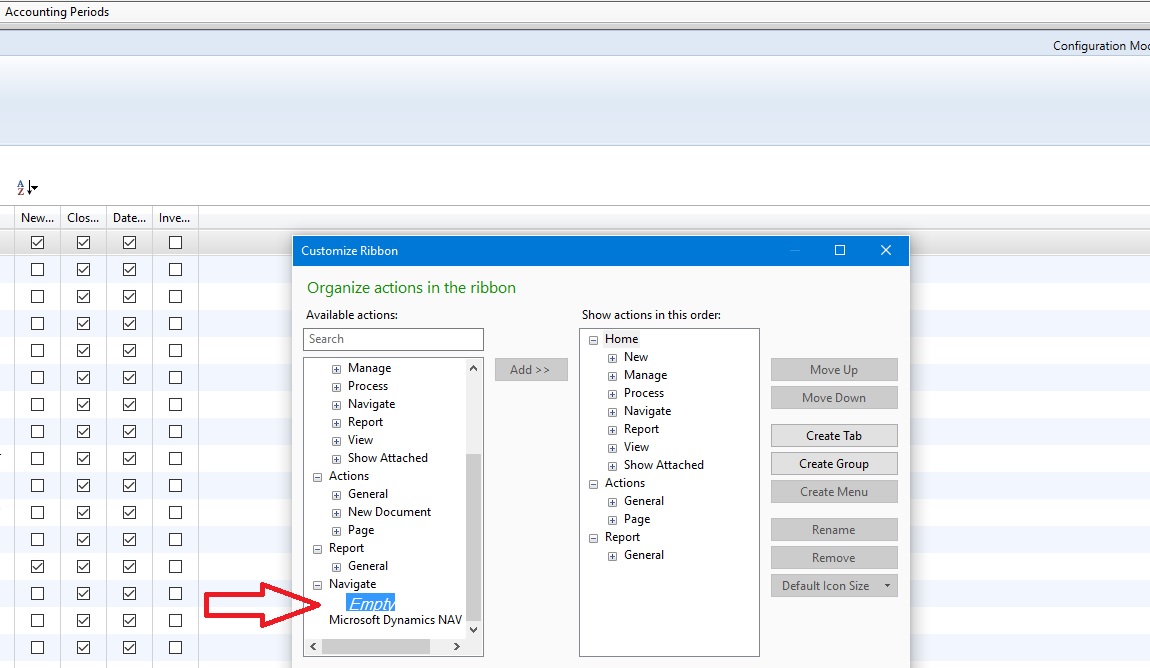
The Navigate tab is empty and there is no Reopen fiscal period. 

I checked the customization of the ribbon but could not find it

Any idea how i can reopen the fiscal period or get my buttons back? 

Accounting-Periods.jpg

Thank you

R.H,

*This post is locked for comments

I have the same question (0)
  • Suggested answer
    keoma Profile Picture
    32,729 on at

    Please Follow dynamicsuser.net/.../89549

  • Community Member Profile Picture
    on at

    Hi Jonathan, 
    Thank you for your reply, I've checked the post you shared, but it didnt clarify the "Reopen fiscal period" option. Could you help explain more? i might have missed something.. https://msdn.microsoft.com/en-us/library/hh936471(v=nav.70).aspx  sais it shoud be simple.. 


    Thanks

    R

  • Suggested answer
    Alexander Ermakov Profile Picture
    28,096 on at

    It looks like this functionality is not available on that page for W1 version; there is no such option for that page in Object Designer. I'll check more, perhaps it is somewhere else, perchance in some other localization.

  • Suggested answer
    Community Member Profile Picture
    on at

    This is localised functionality available in French Database. Are you using France country database? If not, you would not have such functionality available in your database.

    You may see the feasibility of copying the code from french database to your database version.

  • Suggested answer
    Amol Salvi Profile Picture
    18,698 on at

    First of all why do you want to reopen the accounting period ?

    As there is only one page and table which is used nowhere in application.

    Even though period is closed still you can enter the entries in closed period and generate income statement

  • Community Member Profile Picture
    on at

    It is a requirement from our accounts department. When closing the accounting period there were wrong dates. 
    As my understanding from the accounts side, they require correct dates for audit purposes. 

  • Suggested answer
    Community Member Profile Picture
    on at

    Hi Vishal,

    Thank you for the clarification.

    Would you know any workarounds?

    Best Regards

    R

  • Community Member Profile Picture
    on at

    Hi Jonathan,

    Thank you for your reply, I've checked the post you shared, but it didnt clarify the "Reopen fiscal period" option. Could you help explain more? i might have missed something.. msdn.microsoft.com/.../hh936471(v=nav.70).aspx  sais it shoud be simple..

    Thanks

    R

  • Suggested answer
    Amol Salvi Profile Picture
    18,698 on at

    Hi Ram,

    You can pass reverse transactions and pass correct entries in system. It is possible even though accounting period closed.

    You can try on test database.

  • Indikauk Profile Picture
    1,759 on at

    Hi. Ram855g

    as other mention Accounting Period Re-Open Functionality not available in W1 Database.  if can explain Properly why do you want to Re-Open Accounting period or What was your Problem we will be able help you on that matter suggesting you work around for solving your problem.

Under review

Thank you for your reply! To ensure a great experience for everyone, your content is awaiting approval by our Community Managers. Please check back later.

Helpful resources

Quick Links

Responsible AI policies

As AI tools become more common, we’re introducing a Responsible AI Use…

Neeraj Kumar – Community Spotlight

We are honored to recognize Neeraj Kumar as our Community Spotlight honoree for…

Leaderboard > 🔒一 Microsoft Dynamics NAV (Archived)

#1
HoangNam Profile Picture

HoangNam 7

Last 30 days Overall leaderboard

Featured topics

Product updates

Dynamics 365 release plans