web
You’re offline. This is a read only version of the page.
close
Skip to main content

Announcements

No record found.

News and Announcements icon
Community site session details

Community site session details

Session Id :
Dynamics 365 Community / Forums / Finance forum / Latest Purchase Price ...
Finance forum

Latest Purchase Price - How to make it by default to YES for all items that will be created in the future

(0) ShareShare
ReportReport
Posted on by

Every time we create a new item under "Product Information Management", the field "Latest Purchase Price" is set by default to NO and I need to always manually change it to YES in order to capture the latest purchase price when we create a PO. 

The question here is how can this field be set to "YES" by default so that any items that will be created in the future will automatically have the field set to YES.  

8420.1.JPG

Categories:
I have the same question (0)
  • Mea_ Profile Picture
    60,286 on at

    Hi Bader814,

    I dont think that it is possible without a customization, but it should be a minor change to make it ticked by default. 

  • Community Member Profile Picture
    on at

    HI Bader814,

    Add these codes to your class

    [ExtensionOf(tableStr(InventTable))]

    final class InventTableMy_Extension

    {

        public void myDefaultPurchModel()

        {

            // This would have partner specific logic to initialize the new field.

            this.PurchModel = NoYes::Yes;

        }


    }

    class InventTableMy_EventHandler

    {

        [DataEventHandler(tableStr(InventTable), DataEventType::Inserting)]

        public static void InventTable_onInserting(Common sender, DataEventArgs e)

        {

            InventTable inventTable = sender as InventTable;

            // Call the method as if it was defined directly on InventTable.

            inventTable.myDefaultPurchModel();

        }


    }  

    The result like this:
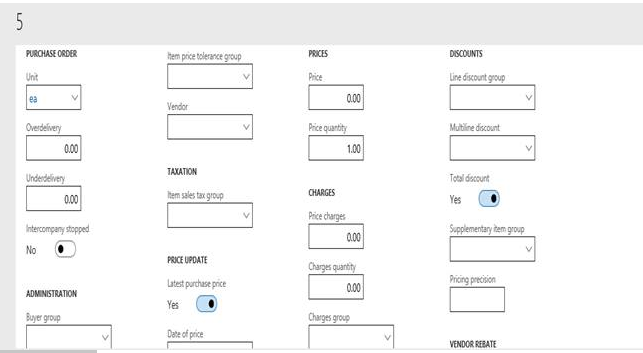
    _5563B783_16.PNG

    Best Regards

    Tom Cai

  • guk1964 Profile Picture
    10,888 on at

    Create a record template.

    docs.microsoft.com/.../record-template

  • Suggested answer
    Elodie Baudin Profile Picture
    137 on at
    Hello, 
    You need to create an item template to solve your problem, do you know how you make make this? 
    Do you use Released Products or only products? 
     
    Otherwise, you have to use Data management to change this option , but it will be after the item creation so this could be risky if transactions are made in the meantime.

    I hope this comment answer to your request ;) 
  • Adis Profile Picture
    6,604 Super User 2026 Season 1 on at
    Hey,
     
    You could also check if it is possible to change the switch via Power Automate. Its always recommened not to interfere with the code. As soon as something doesnt work, you wont get supoort with custom code.
    Worst thing might need to be changed is the entity and\or the creation of a business event, in case you want to enable the switch in a specific event. Might be even more developer work than changing the default setting, but you have no custom code.
     
    Kind regards, Adis

Under review

Thank you for your reply! To ensure a great experience for everyone, your content is awaiting approval by our Community Managers. Please check back later.

Helpful resources

Quick Links

November Spotlight Star - Khushbu Rajvi

Congratulations to a top community star!

Forum Structure Changes Coming on 11/8!

In our never-ending quest to help the Dynamics 365 Community members get answers faster …

Dynamics 365 Community Platform update – Oct 28

Welcome to the next edition of the Community Platform Update. This is a status …

Leaderboard > Finance

Last 30 days Overall leaderboard

Featured topics

Product updates

Dynamics 365 release plans
