web
You’re offline. This is a read only version of the page.
close
Skip to main content

Notifications

Announcements

No record found.

Community site session details

Community site session details

Session Id :
Microsoft Dynamics AX (Archived)

How to remove the " In Use " on a Sequence Number?

(0) ShareShare
ReportReport
Posted on by 14,855

Dear 

I am trying to change the Internal Invoice Sequence number but the system doesn't allow it because it is marked as In Use, why is that ? how can i remove the In use in order to change the sequence?
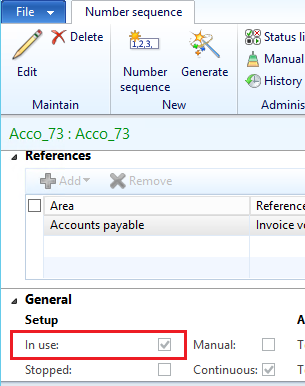
Sequence-number.png

*This post is locked for comments

I have the same question (0)
  • André Arnaud de Calavon Profile Picture
    301,069 Super User 2025 Season 2 on at

    Hi N.W.,

    When this is required, I do this usually with a job in AX2012 or change it directly in the SQL database. You need first to verify if it is really needed to change the number sequence. Are you trying to change e.g. the segments or numbers or do you want to assign another number sequence series to the internal invoice?

    The last would also be an option and later delete the current number sequence.

  • dolee Profile Picture
    11,279 on at

    I recommend the 2nd option in Andre's answer, that is to build a new number sequence that fits your need then assign it to Internal Invoice. Remember you can set the "next" value to something other than 1 before start using it.

  • Community Member Profile Picture
    on at

    Goto AOT -> data dictionary -> tables -> numbersequencetable -> fields-> Inuse-> properties-> change allow edit on create from no to yes. save it

    then open the table and check the box" In use" field then change back the properties and save it again.

Under review

Thank you for your reply! To ensure a great experience for everyone, your content is awaiting approval by our Community Managers. Please check back later.

Helpful resources

Quick Links

Responsible AI policies

As AI tools become more common, we’re introducing a Responsible AI Use…

Neeraj Kumar – Community Spotlight

We are honored to recognize Neeraj Kumar as our Community Spotlight honoree for…

Leaderboard > 🔒一 Microsoft Dynamics AX (Archived)

#1
Martin Dráb Profile Picture

Martin Dráb 4 Most Valuable Professional

#1
Priya_K Profile Picture

Priya_K 4

#3
MyDynamicsNAV Profile Picture

MyDynamicsNAV 2

Last 30 days Overall leaderboard

Featured topics

Product updates

Dynamics 365 release plans



