web
You’re offline. This is a read only version of the page.
close
Skip to main content

Notifications

Announcements

No record found.

Community site session details

Community site session details

Session Id :
Finance | Project Operations, Human Resources, ...
Suggested Answer

D365FO Multi-Select Lookup Not Persisting Selected Values

(5) ShareShare
ReportReport
Posted on by 275
Hi, I'm implementing a multi-select lookup in Dynamics 365 Finance & Operations using SysLookupMultiSelectCtrl. While the selection works, previously selected values are not persisting when reopening the form. Even after selecting values, saving, and reopening the form, the lookup does not show the previously selected values as checked.  (check below screeenshot)
 
 
What is the correct way to ensure selected values persist when reopening the form? Are we missing a step with SysLookupMultiSelectCtrl?
 
Here are the two classes im using:
 
Categories:
I have the same question (0)
  • Suggested answer
    Martin Dráb Profile Picture
    237,878 Most Valuable Professional on at
    You indeed doesn't have any code assigning the values to SysLookupMultiSelectCtrl object. Use its set() method; cross-references will show you a plenty of examples in the standard application.
     
    By the way, storing multiple values (separated by semicolon) in a single fields violates the very basics of relation database design. It's difficult to query, you can't index the values, you risk exceeding the field length and so on. The right design is using another table with 1:N relation.
  • ISDev Profile Picture
    275 on at
    Hi Martin,
     
    is it possible you tell me which part of code needs to be updated and where to add the set(). please?
  • Layan Jwei Profile Picture
    8,112 Super User 2025 Season 2 on at
    Hi,
     
    Yes you need to call multiSelectCtrl.Set after you defined it in your initialized method
     

    Thanks,
    Layan Jweihan
    Please mark this answer as "Verified" if it solved your issue. In order to help others who will face a similar issue in the future.

     
  • ISDev Profile Picture
    275 on at
    Hi ,
     
    After i added the set method, its still not working.
     
     public void init()
     {
         next init();
         
         FormStringControl specialityBoxCtrl;
         specialityBoxCtrl = this.design().controlName(formControlStr(VendTable, VendTable_SpecialityName));
         multiselectCtrl = SysLookupMultiSelectCtrl::construct(
             this,
             specialityBoxCtrl,
            queryStr(IS_VendorSpecQuery),
             false,
             [tableNum(IS_VendorSpecTable), fieldNum(IS_VendorSpecTable, SpecialityName)]
         );
         container selectedValues = str2Con(vendTable.SpecialityName, ';');
         multiselectCtrl.set(selectedValues);
         this.parmMultiselectCtrl(multiselectCtrl);
        
     }
  • Martin Dráb Profile Picture
    237,878 Most Valuable Professional on at
  • Martin Dráb Profile Picture
    237,878 Most Valuable Professional on at
    I'm not surprised by that, because the value is invalid. It's not sufficient to call set() and pass some data to it; you need to pass correct data. There was a reason why I told you how to look at examples; you could also read the documentation of set() method (or look at tis implementation).
     
    The value should be container with two values: a container of IDs and a conteainer of descriptions. Check AccountLogistics_BR::postalAddressRoles(), for instance, to see an example of how to create the right value.
  • Waed Ayyad Profile Picture
    9,039 Super User 2025 Season 2 on at

    Hi, 

    Is your issue resolved? If yes, mark the answers that helped you as verified. 

    Thanks,

    Waed Ayyad

  • Suggested answer
    10newolf Profile Picture
    5 on at
    SysLookupMultiSelectCtrl does not persist selections automatically.
    You need to explicitly save the selected values to a field and reload them when the form runs.
    A common pattern is to store the selected IDs as a semicolon-separated string in your parameter table.

    Below is a working example that extends the WHSParameters form.
    It adds a multi-select lookup for excluded product lifecycle state IDs and ensures the values persist between sessions.
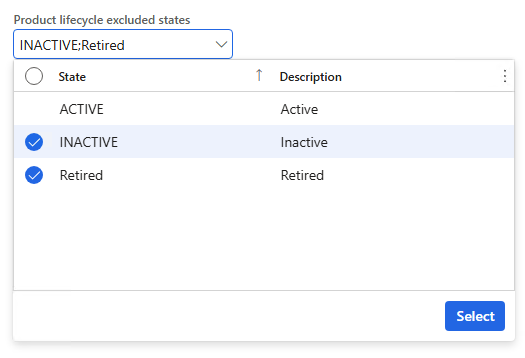

    Form Extension:
    /// <summary>
    /// Extension of the <c>WHSParameters</c> form.
    /// Adds support for a multi-select lookup control used to select excluded product lifecycle state IDs
    /// for fixed location logic.
    /// </summary>
    [ExtensionOf(formStr(WHSParameters))]
    public final class TestWHSParameters_Extension
    {
        /// <summary>
        /// Holds the instance of <c>SysLookupMultiSelectCtrl</c> for the excluded state IDs control.
        /// </summary>
        public SysLookupMultiSelectCtrl multiSelectCtl;
        /// <summary>
        /// Gets or sets the <c>SysLookupMultiSelectCtrl</c> instance for the excluded state IDs control.
        /// </summary>
        public SysLookupMultiSelectCtrl parmMultiSelectCtl(SysLookupMultiSelectCtrl _multiSelectCtl = multiSelectCtl)
        {
            multiSelectCtl = _multiSelectCtl;
            return multiSelectCtl;
        }
        /// <summary>
        /// Executes after the form is run and the data source is populated.
        /// Constructs the multi-select lookup control and restores saved selections.
        /// </summary>
        public void run()
        {
            next run();
            FormStringControl stateIds =
                this.design().controlName(
                    formControlStr(WHSParameters, TestProductLifecycleExcludedStateIds));
            this.parmMultiSelectCtl(
                SysLookupMultiSelectCtrl::construct(
                    this,
                    stateIds,
                    querystr(TestStateIds),
                    false,
                    [tableNum(EcoResProductLifecycleState), fieldNum(EcoResProductLifecycleState, StateId)]
                )
            );
        }
    }
    And the modified event handler that persists the selected values:
    /// <summary>
    /// Event handler for the Product Lifecycle Excluded State IDs control on the WHSParameters form.
    /// Saves the selected values into WHSParameters as a semicolon-separated string.
    /// </summary>
    public final class TestProductLifecycleExcludedStateIds_ModifiedEvent
    {
        [FormControlEventHandler(
            formControlStr(WHSParameters, TestFixedLocations_TestProductLifecycleExcludedStateIds),
            FormControlEventType::Modified)]
        public static void TestFixedLocations_TestProductLifecycleExcludedStateIds_OnModified(FormControl sender, FormControlEventArgs e)
        {
            FormRun formRun = sender.dataSourceObject().formRun();
            SysLookupMultiSelectCtrl multiSelectCtl = formRun.parmMultiSelectCtl();
            WHSParameters whsParameters =
                formRun.dataSource(formDataSourceStr(WHSParameters, WHSParameters)).cursor();
            whsParameters.TestProductLifecycleExcludedStateIds =
                con2Str(multiSelectCtl.getSelectedFieldValues(), ';');
        }
    }

    🎤💥

Under review

Thank you for your reply! To ensure a great experience for everyone, your content is awaiting approval by our Community Managers. Please check back later.

Helpful resources

Quick Links

Responsible AI policies

As AI tools become more common, we’re introducing a Responsible AI Use…

Neeraj Kumar – Community Spotlight

We are honored to recognize Neeraj Kumar as our Community Spotlight honoree for…

Leaderboard > Finance | Project Operations, Human Resources, AX, GP, SL

#1
Martin Dráb Profile Picture

Martin Dráb 646 Most Valuable Professional

#2
André Arnaud de Calavon Profile Picture

André Arnaud de Cal... 529 Super User 2025 Season 2

#3
Sohaib Cheema Profile Picture

Sohaib Cheema 285 User Group Leader

Last 30 days Overall leaderboard

Product updates

Dynamics 365 release plans



