web
You’re offline. This is a read only version of the page.
close
Skip to main content

Announcements

News and Announcements icon
Community site session details

Community site session details

Session Id :
Microsoft Dynamics CRM (Archived)

One user cannot see "My Views" for Leads - but can for all other entities

(0) ShareShare
ReportReport
Posted on by

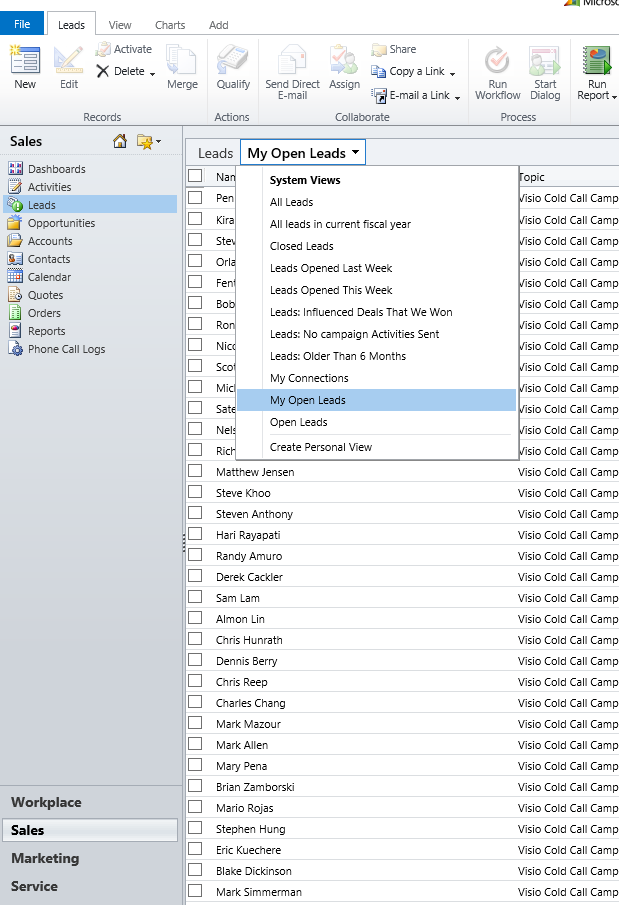
We have one user in our organization who can use advanced find to create new personal views for leads, but those views don't appear in the view dropdown on the main "Leads" page.  It doesn't matter if she created the views, or if someone shared a view with her - the section for "My Views" just doesn't appear.  However, going to other entity types, she can see "My Views".  If she opens Advanced Search, then goes to saved views and finds one of the views in the list of active views (they are all active), she can select it and click the 'results' button and it works.  But the views just never show up on the dropdown for views of Leads.  

Other users with the exact same roles do not experience this problem.  We have tried both IE11 and Chrome.  See screenshot, there there are at least 3 views she created and three that are shared with her, but no "My Views" section.

We are using CRM 2011 On Premise with all the latest rollups.  I have looked in the DB at the SavedQuery view and the pricipalobjectaccess table and everything looks normal.  Again, other users don't have this problem.

We have tried the usual rebooting, clearing cache and cookies, etc. 
no-my-views.png

*This post is locked for comments

I have the same question (0)
  • Community Member Profile Picture
    on at

    SavedQueryBase only holds system views. Can you please confirm that you have checked the UserQueryBase? There may be some clue there as to why the custom views are not appearing, but I'm stumped as to why this issue would only affect one user in one entity.

  • Community Member Profile Picture
    on at

    Yes, I am sorry - of course I meant UserQuery.  I can see them all in the database and they have a state code of 0 and a status code of 1, ReturnedTypeCode of 4 - everything looks normal.

Under review

Thank you for your reply! To ensure a great experience for everyone, your content is awaiting approval by our Community Managers. Please check back later.

Helpful resources

Quick Links

Season of Sharing Community Challenge Launch!

Jump in, show your community spirit, and win prizes!

Women in Power Builds Momentum

Expanding mentorship, skilling, and AI innovation

Congratulations to the May Top 10 Community Leaders

These are the community rock stars!

Leaderboard > 🔒一 Microsoft Dynamics CRM (Archived)

#1
ScottDurow Profile Picture

ScottDurow 2

#2
GJones Profile Picture

GJones 1

Last 30 days Overall leaderboard

Featured topics

Product updates

Dynamics 365 release plans



