web
You’re offline. This is a read only version of the page.
close
Skip to main content

Notifications

Announcements

No record found.

Community site session details

Community site session details

Session Id :
Microsoft Dynamics AX (Archived)

AX SSRS report export to excel error.

(0) ShareShare
ReportReport
Posted on by

Hi, Any sort of help is appreciated for the below issue.

Have a intermittent issue where users are able to render large data report to screen.

But when trying to exporting to excel, after the render on screen, it is loading for a while and getting the below error.
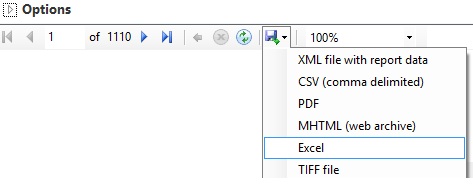
Error_5F00_excel.jpg

"The remote server returned an error: (401) Unauthorized"
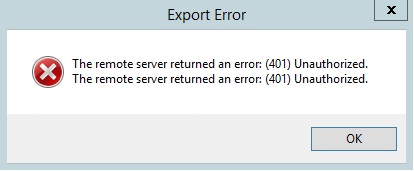
Error_5F00_SSRSReport.jpg

Event log captures this ASP.Net warning every time this failed.
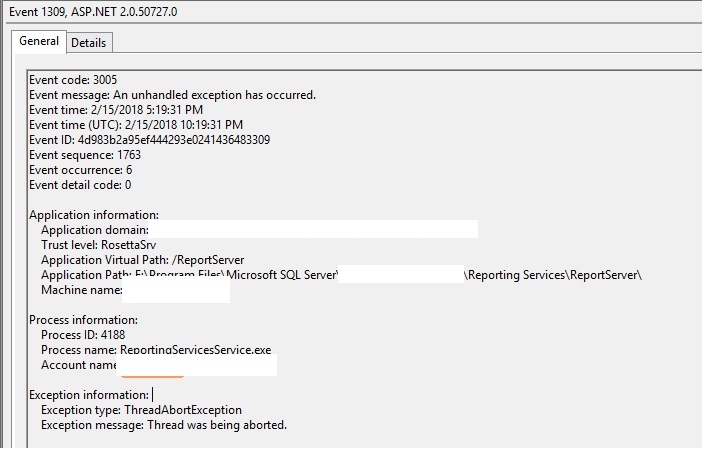
 7178.Error_5F00_ASP.jpg

Did anyone encountered similar issue, if so what is the resolution for this.

*This post is locked for comments

I have the same question (0)
  • Community Member Profile Picture
    on at

    Configuration set to "Never timeout". Its Custaging OOTB report. and the format they are rendering on screen is simple grid.

    Its not failing always, with the same 1100 pages data, it successfully exports sometimes.

  • Suggested answer
    BorisD Profile Picture
    2,826 Moderator on at

    Hello Ram,

    Is it successfully exported for the same user sometimes? Are you in a 2 Domain environment? I have seen this error and was related to permissions. The users Domain password expired after they logged on to AX. In a 2 Domain environment they were prompted for a logon a second time while accessing AX and they enter credentials for domain A instead of domain b. Make sure the user password is not expired. Try deleting user cache in AX and .auc files from user profile.  in case its cached the old password.

    Here is a very good link to further troubleshoot the issue as well. Use Google translate to translate the text.

    www.mathdax.ca/.../ssrs-request-failed-with-http-status.html

    Here is another link for troubleshooting steps. Read the comments below. there is useful information there.

    http://daxdude.blogspot.cz/2013/02/ax-ssrs-error-request-failed-with-http.html

  • Community Member Profile Picture
    on at

    Hi Boris, thank you for reply.

    Yes users are able to export successfully sometimes.

    We are on load balancing with two SSRS servers.

    We suspected the same, so to confirm turned off one of the servers. Now we have only one SSRS reporting server running.

    Initial few attempts we were able to successfully export. But after a while the issue is back.

    Just to be clear, Users are able to render report on screen ever time, issue is only when trying to export to excel and that too only with data heavy reports. ~1000 pages in our case.

  • Community Member Profile Picture
    on at

    Hi Boris,

    Verified on both SSRS server, have the same configuration as mentioned in the first link.

  • BorisD Profile Picture
    2,826 Moderator on at

    Are the clients running 64bit Excel? If not try loading 64bit Excel and test on one client. Is it the same exact data every time? I wonder if your hitting the 32bit Excel limit sometimes.  

  • Verified answer
    Community Member Profile Picture
    on at

    This issue was finally traced down to the NetScaler.

    Resolved by changing the protocol from HTTP to TCP for SSRS virtual server on NetScaler.

Under review

Thank you for your reply! To ensure a great experience for everyone, your content is awaiting approval by our Community Managers. Please check back later.

Helpful resources

Quick Links

Responsible AI policies

As AI tools become more common, we’re introducing a Responsible AI Use…

Neeraj Kumar – Community Spotlight

We are honored to recognize Neeraj Kumar as our Community Spotlight honoree for…

Leaderboard > 🔒一 Microsoft Dynamics AX (Archived)

#1
Martin Dráb Profile Picture

Martin Dráb 4 Most Valuable Professional

#1
Priya_K Profile Picture

Priya_K 4

#3
MyDynamicsNAV Profile Picture

MyDynamicsNAV 2

Last 30 days Overall leaderboard

Featured topics

Product updates

Dynamics 365 release plans



