web
You’re offline. This is a read only version of the page.
close
Skip to main content

Announcements

News and Announcements icon
Community site session details

Community site session details

Session Id :
Microsoft Dynamics AX (Archived)

Extract FromDate and ToDate From Date Advanced Filtering Input

(0) ShareShare
ReportReport
Posted on by 1,214

Hi,

I'm creating a form grid view with working calendar dates as the main datasource. User should be able to filter date range using advanced filter like 1/3/2019..31/3/2019
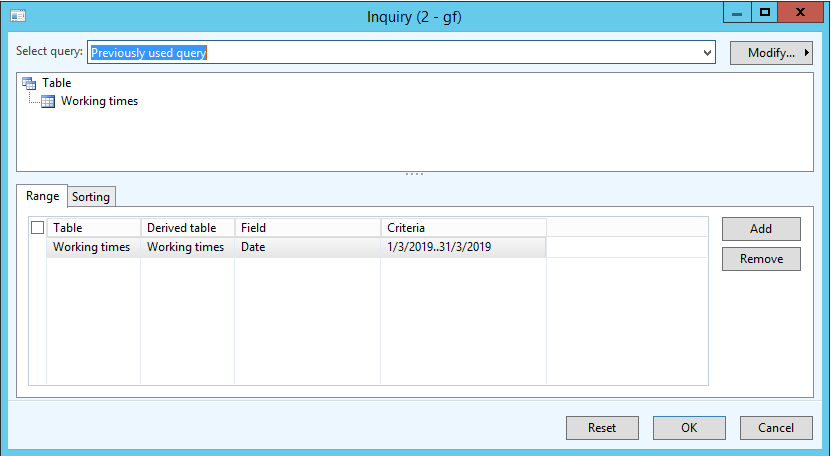
date-advanced-filter.png

The query range is like Date >= 1/3/2019 && Date <= 31/3/2019.

Is there any way to extract the input values and store 1/3/2019 as FromDate and 31/3/2019 as ToDate? 

I'd like to use these values for comparison with each line of it's child data source later.

Thank You.

*This post is locked for comments

I have the same question (0)
  • Verified answer
    Mea_ Profile Picture
    60,286 on at

    Filter you add is effectively a query range. Let's say you have QueryBuildDataSource (qbds), to get range value you do

    dateRange = qbds.findRange(fieldNum(MyTable, MyField));
    if (dateRange )
    {
        info(dateRange.value());
    }

    and you can always get qbds from a query by table id.

  • HAIRUL HAZRI Profile Picture
    1,214 on at

    Thank you Ievgen. It works. 

    Here's my completed code in case somebody needs it:

    Query                   query;
    QueryRun                queryRun;
    QueryBuildDataSource    qbdsWorkCalendarDate;
    QueryBuildRange         qbrProductionDate, dateRange;
    int                     rmFromDate, rmToDate;
    str                     dateRangeValue, fromDateStr, toDateStr;
    TransDate               fromDate, toDate;
    
    query = new Query();
    
    //define data sources
    qbdsWorkCalendarDate = query.addDataSource(tableNum(WorkCalendarDate));
    
    qbrProductionDate = qbdsWorkCalendarDate.addRange(fieldNum(WorkCalendarDate, TransDate));
    
    qbdsWorkCalendarDate.addOrderByField(fieldNum(WorkCalendarDate, TransDate));
    
    queryRun = new QueryRun(query);
    
    if (queryRun.prompt())
        {
            while(queryRun.next())
            {
                //After prompt, range is specified. So query is modified. Get modified query range value. Otherwise query only has range but without value.
                query = queryRun.query();
                qbdsWorkCalendarDate = queryRun.query().dataSourceTable(tablenum(WorkCalendarDate));
                dateRange = qbdsWorkCalendarDate.findRange(fieldNum(WorkCalendarDate,TransDate));
                dateRangeValue = dateRange.value();
                
                //Extract from date
                rmFromDate = strFind(dateRangeValue,"..",1,strLen(dateRangeValue));
                fromDateStr = strDel(dateRangeValue, rmFromDate, strLen(dateRangeValue));
                fromDate = str2Date(fromDateStr, 123);
                
                
                //Extract toDate
                rmToDate = strFind(dateRangeValue,"..",1,strLen(dateRangeValue));
                toDateStr = strDel(dateRangeValue, 1, rmToDate + 1);
                toDate = str2Date(toDateStr, 123);
                
                info(strFmt("From %1 To %2", fromDate, toDate));
            }
        }


Under review

Thank you for your reply! To ensure a great experience for everyone, your content is awaiting approval by our Community Managers. Please check back later.

Helpful resources

Quick Links

Season of Sharing Community Challenge Launch!

Jump in, show your community spirit, and win prizes!

Women in Power Builds Momentum

Expanding mentorship, skilling, and AI innovation

Congratulations to the May Top 10 Community Leaders

These are the community rock stars!

Leaderboard > 🔒一 Microsoft Dynamics AX (Archived)

#1
CP04-islander Profile Picture

CP04-islander 21

#2
dserp Profile Picture

dserp 4

#2
dekion Profile Picture

dekion 4

Last 30 days Overall leaderboard

Featured topics

Product updates

Dynamics 365 release plans



