web
You’re offline. This is a read only version of the page.
close
Skip to main content

Notifications

Announcements

No record found.

Community site session details

Community site session details

Session Id :
Service | Customer Service, Contact Center, Fie...
Suggested Answer

Change Forms via JS

(0) ShareShare
ReportReport
Posted on by 410

Hi Guys,

I've been working today on the following scenario:

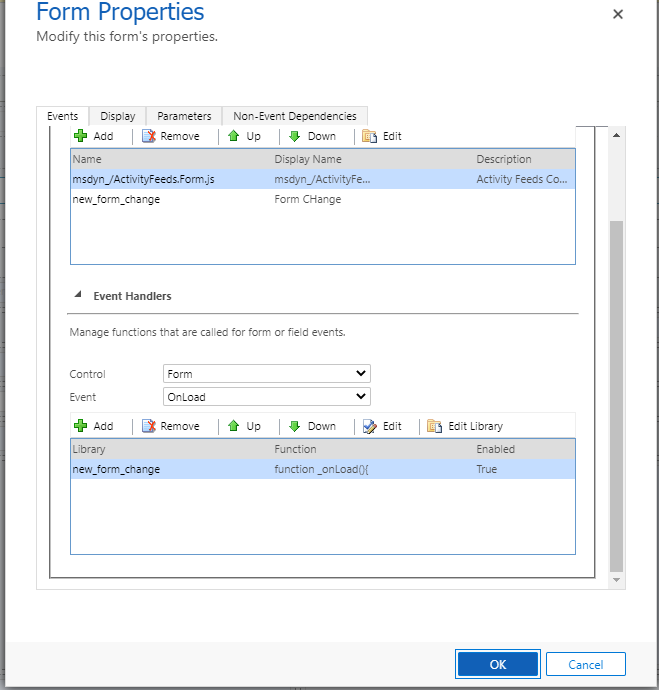
We have 3 Case forms (each one for a different Case Origin Type)

form-1.PNG

On each form we have a JS that checks the case origin and based on the value changes the form for the user:

formSelector : used to get the list forms that are in the entity (only if more than 1)
getCurrentItem() : returns the current form rendered to the user (this is most important)
navigate() : it will help(force) to navigate to the form that's selecting

function _onLoad(){

if(Xrm.Page.ui.getFormType() == "2") //doing only on update mode, so only will get the Case Origin

{

                var caseOrigin = Xrm.Page.getAttribute('caseorigincode').getValue();

                var items = Xrm.Page.ui.formSelector.items.get();

                var currentItem = Xrm.Page.ui.formSelector.getCurrentItem();

                for (var it in items) //iterate all the items means forms

                {

                                var form= items[it];

                                var formLabel = form.getLabel(); //get the form label like Email, Phone Call

                                //Check condition Label from Form and the corresponding Case Origin and mainly if its not the Current Selected Form

                                if (formLabel == "Phone Call" && caseOrigin == "1" && currentItem.getLabel() != "Phone Call")

                                {

                                                form.navigate(); //now in this case just navigate


                                }

                                else if (formLabel == "Email" && caseOrigin == "2" && currentItem.getLabel() != "Email")

                                {

                                                form.navigate();

                                }

                                else if (formLabel == "Information" && caseOrigin == "3" && currentItem.getLabel() != "Information")

                                {

                                                form.navigate();

                                }

                }

}

}

form2.PNG

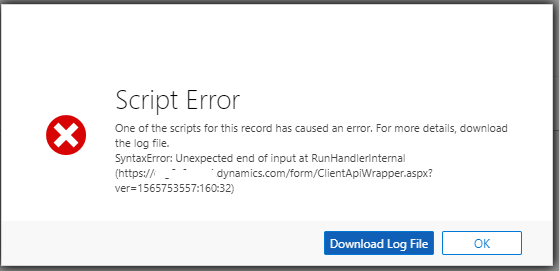
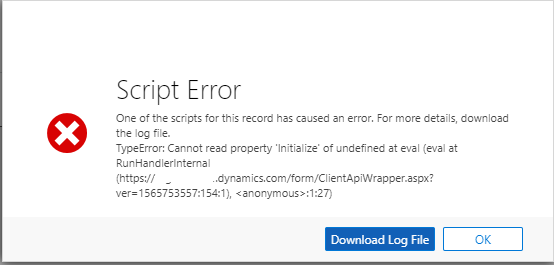
But when i load the form or change a value to case origin i get the following error:
form3.PNG

This is the information from the log:

SyntaxError: Unexpected end of input
    at RunHandlerInternal (ORGNAME.dynamics.com/.../ClientApiWrapper.aspx
    at RunHandlers (ORGNAME.dynamics.com/.../ClientApiWrapper.aspx
    at OnScriptTagLoaded (ORGNMAE.dynamics.com/.../ClientApiWrapper.aspx
    at https://ORGNAME.dynamics.com/form/ClientApiWrapper.aspx?ver=1565753557:244:1
error-4.PNG

TypeError: Cannot read property 'Initialize' of undefined
    at eval (eval at RunHandlerInternal (ORGNAME.dynamics.com/.../ClientApiWrapper.aspx, <anonymous>:1:27)
    at RunHandlerInternal (ORGNAME.dynamics.com/.../ClientApiWrapper.aspx
    at RunHandlers (ORGNAME.dynamics.com/.../ClientApiWrapper.aspx
    at OnScriptTagLoaded (ORGNAME.dynamics.com/.../ClientApiWrapper.aspx
    at ORGNAME.dynamics.com/.../ClientApiWrapper.aspx

Anyone has any suggestion where im mistaking?

Thanks in advanced and regards

I have the same question (0)
  • Suggested answer
    RaviKashyap Profile Picture
    55,410 Moderator on at

    Hi,

    Based on the errors, it looks like you have some syntax error in your javascript library When I checked your hraed script using an online java script syntax validator, i see some error ( it may be just the formatting here in this thread). You can also check your entire script similary and fix any syntax error.

    js_5F00_illegal.png

    esprima.org/.../validate.html

    Hope this helps.

  • Suggested answer
    PS Profile Picture
    23,577 on at
  • Suggested answer
    Pawar Pravin  Profile Picture
    5,237 on at

    Hi There,

    I would suggest you to add logicalname of attribute in double inverted comma's as mentioned below:

    var caseOrigin = Xrm.Page.getAttribute("caseorigincode").getValue();

    This should work.

Under review

Thank you for your reply! To ensure a great experience for everyone, your content is awaiting approval by our Community Managers. Please check back later.

Helpful resources

Quick Links

Responsible AI policies

As AI tools become more common, we’re introducing a Responsible AI Use…

Neeraj Kumar – Community Spotlight

We are honored to recognize Neeraj Kumar as our Community Spotlight honoree for…

Leaderboard > Service | Customer Service, Contact Center, Field Service, Guides

#1
Tom_Gioielli Profile Picture

Tom_Gioielli 45 Super User 2025 Season 2

#2
Daniyal Khaleel Profile Picture

Daniyal Khaleel 27 Most Valuable Professional

#3
Soundari Profile Picture

Soundari 15

Last 30 days Overall leaderboard

Featured topics

Product updates

Dynamics 365 release plans